

unauthorizedrob
Inspiring
July 31, 2017
Answered

Text color in InDesign document is blue; export to pdf, images are fine but text is now black

  • July 31, 2017
  • 1 reply
  • 4290 views

Hi

I am working in InDesign CC  2017.1 Release, 12.1.0.56 Build, on an iMac using MacOS Sierra, Version 10.12.6.

I have built a booklet with light blue text and illustrations on every page.  When I export to pdf, the text has gone from blue to BLACK.

I have looked for guidance on managing text color from ID to PDF, with no luck so far.

Any help?


Thanks!

Rob
    This topic has been closed for replies.
    Correct answer unauthorizedrob

    I would suggest the traditional ways to troubleshoot:

    If it only happens in one document, there could be corruption. To fix it save as IDML:

    Clean corrupt files by exporting to .IDML or .INX

    If it happens in more than one document, try restoring preferences:

    Trash, Replace, Reset, or Restore the application Preferences


    Thanks for your guidance, Steve.

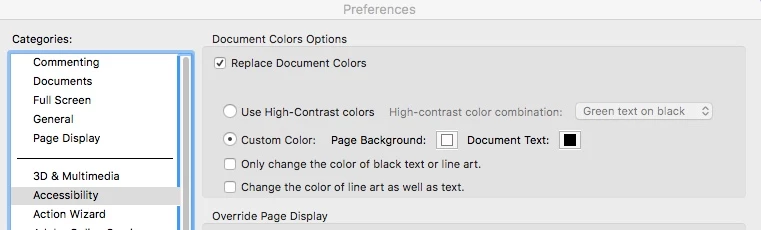
    It turns out the problem was on the Acrobat side.

    There was a setting under "Accessibility" that elected to "Replace Document Colors," and "set document text to black."

    I have a vague memory of using that when a document came in with faint gray text.  But forgot to uncheck it.

    Unchecking those options solved the problem. 

    Thanks for sticking with me!

    Rob

    1 reply

    Jongware
    Community Expert
    Community Expert
    July 31, 2017

    That is not regular behavior – unless you are not 'exporting to PDF' the regular way.

    Where you state you 'export' to PDF, are you actually using the Print dialog instead of Export? The print dialog does have a button "Text as black":

    unauthorizedrob
    Inspiring
    July 31, 2017

    Hi

    thanks for responding.   I am using the export feature, not print.  I saw that option.  But I am not using the print dialogue

    any other ideas?

    thanks

    r

    Jongware
    Community Expert
    Community Expert
    July 31, 2017

    If you have a special effect applied to the text, or to an object above it, this would show in the Preview inside InDesign. But to make sure, check this again with Overprint Preview.

    Can you select the blue text and make a screenshot that includes the Color dialog?