

BEGINNER_X
Legend
January 31, 2020
Answered

Text Compare between two InDesign Files

  • January 31, 2020
  • 2 replies
  • 13061 views

Hi All,


Request:

Highlight the text compare between the source and final files (i.e, any characters like am, is, was etc...)

Source: Climate is looking goad.

Final: Cliate is looking good.


So Far I DID:

Highlight the paragraph compare between two documents


Help from yours:

Highlight the different text compare between two documents. (i.e, any characters like am, is, was etc...)


Could you please help with simple sample.
This topic has been closed for replies.
Correct answer Barb Binder

Jeff's answer is great.


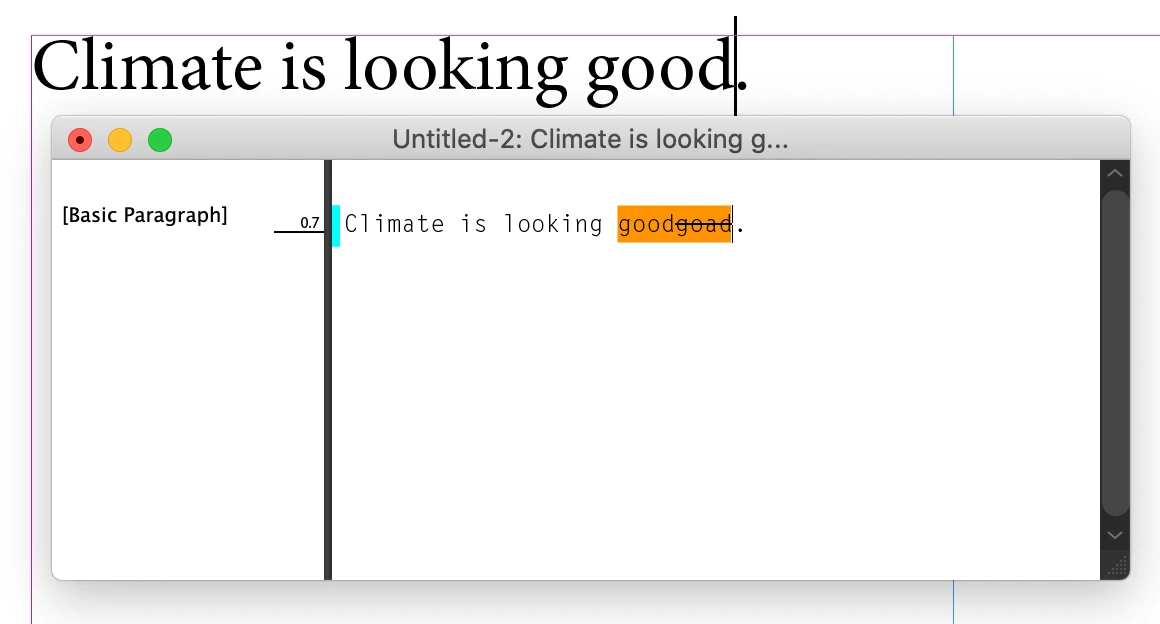
The other idea is to turn on track changes before you enter edits into an InDesign document, so that you can see the before/after in Story Editor view.  Of course, once you accept/reject changes, that view will be gone. If that is of interest, you can read more about it here: https://helpx.adobe.com/indesign/using/tracking-reviewing-changes.html.


~Barb


2 replies

Barb Binder
Community Expert
Barb BinderCommunity ExpertCorrect answer
Community Expert
January 31, 2020

Jeff's answer is great.


The other idea is to turn on track changes before you enter edits into an InDesign document, so that you can see the before/after in Story Editor view.  Of course, once you accept/reject changes, that view will be gone. If that is of interest, you can read more about it here: https://helpx.adobe.com/indesign/using/tracking-reviewing-changes.html.


~Barb


~Barb at Rocky Mountain Training
Jeff Witchel, ACI
Community Expert
Community Expert
January 31, 2020

Not sure I understand your question or not. But if you're looking to compare all the differences between two InDesign documents, the easiest way to do this is to Expoert both to PDF and open in Acrobat. In the tools section at the top of your document window,  choose Compare Files in the Share and Review section.

Hope this helps!

Participant
June 22, 2022

Thanks Jeff! This helped ALOT.