


Copy link to clipboard
Copied
Good day everyone,
I am hoping someone may be able to assist with this problem. I am trying to fill the text frames with copy. However, as can be seen in the image, some lines are not cooperating with me. There is no formatting on the text whatsoever as it is a straight copy and paste from Notepad with no line breaks.
The text flows fine down the three rows of containers, but I cannot figure out why it is skipping lines in the last container of each row when there is clearly space for the words to fit. All the copy is present, it is just not filling the containers fully.
I have tried in both single line and paragraph composer, single and multiple columns, GREP find and replace, and pretty much everything else I could find, but nothing seems to be working. If I flow the text from frame to frame, then all the frames fill correctly with no gaps, however, I need the text to flow from row to row otherwise it does not read right. It must read like a book across the rows and down. Would anyone here have any clue as to what the problem could be?


 1 Correct answer


Hi bruces47954182 ,
that's a limitation with InDesign's text compositing engine.
Workaround 1:
If you single out every "character" that was converted to path as a separate text frame then it will work.
Right now you are doing this with compositie paths with too many gaps. Four gaps are ok. Five gaps are too much.
Workaround 2: Do that with Adobe Illustrator and place the ai file.
Regards,
Uwe

 11
Replies
11
11
Replies
11

Copy link to clipboard
Copied
Hi bruces47954182 ,
that's a limitation with InDesign's text compositing engine.
Workaround 1:
If you single out every "character" that was converted to path as a separate text frame then it will work.
Right now you are doing this with compositie paths with too many gaps. Four gaps are ok. Five gaps are too much.
Workaround 2: Do that with Adobe Illustrator and place the ai file.
Regards,
Uwe
Copy link to clipboard
Copied
Hi Laubender. That's a bit of a shame the compositing engine has this limitation. Thanks for explaining, at least now I know I can stop smashing head against the wall over it, because it's just not going to happen. I will try the AI route instead. Be well.
Copy link to clipboard
Copied
Hi bruces47954182 ,
here a sample from my German Adobe Illustrator CS6:

How will that work?
One group with a compositive path stacked over a text frame.
The text wrap options of the compositive path are set with:

You have to set the text wrap after you grouped the objects.
Regards,
Uwe
Copy link to clipboard
Copied
Thank you!

Copy link to clipboard
Copied
Hi Uwe,
Great minds think alike 
InDesign Text Frame Flow Issue - Graphic Design Stack Exchange
Although our methods slightly differ...
I'm wondering if yours couldn't lead to this kind of issue:
(but I'm not an Illustrator guru, so maybe I missed something)

Copy link to clipboard
Copied
Hi Vinny,
you could flow text through several text frames in several groups.
So the vertical gaps between would be no issue.
Regards,
Uwe
Copy link to clipboard
Copied
Getting there. Still needs some work, but the gaps between the groups can be overcome using line breaks to move the text down. It's not ideal and is quite fiddly, but with a bit of patience and adjustments it can get the job done. Thank you guys! 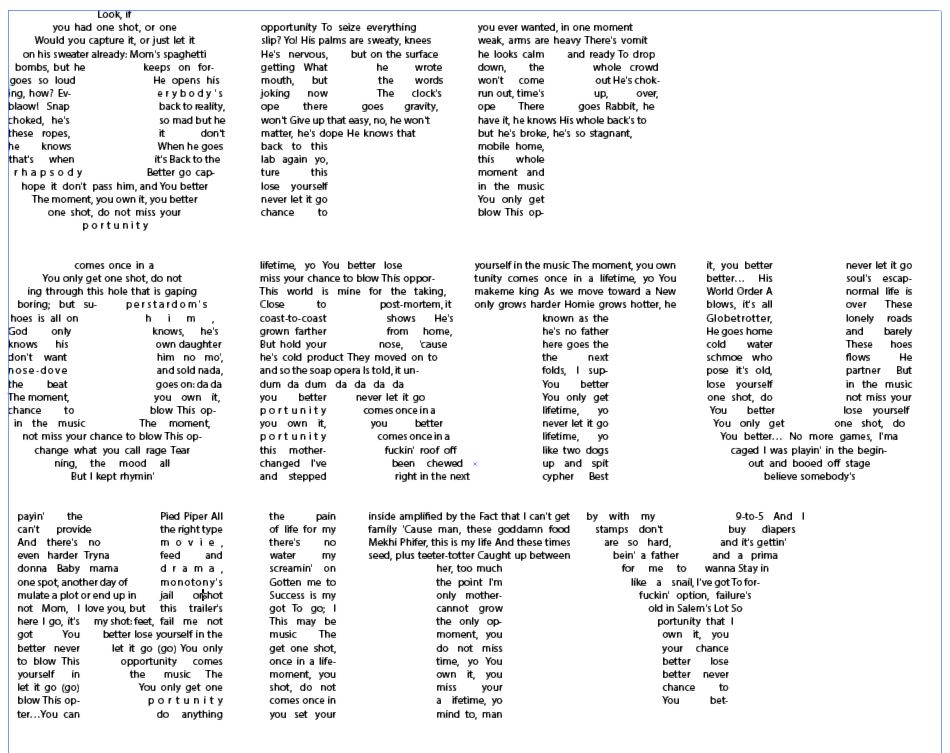
Copy link to clipboard
Copied
Hi bruces47954182 ,
you'd gain flexibility if you are doing three groups of one compositive path and a text frame stacked below.
Thread the text frames from group to group.
Regards,
Uwe
Copy link to clipboard
Copied
Hi bruces47954182 ,
as I can see from your screenshot Illustrator's text engine leaves large white space gaps in text lines.
Not very good. Allow hyphenation, set the value for property Language appropriately, experiment with tracking a bit.
Maybe also with point size (decrease) vs leading (increase).
InDesign would do it better, I think, especially hyphenation, but unfortunately we cannot have that…
Regards,
Uwe
Copy link to clipboard
Copied
Thanks. Yes, busy experimenting with the different text options to try get the best overall coverage.
Copy link to clipboard
Copied
Thank you for the help guys, on this and the previous forum. Appreciated.


Get ready! An upgraded Adobe Community experience is coming in January.
Learn more
 AdChoices