Participant
February 15, 2018
Answered

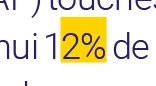
Text highlighted in yellow for no understandable reason

  • February 15, 2018
  • 1 reply
  • 7112 views

Hi everyone,

I've been going crazy over an issue I have with a document in InDesign. A few parts of my text are automatically highlighted in yellow, usually when related to numbers: 10 millions, 12%, depuis 40 ans... I've tried changing the font, unchecked everything in Preferences/Composition, etc.

What's really weird is that if I write "10 millios" it's fine, but as soon as I put the missing n, it highlights the word. It also only highlights the last figure, not the whole number, and the word below or after (see examples below).

It's also very annoying because it does also appear whenever I export the document in pdf or jpg

Can anyone help me?

Many thanks in advance for your help!

    This topic has been closed for replies.
    Correct answer John Mensinger

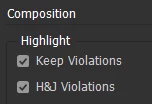
    It looks like this highlighting would be connected to your Hyphenation & Justification, and possibly Keep settings. There are toggles for the highlighting in Preferences > Composition:

    It's troubling, however, that you say it appears in exports (the highlighting I mentioned above wouldn't). If the document was originally created by someone else, check for Nested or GREP styles applying a Character Style with Custom Underline.

    1 reply

    John Mensinger
    Community Expert
    John MensingerCommunity ExpertCorrect answer
    Community Expert
    February 15, 2018

    It looks like this highlighting would be connected to your Hyphenation & Justification, and possibly Keep settings. There are toggles for the highlighting in Preferences > Composition:

    It's troubling, however, that you say it appears in exports (the highlighting I mentioned above wouldn't). If the document was originally created by someone else, check for Nested or GREP styles applying a Character Style with Custom Underline.

    Participant
    February 15, 2018

    Thank you John!

    It was indeed coming from a GREP style, the document was created by someone else and as I'm new to InDesign, I had never heard of GREP styles.

    Many thanks for your prompt answer and for helping me!

    John Mensinger
    Community Expert
    Community Expert
    February 15, 2018

    You're welcome. I'm glad you've got it sorted.