
Text not staying on baseline when rotated
I've tried searching for anyone else having this issue, but I'm not finding anything. When I'm rotating a block of text, my curved characters are off the baseline. Lowercase a,c,d,e,o,u, etc.
My client is wondering why it looks so funky and I can't figure out why its doing it. Has anyone else run into this and do you have a fix? Details below.
______________
Software: InDesign 14.0.3, Illustrator 22.0.6, Acrobat Pro DC 2019.012.20040
Compurer: Macbook Pro 15", 2018
OS: macOS Mojave 10.14.6
Fonts: ITC Charter Com Bold, ITC Charter Com Regular, HelveticaNeueLTPro-Roman.ttf, HelveticaNeueLTPro-Bd.ttf
InDesign
Here's the way it looks on my non-retina display monitor:
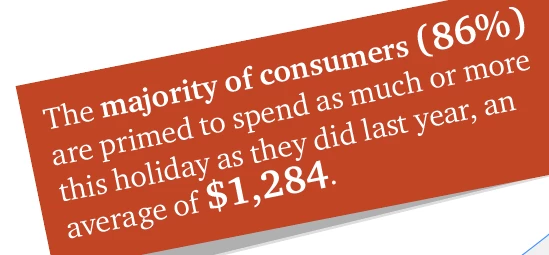
Charter regular and bold used. Angle of rotation 11.5˚
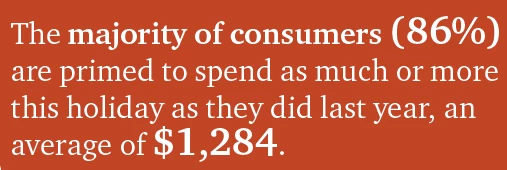
Its really obvious in the bold characters that they are off the baseline. When I go to a 0˚ angle it looks right:
I also tried it at 1˚:
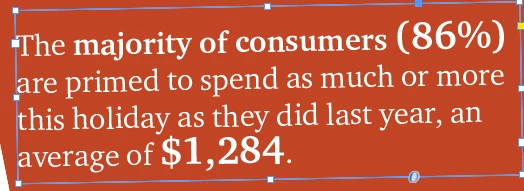
11˚:

So I thought maybe I needed to use a rotation preset, so I 45˚, but they jump back on the baseline:

Ok, I thought, maybe its a preset thing, but 45˚ is too hard to read so I tried 30˚. No luck, off the baseline again.

The only "fix" I can seem to find is to convert the text to outlines at 0˚ and then rotate. If I convert while rotated, it keeps the weird jumping characters.
When I view these in Acrobat DC, it actually seems to exaggerate the baseline issue:

Anyone else run into this or happen to have a fix for it? I'd really rather not convert all the text I have on angles to outlines....
Thanks,
Karen
 AdChoices