
Ralf_1981
Participant
March 28, 2017
Question

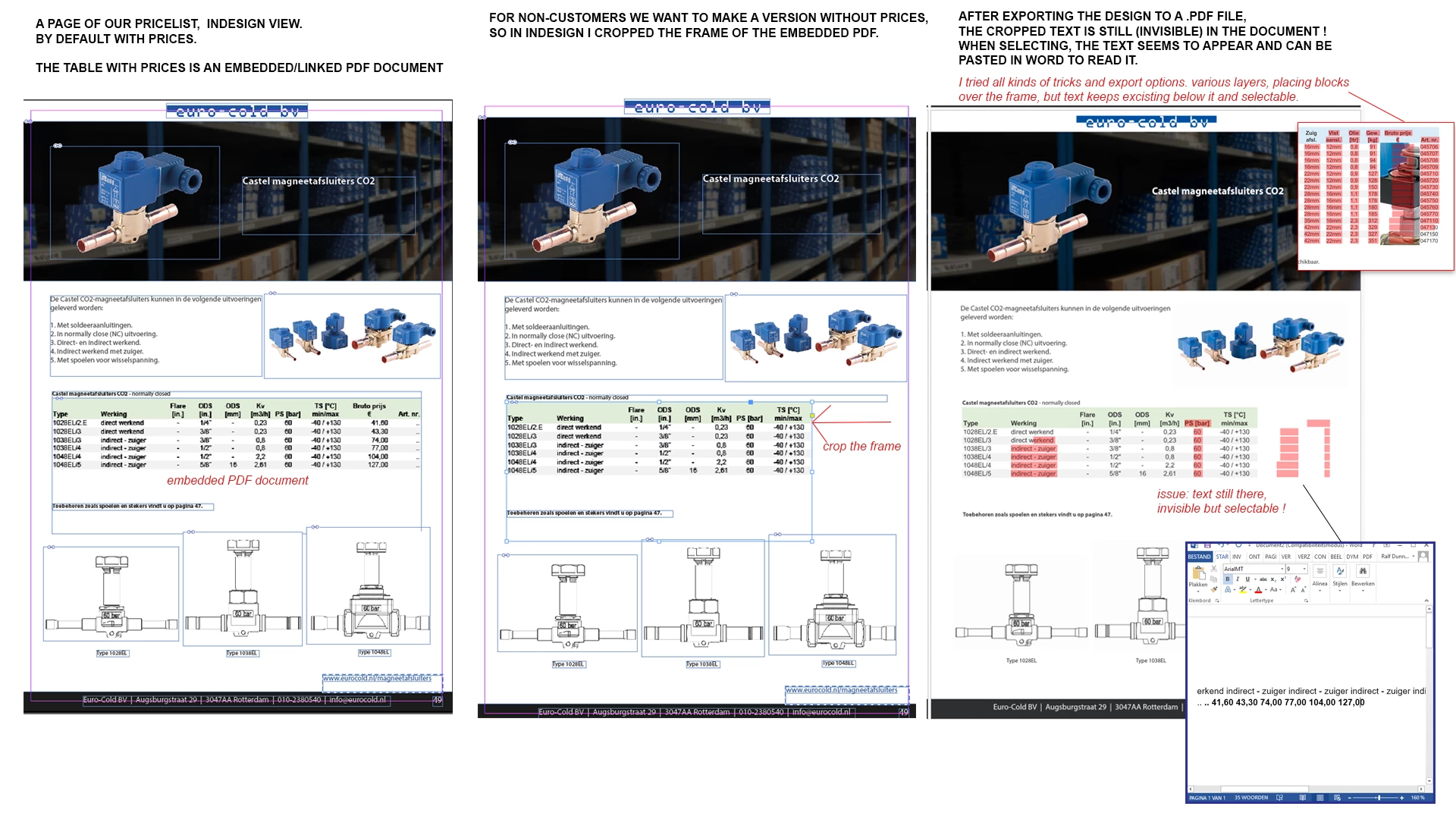
Text outside cropped embedded document still visible via selection in exported PDF

  • March 28, 2017
  • 2 replies
  • 3199 views

In our pricelist we use placed/embedded PDF documents.
For non excisting customers we want to make a version without prices.

For that I crop the frame of the embedded document, so the last columns dissappear.

But, after exporting the design to a .PDF file,
the cropped text is still (invisible) in the document.
When selecting, the text seems to appear and can be pasted in word to read it.

I tried all kinds of tricks and export options. various layers, placing blocks or images over the frame,
but text keeps excisting below it and selectable.
It's really annoying me, I hope someone has a solutions for this issue.

See screenshot:

https://www.eurocold.nl/wp-content/uploads/2017/03/indesign-prijsloosissue.png   (high res version)
This topic has been closed for replies.

2 replies

Participating Frequently
April 18, 2019

I had an identical problem and after many attempts I came to the solution that suited for me. I exported the file from InDesign as EPS! Such a document can be opened in the illustrator and saved as a PDF or via Adobe Distiller converted to PDF.

See Screenshots:

Participant
February 27, 2023

Great suggestion, your solution worked for me. I soon found another option using Adobe Acrobat. 

The Redact "Sanitize Document" tool in Adobe Acrobat has the ability to remove invisible text. 


Click this tool


Use “Selectively remove”

Unselect everything except “hidden text”


Run then save as a new document. 


Hope this helps someone else. This was helpful for us in making PDFs accessible. 

vinny38
Legend
March 28, 2017

Hi ralf

As far as I know, there's no way to completely get rid of cropped pdf part, non-printing or non-showing layers...

Even if you outline your PDF (which is probably NOT what you want to do, and you're right), you could retrieve the hidden vector using Illustrator. Only a raster image could be downsampled. But again, this is probably not what you want to do...

That said, I don't have a magic solution for you. Meaning fast and easy.

My advice would be to recreate your tables in Indesign and use Conditional Text.

Unselected conditional text definitely can't be retrieved...

Problem here are colored cells background that you probably want to hide too.

If you just want to hide the text and can live with the remaining background color, well... that would be easy then.

If not, here's a workaround using 4 paragraph styles instead of a table:

"header 1" > next style: "header 2" > next style "line1" > next style "line2" (next style "line1")

Forcing "apply next style" would make things quite easy.

Each style has a paragraph rule set as for a background color, length set to text.

Then use Conditional text to show/hide the prices "columns".

See example below (see the red waves under invisible text):

Ralf_1981
Ralf_1981Author
Participant
March 29, 2017

Hi Vinny,

thank you very much for your detailed answer,

but I think this is not an option for us.

The thing is: we extract these PDF files from our ERP system,
so that we can easily update the pricelist when needed...
It's to time consuming to recreate the tables in InDesign.

I think my best option is to extract PDF files without prices from our ERP,
en then make a second InDesign file with the PDF's without prices embedded.

It's a pitty, I would be a lot more easier if I could simply crop the frame... .


Possible solution: (?)

When I run my generated PDF from indesign through a freeware PDF compressor,
It makes images of my tables (so non-selectable text) and then the "invisible" text dissappeared too.


But, the freeware program ruins my quality and even makes the file size bigger.
Is there such an option in indesign to create images of the embedded tables? Of do you know a good PDF convertor/compressor to "image" the tables in my created PDF? 

Br, Ralf

Eternal Warrior
Inspiring
March 29, 2017

Apologies, I was going to try and answer this yesterday but I have a few thoughts...

Can you tell me what the frame properties are in InDesign for the PDF's being placed?

I'm wondering if they are assigned as graphic frames > the thought being that perhaps this tells InDesign on export to rasterize and flatten the PDF to an image.

Also while we are on the subject... have you tried using Object Export Options...?

I noticed this:

IF THIS does work... I Imagine you should be able to set up an Object Style with the Object Export Options... but I will look into this.

Otherwise I would say you could try using redactions in the original PDF's using Acrobat... If you then sanitise the document - or delete the price part of the table essentially - you definitely shouldn't get this ghosting invisibly anymore.