
FlamNight
Participant
April 8, 2021
Answered

Text quality goes down when apply any effect

  • April 8, 2021
  • 1 reply
  • 1086 views

Hi everyone, I'm new to InDesign and I can't figure out how to handle this problem. When I apply any effect to an object from the effects panel (ex. Transparency) any other image or text in the same page lose quality (resolution goes down I think...). You can see an example in the screen (Left: no effect/tranparency applied to the rectangle. Right: 50% transparency and texts below look a little more pixelated). Open attachment for better image quality.
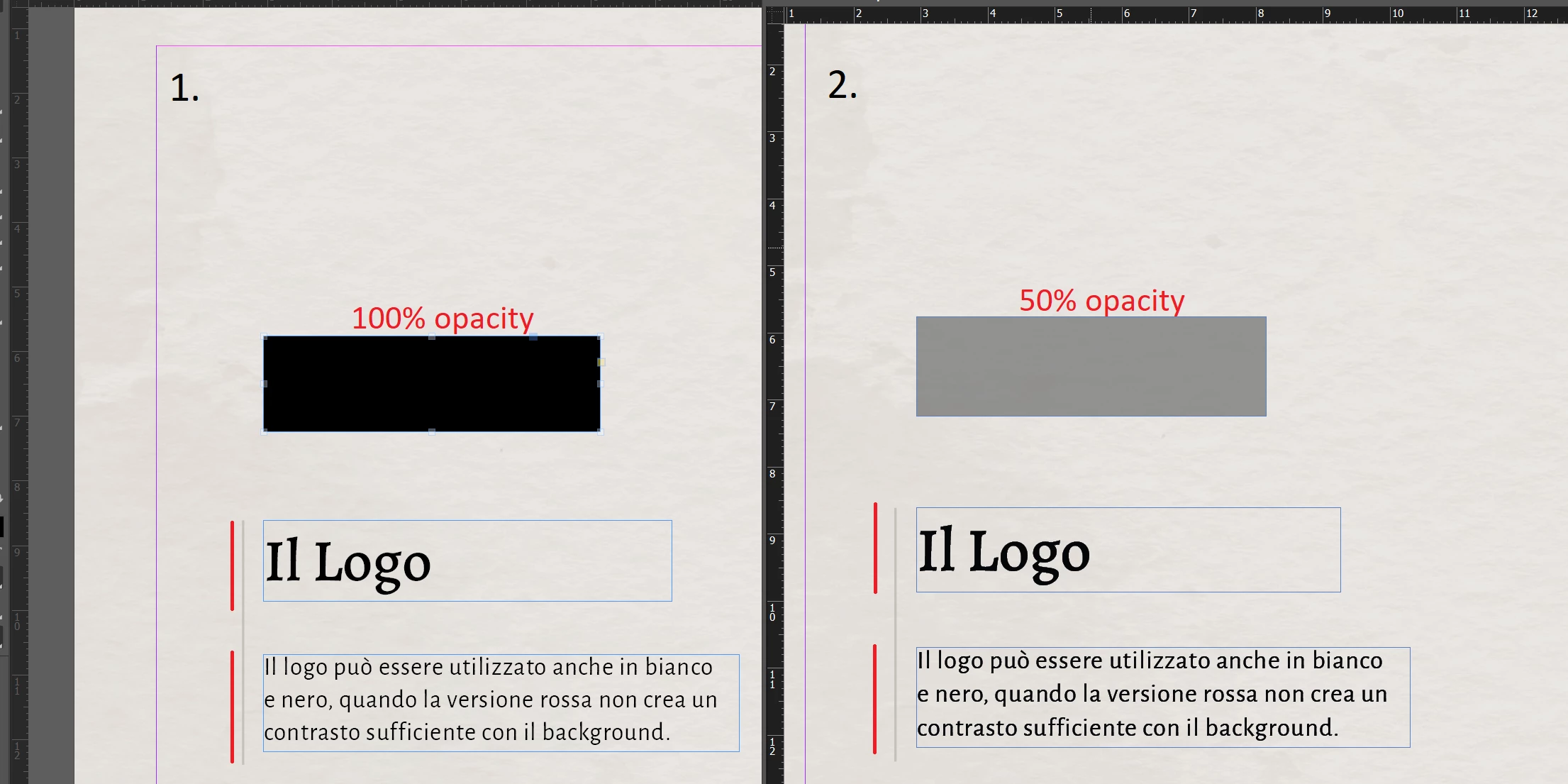


When I export the entire file to a PDF, in Acrobat it looks exactly the same as I said above. When I open the PDF in Chrome, instead, everything is fine and both texts are perfect.

I'm a bit confused...


Already set High Quality Display Performance and each View Setting to High Quality (max).


InDesign v16.1

Acrobat v 21.0

This topic has been closed for replies.
Correct answer Test Screen Name

There is a rule that, if ANY transparency is used ANYWHERE on a page, then EVERYTHING on the page is converted into the document blend space. Check the document blend space matches the RGB/CMYK definition you are using for your text colour. Converting colour space won't cause pixellation though. 

1 reply

Derek Cross
Community Expert
Community Expert
April 8, 2021

Check you haven't inadvertently applied a stroke (outline) or effect like Glow to the text.

How are you applying the tint to the object – is it like I've done it below from the swatches panel?


FlamNight
FlamNightAuthor
Participant
April 9, 2021

Hi,

thank you for your reply.


Yes, I've already checked and there is no stroke or any other effect to the text. When I apply the tint to the rectangle I use one of the swatches in that panel ([black] in this case), but instead of using the "% tint" in the upper right, I use "% Opacity" from the Properties panel (because I need transparency in my graphic).


The "pixelated" text appear immediately after applying the opacity/transparency or any other effect (drop shadow for example...) to any object in the same page. And immediately disappears when i deactivate that effect or bring the opacity back to 100%.


Another intresting thing is that texts in other project's pages remain perfect. Only the page where I apply an effect to an object seems to be affected.


Thank you again!

Test Screen NameCorrect answer
Legend
April 9, 2021

There is a rule that, if ANY transparency is used ANYWHERE on a page, then EVERYTHING on the page is converted into the document blend space. Check the document blend space matches the RGB/CMYK definition you are using for your text colour. Converting colour space won't cause pixellation though.