Participant
February 10, 2022
Question

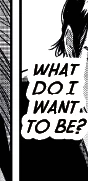
Text stroke covers the text because it's too big
  • February 10, 2022
  • 3 replies
  • 240 views

It's my first time using this software and I stumbled upon this today. Is there any way to fix this so that the text doesn't get covered by the stroke?

This topic has been closed for replies.

3 replies

Jeff Witchel, ACI
Community Expert
Community Expert
February 10, 2022

What you're looking to do is more easily accomplished in Illustrator, where you can apply the stroke to the text object and then drag the stroke under the fill in the Appearance panel.

Here's a video tutoriual about how to do it: http://www.jeffwitchel.net/2013/03/adding-typographically-correct-strokes/


Legend
February 10, 2022

If you don't want to increase the leading, you can either work around it by putting a second instance of the text above the stroked instance, and grouping them, (or if you have Illustrator, do it there by applying the stroke to the text object, and moving it below the characters in the Attributes panel.)

Peter Spier
Community Expert
Community Expert
February 10, 2022

Hard to tell from the image, but it looks like you've applied a heavy Paper (white) stroke to the text and the stroke overlaps text on other lines. To solve that you would need to increase the leading applied to the text. You may also need to increase the tracking amount to prevent overlaps on the same line.