
Text threads or no-stable layout
Hello, I desperately need help with my project. I've places a document that is slightly over 100 pages long. I did a lot of reshuffling of the pages. At some point, the pages started to dissapear and jump all over the place. I've managed to create a correct layout, deleted overset text, but as I was editing adding some changes, the pattern with the pages repeated itselt. When I look at my text threads, they go all over the place. The worst is that I cannot split the document into the chunks to create a "book". I've extracted the first 67 pages, but the rest of them are chaotic and duplicating themselve. I think that the pages are not properly linked, but I don't know how to unlink them or, possibly, to fix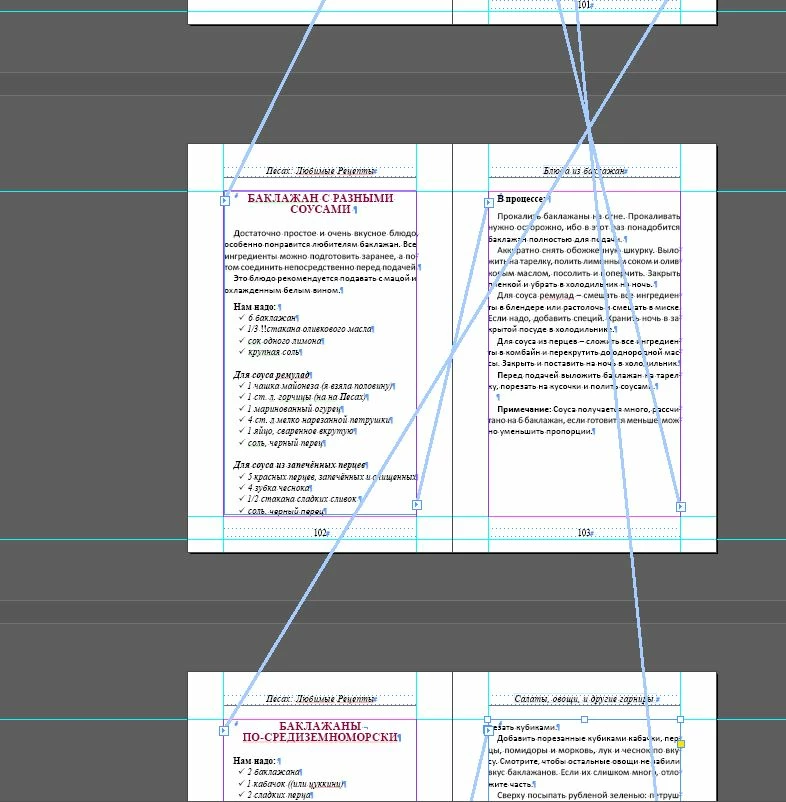 the probleim. I would very much appreciate any help. Thank you!
 AdChoices