
JonathanArias
Legend
July 12, 2021
Answered

text variable supercripts

  • July 12, 2021
  • 4 replies
  • 2119 views

Hello,

i have a text variable that i am running as a header, it however won't honor the suprecript for the registration symbol. how do i fix this?
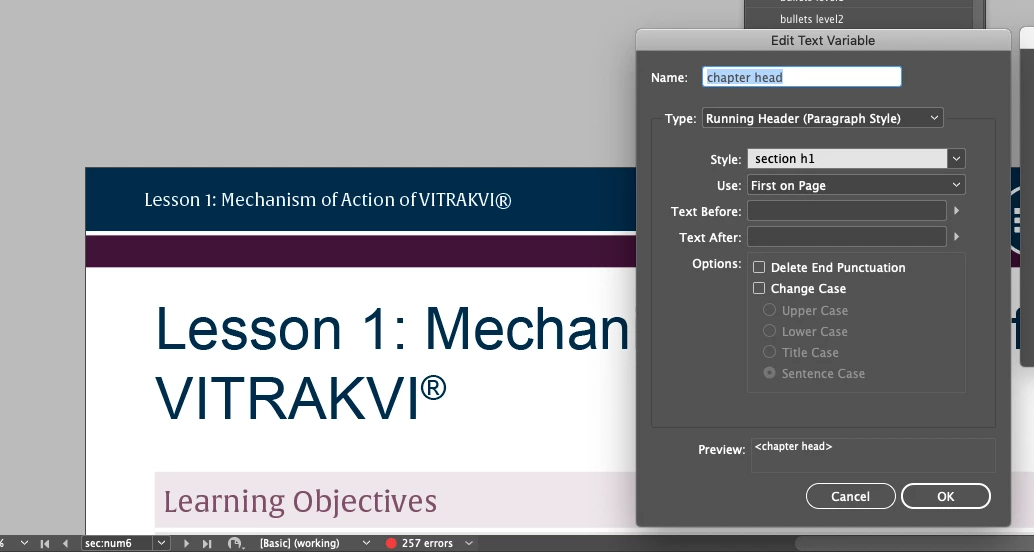
thanks

jonathan

This topic has been closed for replies.
Correct answer Eugene Tyson

Do the way I suggested. Create two character styles that have no attributes.


Apply one to the text and the other to the r symbol.


Insert two running head variables using the character styles.


Apply superscript to the variable for the r symbol.


That's the easiest solution and works 100%.


I used this technique on a book that had 8 running headers of various styles, bold, italic etc.


4 replies

Community Expert
July 13, 2021

Brand fonts?

Very well! Your customer controls the license of that font?


Ask your customer if you could do a new one-character font using the glyph shape of the REGISTERED SIGN from that brand font. A GREP style could apply this one-character font automatically to the REGISTERED SIGN. You could do this even with the free version of IndyFont.


Regards,
Uwe Laubender

( ACP )

Community Expert
July 14, 2021

A reply to myself and Jonathan:

Forget about that one-character-font in this case.


You cannot control the instance of the Registered mark with a GREP style because the text variable is a solid block of text. Go for the way Eugene suggested with the two character styles that echo the contents to two text variable instances.


Regards,
Uwe Laubender

( ACP )

Community Expert
July 13, 2021

Hi Jonathan,

if you follow Joel's advice with a special font for the Registered mark, consider the IndyFont script by Jongware and Marc Autret: https://www.indiscripts.com/category/projects/IndyFont


Regards,
Uwe Laubender

( ACP )

JonathanArias
Legend
July 13, 2021

right, i have brand fonts from the client i have to work with. i can't buy that nor use other fonts

Eugene TysonCommunity ExpertCorrect answer
Community Expert
July 13, 2021

Do the way I suggested. Create two character styles that have no attributes.


Apply one to the text and the other to the r symbol.


Insert two running head variables using the character styles.


Apply superscript to the variable for the r symbol.


That's the easiest solution and works 100%.


I used this technique on a book that had 8 running headers of various styles, bold, italic etc.


Community Expert
July 13, 2021

Use 2 running head styles

1 to pick up the Paragraph -as you have done.

But instead make it a Character Style


So you apply the Character Style to the text up to the R mark

Then apply a different character style to the R mark


In the running heads - insert both Running Head text variables to capture both your Character Styles

And on the 2nd Running Head for the R mark - you can apply the Superscript


You can also then setup the Character Style to operate as a nested style in your original Paragraph Styles.


Joel Cherney
Community Expert
Community Expert
July 13, 2021

I find it surprising that it's hard to do this, honestly. I imagined that one could use a paragraph style or a GREP style to force superscript on the running header, but no such luck. One nasty hack method you could use would be to use a font for your running heads that had a reserved symbol that was already formatted in a way that you wouldn't need to apply superscript. For example, the ® in Minion and Myriad are both small and placed well above the x-height, so you could swap out the font you're currently using for the style for the running head for something else. 


Also, you could head over to indesign.uservoice.com and suggest that running heads respect character styles and GREP styles and so on. Or you could vote to support an already existing feature request - there is already at least one such suggestion. It happens to contain a link to a script that I think will allow you to apply the necessary superscript styling to your running heads. I haven't tried it myself, but it looks like it should work.

JonathanArias
Legend
July 13, 2021

thank you for the answers, i will just hand type it and make individual master, this is a really big issue to not fix for so many versions. 

Joel Cherney
Community Expert
Community Expert
July 13, 2021

Yes, I'm sure that if it's faster to do it manually, that would make the most sense. I'm never doing it manually ever again, myself, because I think that Eugene's solution is so clever. 


Beyond that, I find that Uwe's suggestion that you use IndyFont is also on the mark; there are dozens of challenging workarounds that IndyFont sweeps out of the way with the simple solution "just make a font with that glyph in it." 


Basically, I kinda feel like I have the least-correct answer of all of the posters in your thread. 🙂 But if "doing it by hand and making a bunch of master pages" represents the solution with the fewest minutes and the fewest clicks, then go for it!