- Home
- InDesign
- Discussions
- Re: Text variable to add swatch names to text box.
- Re: Text variable to add swatch names to text box.

Copy link to clipboard
Copied
Does anyone know how to create a text variable to add the swatch names to a text box to be used as part of a slug line for the document?


 2 Correct answers


var doc = app.activeDocument;
var swatches = doc.swatches;
var i = swatches.length;
var s = "Swatches Used: ";
var a = [];
while (i-- && i > 3) {
    app.findColorPreferences.findWhat = swatches[i];
    if (doc.findColor() > 0) {
         a.push(swatches[i].name);
    }
}
a.sort();
s+= a.join(", ");
var label = "";
with (doc.documentPreferences) {
    label += "W x H: " + pageWidth + " x " + pageHeight + "; " + s;
}
var tf = app.selection[0];
tf.contents = label;

Duh. Sorry about that.
thank you so much! I think this will work perfectly!!!!
 28
Replies
28
28
Replies
28

Copy link to clipboard
Copied
Can you describe a little more what you need. A list of all swatches in the doc?
Copy link to clipboard
Copied
I actually would like to create a text box for a print proof file that lists things like the file name, any USED swatches in the document, trim size...that sort of thing.
And that text box would be in a slug area outside of the trim box.
Copy link to clipboard
Copied
I think something like this should work. Haven't tested since my machine is tied up running a big process. Let me know if any bugs.
var doc = app.activeDocument;
var swatches = doc.swatches;
var i = swatches.length;
var s = "Swatches Used: ";
var a = [];
while (i-- && i > 0) {
    app.findColorPreferences.findWhat = swatches[i];
    if (doc.findColor() > 0) {
         a.push(swatches[i].name);
    }
}
a.sort();
s+= a.join(", ");
var tv;
try {
    tv = doc.textVariables.itemByName("Swatches");
    tv.variableOptions.contents = s;
} catch(e) {
    tv = doc.textVariables.add({
        variableType: VariableTypes.CUSTOM_TEXT_TYPE,
        name: "Swatches"
    });
    tv.variableOptions.contents = s;
}
Copy link to clipboard
Copied
Copy link to clipboard
Copied
Edited the code. Try again.
Copy link to clipboard
Copied
Copy link to clipboard
Copied
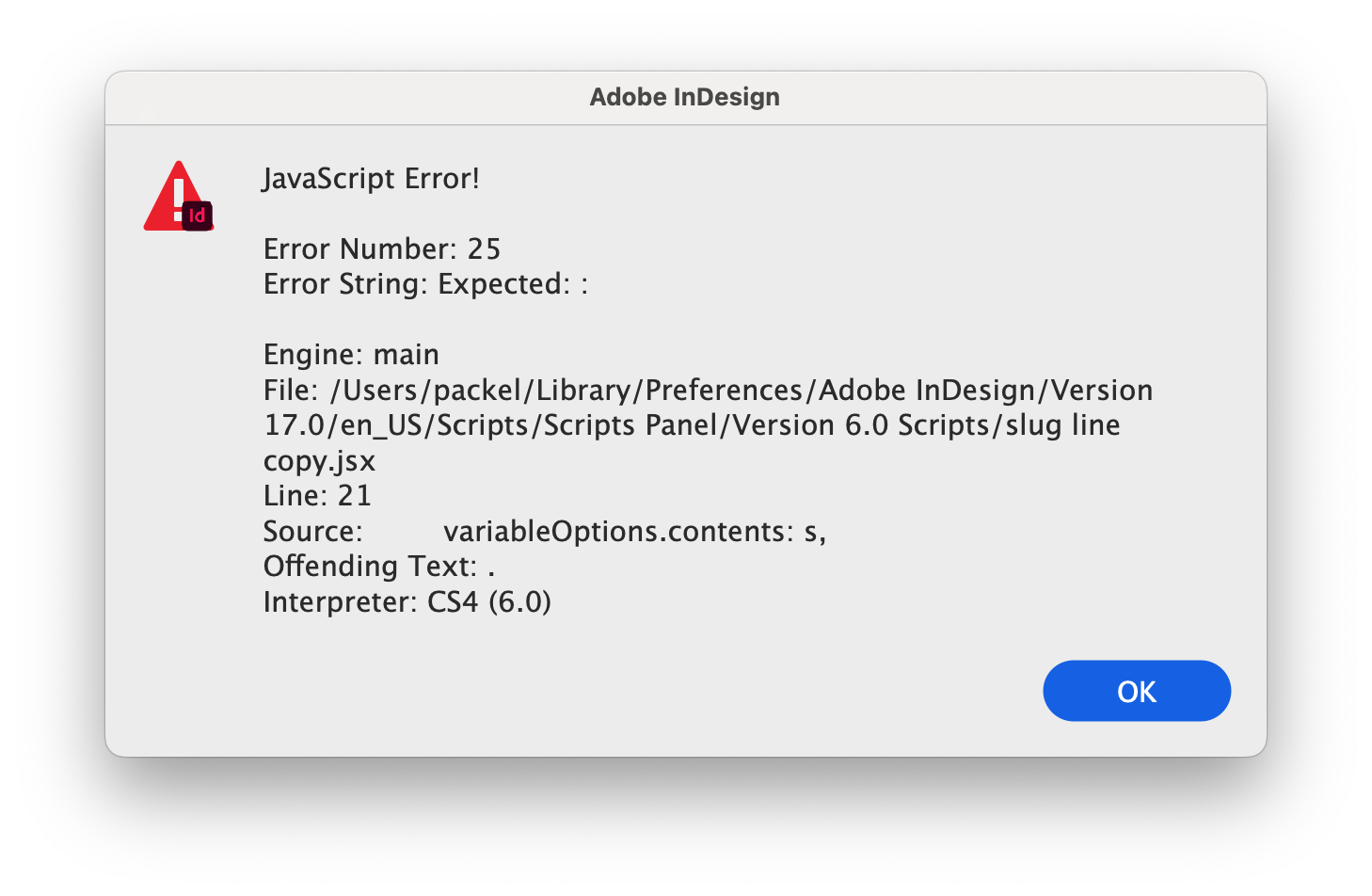
Getting another line of error. Almost there!
Copy link to clipboard
Copied
Updated the code. Should know better than to write without testing. Tried it on my other machine and it worked.
Copy link to clipboard
Copied
Thanks for helping me. I have no clue what I am doing really.
I ran it an nothing appears on my Indesign page.
I put it in my scripts folder.
Am I doing it correctly?
Copy link to clipboard
Copied
It should have created a text variable called Swatches for you. The other info you requested could be easily filled out.
Copy link to clipboard
Copied
Oh silly me. It did! That is pretty awesome.
Can you give me an example line where I could tell it to NOT include certain swatches like Paper or White?
Copy link to clipboard
Copied
you seem very knowledgeable about javascript.
I have a cool script I found but it uses the old jsxbin file.
I have no clue how to even read it to allow me to edit it. Do you?
Copy link to clipboard
Copied
jsxbin is binary, meaning the author intentionally encoded the code so as to not allow it to be edited.
If you want to exclude the top 4 swatches in your list (None, Paper, White, Black), change the line that says
i-- && i > 0to
i-- && i > 3
Copy link to clipboard
Copied
So I have this one that adds the text to the box rather than having to create the text variable each time.
Is it possible to do it this way so I can just run the javascript each time I open a doc?
The text variable does not stay if I open a new doc
var doc = app.activeDocument;
var label = "";
with (doc.documentPreferences) {
label += "W x H: " + pageWidth + " x " + pageHeight;
}
var tf = app.selection[0];
tf.contents = label;
Copy link to clipboard
Copied
var doc = app.activeDocument;
var swatches = doc.swatches;
var i = swatches.length;
var s = "Swatches Used: ";
var a = [];
while (i-- && i > 3) {
    app.findColorPreferences.findWhat = swatches[i];
    if (doc.findColor() > 0) {
         a.push(swatches[i].name);
    }
}
a.sort();
s+= a.join(", ");
var label = "";
with (doc.documentPreferences) {
    label += "W x H: " + pageWidth + " x " + pageHeight + "; " + s;
}
var tf = app.selection[0];
tf.contents = label;
Copy link to clipboard
Copied
Sorry. I may have confused things. I am not sure what the last script is supposed to do.
Your original script is nice, but I do not want to have to run it to create a text variable in the menu each time I open a doc. I need a script that can just be saved and run to fill in the used swatches in a document.
The end goal is to have something that can be used over and over to add a "label" of file content in the slug line each time I prepare a print file.
Copy link to clipboard
Copied
The last script would add the used swatch list after the page height width and fill a selected text frame with that information, like the original script you posted does, jusr with swatches, too.
Copy link to clipboard
Copied
Copy link to clipboard
Copied
You need to have a text frame selected, like you had to do with your pageHeight/width script.
Copy link to clipboard
Copied
Duh. Sorry about that.
thank you so much! I think this will work perfectly!!!!
Copy link to clipboard
Copied
Sure. As a bit of future advice, please describe your problem more clearly next time and what you are trying to achieve. The title asked for a Text Varaiable as swatches. Posting that source code at the onset would have helped get you the solution more expeditiously. We are just volunteers. Have a good weekend.
Copy link to clipboard
Copied
I appreciate the help.
In my head it made sense to me. Sometimes hard to describe.
Have a great weekend too.

Copy link to clipboard
Copied
Hi @denisep726548 ,
why do you run that script from a Version 6.0 Scripts folder?
That would reset and restrict all scripting features to InDesign CS4 from about 14 years ago.
Do not do that with a recent version of InDesign and script code that is meant for that version.
Regards,
Uwe Laubender
( Adobe Community Professional )
Copy link to clipboard
Copied
thanks

-
- 1
- 2

Get ready! An upgraded Adobe Community experience is coming in January.
Learn more
 AdChoices