
Answered
text won't fill the width of a column frame
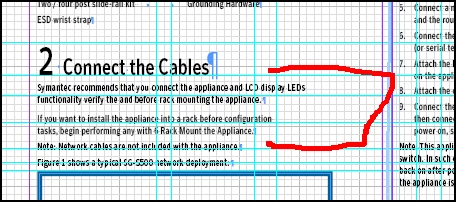
I'm using InDesign 2017.1 release on a Win7 pro machine. I'm having an issue where the text won't fill the frame (column). In some paragraphs in the document, the text goes appropriately to the edge of the frame. In other paragraphs, it doesn't.
Some things I've looked at:
- Checking in story editor - didn't find any oddities
- It doesn't seem to be a text wrap or graphic issue (removing a frame doesn't change how the text displays).
- I did also investigate ignoring text wrap.
- Is not obviously a paragraph style issue; all of them have 0 as the right and last margins.
I'll attach a small example. In it, at the highlighted red area, you can see that both of the paragraphs under 2 have plenty of space for additional text to the right margin. I have to pull the frame far, far out to the right to get the text to move; other text moves as it should. The doc of course really needs the text to go to the right margin, not much space to spare.
Much appreciate your suggestions for what to look for.!
 AdChoices