Answered
Text wrap woes
Hey, I'm a beginner. I'm designing my college magazine. I wanted to wrap text around this illustration. Somehow, the contour options aren't available at all. Please help.

Hey, I'm a beginner. I'm designing my college magazine. I wanted to wrap text around this illustration. Somehow, the contour options aren't available at all. Please help.
Thank you so much sir for the help. Part of the problem's been solved. But the contour option's still grayed out :/
I had actually used illustrator for creating that illustration but I did not import the .ai file. I just copy pasted it.
Anyway, I followed your suggestion to ungroup it and now the outlines are wrapped in a much better way. Although, how do i group them again exactly? (with all the text and background also being in the frame)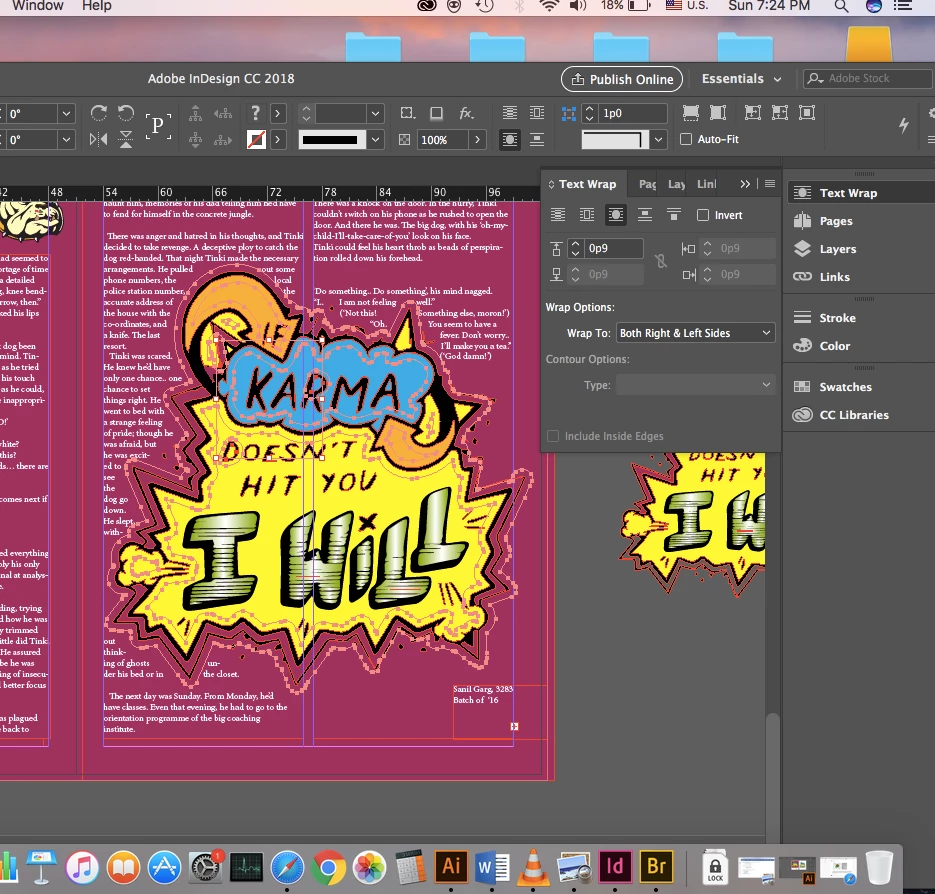
If you copy and paste from Illustrator to InDesign then the object becomes an InDesign object and the contour options will be grayed out. If you place the .ai file then they will become available. So what you have now, though, is actually all InDesign and has to be treated as such. Once you have applied your text wrap to the ungrouped object and it is working the way that you want it then you can try selecting all of it and regrouping it. It should retain the wrap and allow you to still alter the runaround paths using the direct selection tool. However, If you don’t actually need to regroup it then I would suggest leaving it as it is.
Already have an account? Login
Enter your E-mail address. We'll send you an e-mail with instructions to reset your password.
 AdChoices