
Known Participant
November 25, 2024
Question

Thai Font error After Exporting

  • November 25, 2024
  • 3 replies
  • 3398 views

Hello Indesign Community,


We have been using Indesign for our work research paper for 3 years now, we have to export it to pdf and upload on our website to make it publicly available. However, we have the font error problems, in this case we mostly use fonts in Thai Language.


After exporting, everything looks perfectly fine like in the pic. 
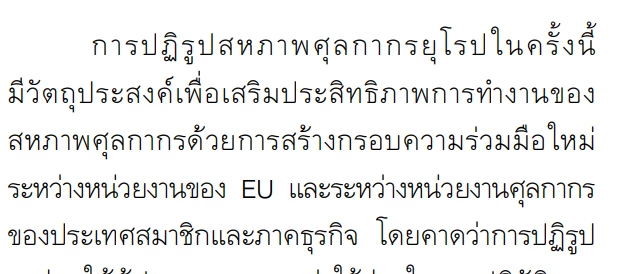
 

However, if we copied&pasted it elsewhere or try to use ctrl+f funtion to look for keywords. We coundn't find a single match as all the fonts are in the wrong orders and abnormal styles as attached some lines, 
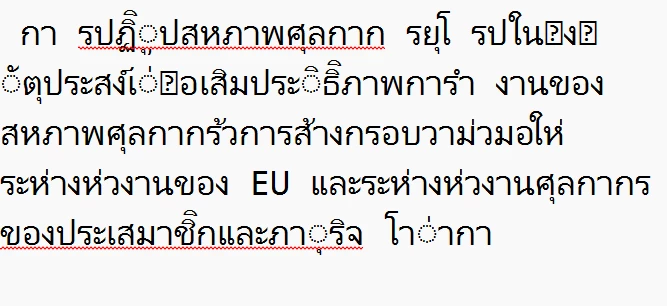
 

This causes us lots problens as we want to spread knowledge and info to all audience, but our work has never been showed up on the web browser as it cannot find the matching keywords from the engins to our works.  I tried changing fonts but still have the same problems, FYI, we never have this problems when we use just Microsoft Words and English Words are not affected. 


Looking forward to your suggestions, maybe some fonts setting or what kind of fonts should we look for. Thank you.

3 replies

Known Participant
March 10, 2025

Hello, this post hasn't been resolved, the issues still occur. Could some expert take a look into it one more time?

BobLevine
Community Expert
Community Expert
November 25, 2024

How are you viewing and testing this PDF? Doesn't everything work okay in Acrobat?

Known Participant
November 25, 2024

Im testing it on Acrobat, the fonts are all in wrong orders when I copied and pasted out to Notepad. Also I could not find asingle matching words by crtl F on Acrobat

Abhishek Rao
Community Manager
Community Manager
November 25, 2024

Hi @Thai Customs Brussels,


Thanks for providing the recording. After reviewing the workflow, it seems like the issue is occurring due to a font compatibility problem when copying from Acrobat. The issue may be related to how the font is being handled in Acrobat after export from InDesign.

Here are some steps you can try:

  1. It might be related to how Acrobat is rendering the fonts. Please try embedding the fonts during the PDF export (in InDesign) by following the steps in the provided screenshots.
  2. Ensure that you are not downsampling or compressing any fonts in the export settings.

    Reference: 


  3. If the issue persists with JS Jindara, try a different font and see if that resolves the issue. Some fonts may not render correctly in Acrobat.

If the problem continues, we can try some additional troubleshooting steps. Let me know how it goes!


Thanks,

Abhishek Rao 

Abhishek Rao
Community Manager
Community Manager
November 25, 2024

Hi @Thai Customs Brussels,


Thank you for sharing the details. Could you let us know:

  1. The version of InDesign you’re using.
  2. Your operating system (e.g., Windows 11, macOS Ventura).
  3. If this issue occurs with only this file or other files as well.

Additionally, could you share a screen recording of your workflow, from working on the file to exporting the PDF? This will help us better understand the issue and provide a solution.

Looking forward to your response!


Thanks, 

Abhishek Rao

Known Participant
November 25, 2024

Thanks for your reply

1. I'm using and recently updated to Version 19.5.1.

2. Windows 11

3. This happens to all files.

I attached the workflow here, You will see there are some warnings on the font JS Jindara, yet I tried changing fonts but the issues still occurs.