Exit
  • Global community
    • Language:
      • Deutsch
      • English
      • Español
      • Français
      • Português
  • 日本語コミュニティ
  • 한국 커뮤니티
0

The document uses fonts that are currently unavailable on your computer

Explorer ,
Mar 21, 2022 Mar 21, 2022

Hi there,

I'm getting this error which I saw a few other posts had, but mine seems to be different because the font is both installed on my computer and indesign.
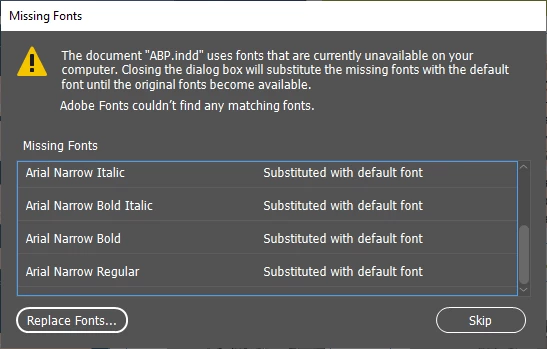
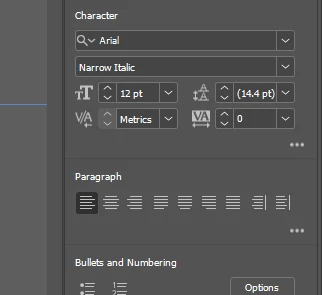
fonts.png

font.png

Issue.png

Fonts Lib.png

The font is visible in both, but does not synchronize

TOPICS
Sync and storage , Type
2.6K
Translate
Report
Community guidelines
Be kind and respectful, give credit to the original source of content, and search for duplicates before posting. Learn more
community guidelines

correct answers 2 Correct answers

Community Expert , Mar 22, 2022 Mar 22, 2022

If this is an older file (maybe from a Mac?*), there may be an internal conflict with the naming structure.

Try replacing the missing fonts with themselves, so it uses the ones installed in your Windows.

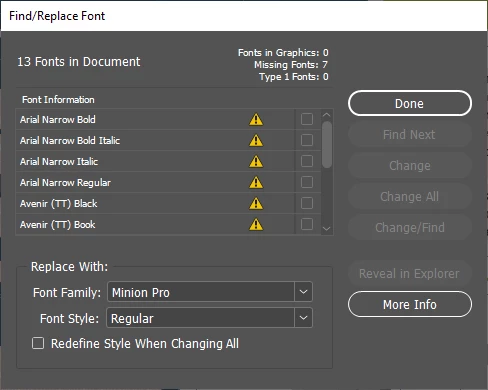
If you select one of the missing fonts (e.g. Arial Narrow), and select Replace with, does Arial Narrow:Regular show up in the list? If so, replace it (making sure "Redefine Syles..." is checked.

If this clears the error for that one, keep doing it for the remaining ones.


*The reason I asked

...
Translate
Community Expert , Mar 22, 2022 Mar 22, 2022

I just thought the software checks your system and adobe fonts to replace any missing fonts.

If you and your colleague had used Adobe fonts, you would'nt have had any missing fonts message. And if the fonts are installed in your system, InDesign cannot replace them automatically since – even if the name is the same – they are actually different fonts.

Translate
Community Expert ,
Mar 21, 2022 Mar 21, 2022

because the font is both installed on my computer and indesign.
You mean that you have installed the font in your system and also in the InDesign font folder? Maybe that's why InDesign doesn't recognize it. Install the font only in the system and be sure that the version used in your document is the same as the one which is installed.

Translate
Report
Community guidelines
Be kind and respectful, give credit to the original source of content, and search for duplicates before posting. Learn more
community guidelines
Explorer ,
Mar 22, 2022 Mar 22, 2022

Arial is a stock font for both indesign and windows 10, that's why I'm confused it's not detecting it


Could this be an issue causing it?

FOnts.png

Translate
Report
Community guidelines
Be kind and respectful, give credit to the original source of content, and search for duplicates before posting. Learn more
community guidelines
Community Expert ,
Mar 22, 2022 Mar 22, 2022

Your screenshot does not show any Arial font, so I am confused…

Arial is a stock font for both indesign and windows 10

There are no fonts for Windows AND for InDesign. Fonts are installed in the system and can be used in applications like InDesign or Word, or… Some fonts can be activated via a cloud solution, but as far as I know, Arial is not part of the Adobe fonts catalog.


So, you have to check in your Windows font folder if Arial is installed (I would be very surprised that it is not the case) and check also if there is not another version in the InDesign font folder (Programs > Adobe > Adobe InDesign > Fonts

Translate
Report
Community guidelines
Be kind and respectful, give credit to the original source of content, and search for duplicates before posting. Learn more
community guidelines
Explorer ,
Mar 22, 2022 Mar 22, 2022

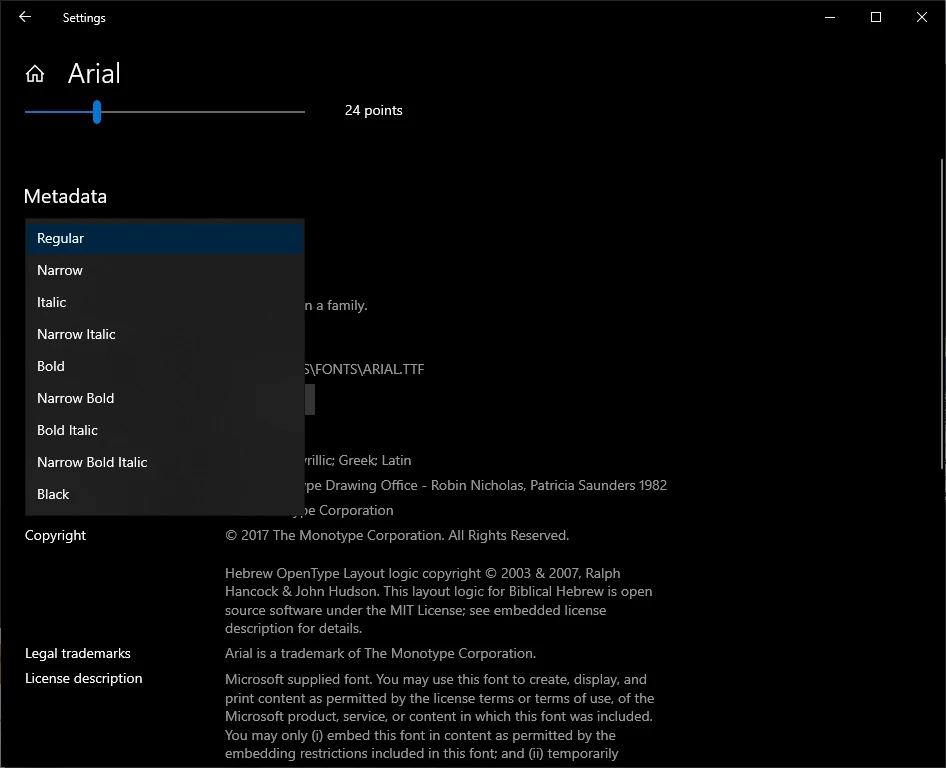
The indesign folder was empty, but the second image shows the font in windows fonts settings 


fonts folder.png

Windows fonts.png


Translate
Report
Community guidelines
Be kind and respectful, give credit to the original source of content, and search for duplicates before posting. Learn more
community guidelines
Community Expert ,
Mar 22, 2022 Mar 22, 2022

The indesign folder was empty

Good!

Did you create this document or has it been provided to you by another person? If it comes from someone else, contact this person to get a package, including the fonts. You will not  need to install them in the Windows font folder, InDesign will recognize them (for this file only).

And what happens if you try to replace the missing Arial font, using the dropdown menu at the bottom of the window (replace with)?


Translate
Report
Community guidelines
Be kind and respectful, give credit to the original source of content, and search for duplicates before posting. Learn more
community guidelines
Explorer ,
Mar 22, 2022 Mar 22, 2022

It was from another person. I will ask them for the package

But why does it not automatically sync with my computer fonts?
I changed all for one font, it replaced that specific font, but I don't want to go through that for every file

I thought the whole point of adobe fonts was to automatically recognize and replace?

Thanks for your support

Translate
Report
Community guidelines
Be kind and respectful, give credit to the original source of content, and search for duplicates before posting. Learn more
community guidelines
Community Beginner ,
Mar 22, 2022 Mar 22, 2022

But why does it not automatically sync with my computer fonts?

If the font used in the document is the same as the one which is installed in your computer, there is no problem. And when I write “ the same”, it means the exact same version, the name is not enough to be sure that it is really the same.


I thought the whole point of adobe fonts was to automatically recognize and replace?

Arial is NOT an Adobe font.


EDIT: error when I logged in. This answer has been written by jmlevy.

Translate
Report
Community guidelines
Be kind and respectful, give credit to the original source of content, and search for duplicates before posting. Learn more
community guidelines
Community Expert ,
Mar 22, 2022 Mar 22, 2022

If this is an older file (maybe from a Mac?*), there may be an internal conflict with the naming structure.

Try replacing the missing fonts with themselves, so it uses the ones installed in your Windows.

If you select one of the missing fonts (e.g. Arial Narrow), and select Replace with, does Arial Narrow:Regular show up in the list? If so, replace it (making sure "Redefine Syles..." is checked.

If this clears the error for that one, keep doing it for the remaining ones.


*The reason I asked about it being a Mac file, is that Avenir is typically a Mac system font.

Screen Shot 2022-03-22 at 11.53.34 AM.png

 Also: open up More Info so you can see things like the font path and version, etc (bottom)

Translate
Report
Community guidelines
Be kind and respectful, give credit to the original source of content, and search for duplicates before posting. Learn more
community guidelines
Explorer ,
Mar 22, 2022 Mar 22, 2022

You guess it right again haha

It's from my coworker, that uses a mac, so I'm guessing that'll cause us some issues with fonts.
I will replace them manually. I just thought the software checks your system and adobe fonts to replace any missing fonts.

Translate
Report
Community guidelines
Be kind and respectful, give credit to the original source of content, and search for duplicates before posting. Learn more
community guidelines
Community Expert ,
Mar 22, 2022 Mar 22, 2022
LATEST

I just thought the software checks your system and adobe fonts to replace any missing fonts.

If you and your colleague had used Adobe fonts, you would'nt have had any missing fonts message. And if the fonts are installed in your system, InDesign cannot replace them automatically since – even if the name is the same – they are actually different fonts.

Translate
Report
Community guidelines
Be kind and respectful, give credit to the original source of content, and search for duplicates before posting. Learn more
community guidelines