
Participant
March 9, 2024
Question

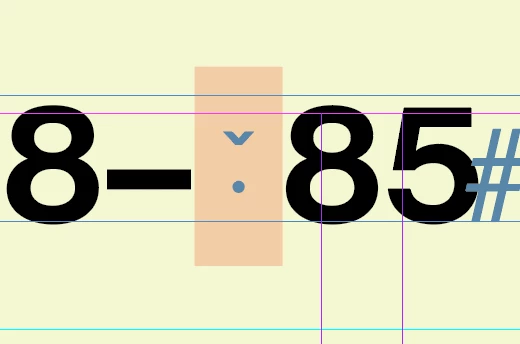
Thin Space is not working in Neue Haas Grotesk Pro
  • March 9, 2024
  • 2 replies
  • 794 views

I am using Neue Haas Grotesk Display Pro, synced from Adobe Fonts. There seems to be a new glitch where thin spaces show up as a missing glyph, and don't work properly.


The problem is only with Neue Haas Grotesk Pro from Adobe Fonts, all other fonts work fine, including ones from Adobe Fonts. I also tried a new document and it still doesn't work.


I've used the font for years without this problem so maybe there was some update that broke it?


CC: Christian Schwartz / Monotype / Adobe

This topic has been closed for replies.

2 replies

Steve Werner
Community Expert
Community Expert
March 9, 2024

Almost forgot to show you the font on my system:


Steve Werner
Community Expert
Community Expert
March 9, 2024

I'm not seeing that. I just installed the same font family from Adobe Fonts


I'm running a 2021 MacBook Pro running InDesign 2024 version 19.2 in Sonoma 14.4


Does this happen in just one file, or can you replicate it in others files?


If just one file, you could have corruption in your file. Save it as an IDML file. (File > Save As > InDesign CS4 or Later [IDML]. Then open the IDML in InDesign to see if you get the same result.


If in all files, try restoring your InDesign caches and preferences. Here's how:


https://www.rockymountaintraining.com/adobe-indesign-rebuilding-preferences-cache/


Tell us more about your operating system (exactly) and InDesign version (exactly)

Participant
March 11, 2024

Thanks for your help, Steve.


It's InDesign 19.2 running on a 2023 M2 Macbook Air / Sonoma 14.4


Any new file I create has the problem, but files older than ~2 weeks work fine. Something must have gotten messed up in my preferences in that time. IDML trick doesn't help.


I'm going to try and see if I can find a preference/type setting somewhere that I accidentally changed, but I will reset them if it comes to that. Just want to save the time of fixing all my preferences if I can. I'll let you know what happens.


Best,

Noah