
Participating Frequently
June 20, 2024
Answered

Thread Text on Path in Reverse Direction

  • June 20, 2024
  • 4 replies
  • 1039 views

Hello! I am looking for a way to thread text between two paths in the reverse direction. Essentially I want my text aligned to the bottom/end of the threaded paths so that the beginning of the text appears to pop backward rather than forward. If there's no overflowing text, I still want the text to sit in the second path. Here's an illustration:
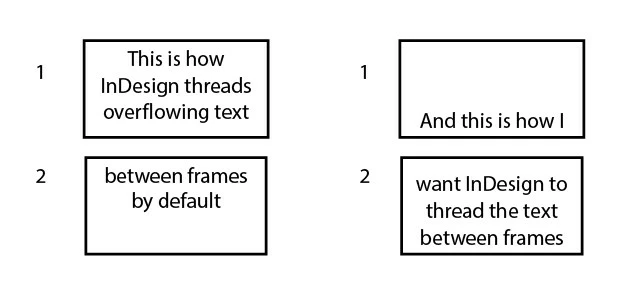


Here is a copy of the script I use to thread text between paths. How would you solve this? Thank you!

/**
* @@@BUILDINFO@@@ AddTextPathsAndThreadToStory-SELECTION.jsx !Version! Tue Jun 05 2018 10:33:14 GMT+0200
*/

( function()
{


/*
Script by Uwe Laubender

Posted at Adobe InDesign Forum:

How to curve text within a paragraph
kol28429812 Jun 5, 2018 7:54 AM
https://forums.adobe.com/message/10425153#10425153

Script adds text path to selected item if no text path is there.
Script threads text path 1 of every selected item in order of selection if possible.

*/

app.scriptPreferences.userInteractionLevel = UserInteractionLevels.INTERACT_WITH_ALL;

app.doScript
(

addTextPathsAndThreadThem,
ScriptLanguage.JAVASCRIPT,
[],
UndoModes.ENTIRE_SCRIPT,
"Add Text Paths to Selection and Thread them | SCRIPT"

);

function addTextPathsAndThreadThem()
{

// Do nothing, if:
if( app.documents.length == 0 ){ return };
if( app.selection.length == 0 ){ return };

if( app.selection.length == 1 && app.selection[0].hasOwnProperty("baselineShift") ){ return };
if( app.selection.length == 1 && app.selection[0].constructor.name == "Cell" ){ return };
if( app.selection.length == 1 && app.selection[0].constructor.name == "Table" ){ return };

if( app.selection.length == 1 && app.selection[0].textPaths.length > 0 ){ return };
if( app.selection.length == 1 && app.selection[0].textPaths.length == 0 )
{
app.selection[0].textPaths.add();
return
};

var sel = app.selection;
var selLength = sel.length;
var textPathsArray = [];
var e;

for( var n=0; n<selLength; n++)
{
if(sel[n].textPaths.length == 0){ sel[n].textPaths.add() };
};

for( var n=0; n<selLength-1; n++)
{
var thisTextPath = sel[n].textPaths[0];
var nextTextPath = sel[n+1].textPaths[0];

try
{
thisTextPath.nextTextFrame = nextTextPath;
}catch(e){ continue };
};

};
}() )
This topic has been closed for replies.
Correct answer m1b

@Robert at ID-Tasker 

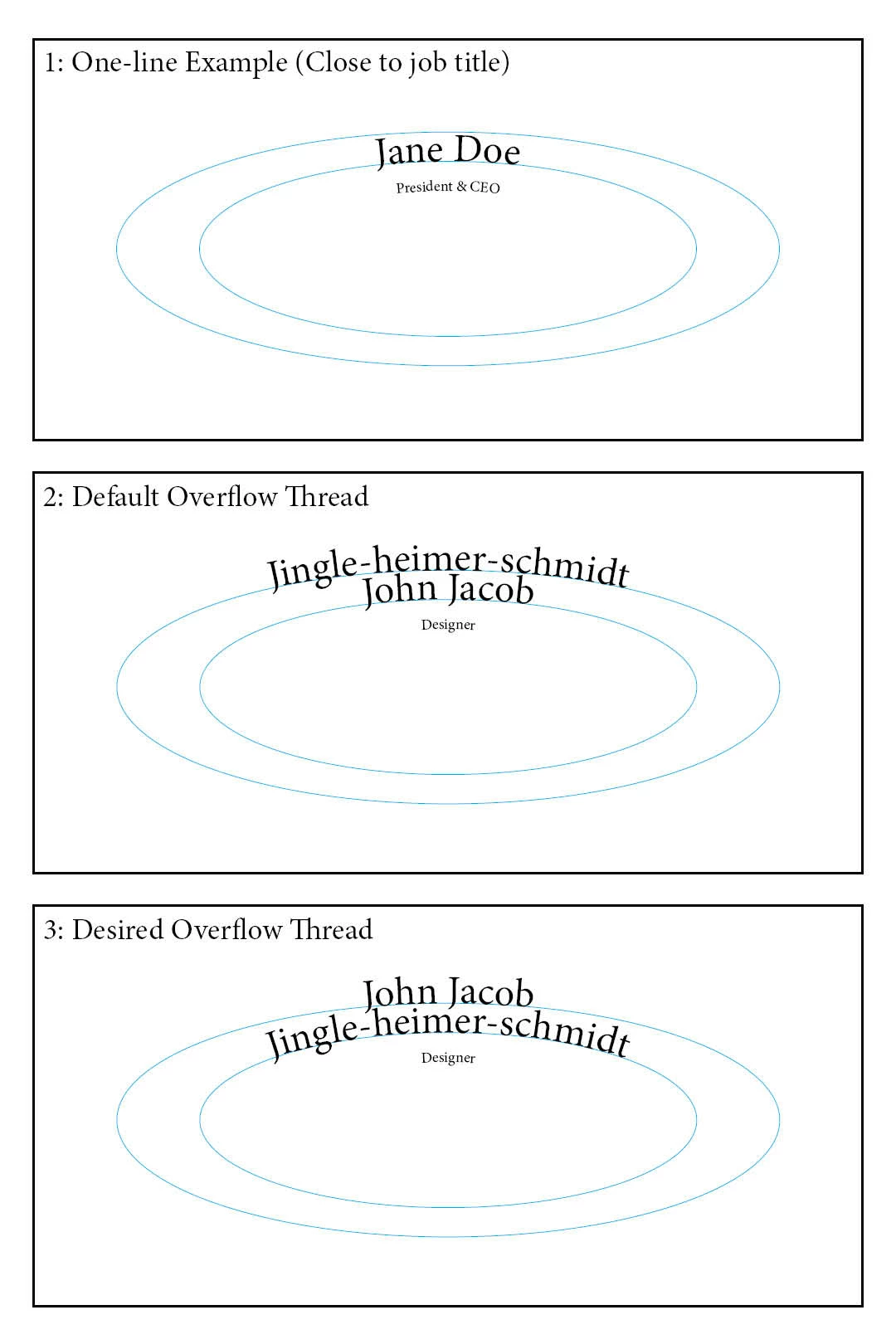
Here's that example image. I'm okay to pay a bit for a solution that works. And weirdly enough I don't have that more button or any reply button on desktop or mobile. Thanks.


Hey @plumbus, I don't know how to do that. I mean, a script can swap the threading order only if it finds both "fields" are used, but it wouldn't be automatic and responsive—you'd have to run the script each time you wanted it to check.


The way I've always done this sort of thing previously is to add a data massaging step (ideally in the database export script, but can be afterwards, eg. a new column in Excel with a formula) that combines line 1 and line 2 in the way you want—specifically that if line 2 is empty, then line 1 has a carriage return before it—in other words, you make a new calculated data field that *always* has two paragraphs.


Like this:


\rJaneDoe
John Jacob\rJingle-heimer-schmidt


And you'd thread the paths in the other order than your screen shot. Maybe that would suit your situation?

- Mark

4 replies

Community Expert
June 22, 2024

Hi @plumbus ,

the order my script is working is this:

"Script threads text path 1 of every selected item in order of selection if possible."


So if you have two objects with text paths selected with the Selection tool the order of selection determines the flow from text path to text path. Given object A and B on the page and you want to flow the text from text path on object B to object A, first select object B, hold the Shift key and add object A to your selection. Then run the script.


What's already discussed:

To determine the contents in the first path and the second path simply add a line break or an end of paragraph character in the text where it should flow in the second path.


Regards,
Uwe Laubender
( Adobe Community Expert )

Robert at ID-Tasker
Legend
June 20, 2024

@plumbus


Script you've attached - is for a completely different situation.


Also, TextPaths are different that TextFrames.


What you need is a script that will increase top margin - or decrease height of the 1st TextFrame - in small increments - untill last TextFrame overflows - then go back one increment.


Unfortunately, I'm on my phone so can't give you working code - just an algorithm. 


m1b
Community Expert
Community Expert
June 20, 2024

Hi @Robert at ID-Tasker, I just saw your comment. I've used "first baseline" but your idea to just change the height of the frame is probably better, because it's easier to adjust manually afterwards. Good idea!

- Mark


EDIT: here is an implementation of @Robert at ID-Tasker's idea.


/**
 * @file End Justify 2.js
 *
 * Script will vertically justify text to bottom of text frames,
 * but also move text to the end of the threaded frames.
 * Usage: Select a text frame or text and run script.
 *
 * @author m1b
 * @version 2024-06-20
 * @discussion https://community.adobe.com/t5/indesign-discussions/thread-text-on-path-in-reverse-direction/m-p/14692412
 */
function main() {

    var doc = app.documents.length && app.activeDocument;

    if (!doc)
        return alert('Please select some text and run script again.');

    var story = doc.selection[0] && doc.selection[0].parentStory;

    if (!story)
        return alert('Please select some text and run script again.');

    if (story.overflows)
        return alert('Story is overflowing. Please fix and try again.');

    app.scriptPreferences.measurementUnit = MeasurementUnits.POINTS;

    const MINIMUM_FRAME_HEIGHT_PTS = 5;
    const INCREMENT_LARGE = 20;
    const INCREMENT_SMALL = 1;

    for (var i = 0, frame, height, offset; i < story.textContainers.length; i++) {

        frame = story.textContainers[i];
        frame.textFramePreferences.verticalJustification = VerticalJustification.BOTTOM_ALIGN;

        // don't need to fiddle with last frame
        if (story.textContainers.length - 1 === i)
            break;

        bounds = frame.geometricBounds;
        height = bounds[2] - bounds[0];

        // move the top bound of frame down until story overflows
        while (
            bounds[2] - bounds[0] - INCREMENT_LARGE > MINIMUM_FRAME_HEIGHT_PTS
            && !story.overflows
        ) {
            bounds[0] += INCREMENT_LARGE;
            frame.geometricBounds = bounds;
        }
        
        // move the top bound of frame back up until story fits again
        while (story.overflows) {
            bounds[0] -= INCREMENT_SMALL;
            frame.geometricBounds = bounds;
        }

    }

};
app.doScript(main, ScriptLanguage.JAVASCRIPT, undefined, UndoModes.ENTIRE_SCRIPT, 'End Justify');


plumbusAuthor
Participating Frequently
June 20, 2024

Thank you so much! This community is amazing.

So writing this post around 1 AM was probablt not my best move. The description I wrote specifies text paths, but the illustration shows frames. I do need this to work with PATHS. My illustration was to explain the threading direction, and I used frames for that because it was simpler, but I see that was confusing, so I apologize. 

Can these techniques be applied to paths? The text is curved. Also, the text is dynamic, so if there's a way to not run the script every time, that would be ideal. 

Thanks again!

m1b
Community Expert
Community Expert
June 20, 2024

Hi @plumbus, I've written a script that does this. It isn't especially flexible, because you have to re-run the script each time you change the number of lines in the story. It just alters the first baseline of each text frame until it gets what you want. Let me know if it works in your case.

- Mark


/**
 * @file End Justify.js
 *
 * Script will vertically justify text to bottom of text frames,
 * but also move text to the end of the threaded frames.
 * Usage: Select a text frame or text and run script. =
 *
 * @author m1b
 * @version 2024-06-20
 * @discussion https://community.adobe.com/t5/indesign-discussions/thread-text-on-path-in-reverse-direction/m-p/14692412
 */
function main() {

    var doc = app.documents.length && app.activeDocument;

    if (!doc)
        return alert('Please select some text and run script again.');

    var story = doc.selection[0] && doc.selection[0].parentStory;

    if (!story)
        return alert('Please select some text and run script again.');

    if (story.overflows)
        return alert('Story is overflowing. Please fix and try again.');

    app.scriptPreferences.measurementUnit = MeasurementUnits.POINTS;

    for (var i = 0, frame, height, firstBaseline; i < story.textContainers.length; i++) {

        frame = story.textContainers[i];
        firstBaseline = 0;

        frame.textFramePreferences.verticalJustification = VerticalJustification.BOTTOM_ALIGN;

        // don't need to fiddle with last frame
        if (story.textContainers.length - 1 === i)
            break;

        // we are going to adjust the first baseline to push the text down to the bottom
        frame.textFramePreferences.firstBaselineOffset = FirstBaseline.FIXED_HEIGHT;
        height = frame.geometricBounds[2] - frame.geometricBounds[0];

        // keep adding to first baseline until it overflows
        while (
            firstBaseline < height
            && !story.overflows
        ) {
            firstBaseline += 20;
            frame.textFramePreferences.minimumFirstBaselineOffset = firstBaseline;
        }

        // keep removing from first baseline until it fits again
        while (story.overflows) {
            firstBaseline -= 1;
            frame.textFramePreferences.minimumFirstBaselineOffset = firstBaseline;
        }

    }

};
app.doScript(main, ScriptLanguage.JAVASCRIPT, undefined, UndoModes.ENTIRE_SCRIPT, 'End Justify');


plumbusAuthor
Participating Frequently
June 20, 2024

Another way to think of this is that the text should be end-aligned to the entire collection of paths, not beginning-aligned.