
Inspiring
August 27, 2018
Answered

To change inset spacing in text frames

  • August 27, 2018
  • 5 replies
  • 3489 views

Okay, I can right-click a text frame and change the inset spacing of the text frame. I am changing the left and right inset spacing to zero.

Only I need to do it hundreds of times.

Is there a semi-automated way to do this?
This topic has been closed for replies.
Correct answer Jongware

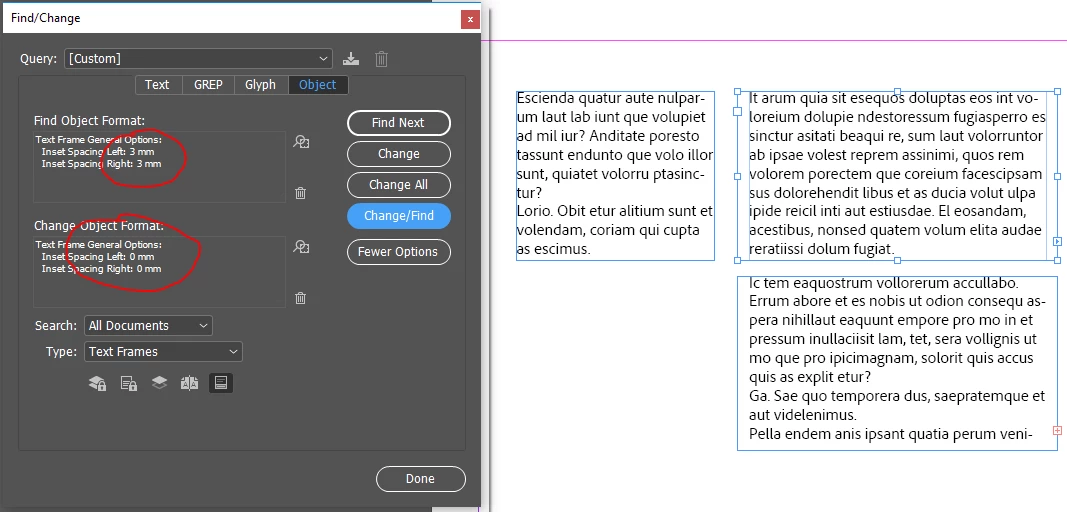
Unless your frame insets are all different, you can use Find/Change:

5 replies

Srishti Bali
Community Manager
Community Manager
August 31, 2018

Hi there,

I would like to know if the steps suggested above worked for you, or the issue still persists.

Kindly update the discussion if you need further assistance with it.

Thanks,

Srishti

sivey@pdxAuthor
Inspiring
September 4, 2018

Yes, thanks! I had not realized that search could work in areas other than text! And if I had been systematic in using Object Styles, that would have been helpful also!

hammer0909
Community Expert
August 27, 2018

Let's not forget that you can also use an Object Style. This turns it into a 1-click operation for each text frame. You can combine this with Jongware's suggestion and actually find frames and apply the Object style to the frames as well. That is if you can isolate the frames in which you want to apply the inset in some way.

Jongware
JongwareCorrect answer
Community Expert
August 27, 2018

Unless your frame insets are all different, you can use Find/Change:

Community Expert
August 27, 2018

Hi,

if you draw out a new text frame with the Text Tool do you see frame insets?

If yes, you changed a preference with text frames.

If not and all the text frames in your documents have frame insets and you want to change them to 0 only a script can handle this efficiently.


Here a script that will do this for all text frames in your active document written in ExtendScript (JavaScript):


/**
* @@@BUILDINFO@@@ ResetAllInsetsOfAllTextFramesToZero-ACTIVE-DOCUMENT.jsx !Version! Mon Aug 27 2018 10:03:43 GMT+0200
*/


( function()

{

	/*
		Script by Uwe Laubender
		ResetAllInsetsOfAllTextFramesToZero-ACTIVE-DOCUMENT.jsx

		Posted in thread:
		To change inset spacing in text frames
		sivey@pdx Aug 27, 2018
		https://community.adobe.com/t5/indesign-discussions/to-change-inset-spacing-in-text-frames/td-p/10037213
	*/

    app.scriptPreferences.userInteractionLevel = UserInteractionLevels.INTERACT_WITH_ALL;

    app.doScript
    (
        setAllTextFrameInsetsOfActiveDocToZero,
        ScriptLanguage.JAVASCRIPT,
        [],
        UndoModes.ENTIRE_SCRIPT,
        "Set All Text Frame Insets To Zero | SCRIPT"
    );

    function setAllTextFrameInsetsOfActiveDocToZero()
    {
        if( app.documents.length == 0 ){ return };
        if( app.documents[0].stories.length == 0 ){ return };

        var allStories = app.documents[0].stories.everyItem().getElements();

        for( var s=0 ; s<allStories.length; s++ )
        {
            var currentTextContainers = allStories[s].textContainers ; // Array of text frames and text paths

            for( var t=0 ; t<currentTextContainers.length; t++ )
            {
                if( currentTextContainers[t].getElements()[0].constructor.name == "TextFrame" )
                {
                    currentTextContainers[t].textFramePreferences.insetSpacing = [ 0,0,0,0 ];
                };
            };
        };
    };

}() )


How to use ExtendScript (JavaScript) code:

Indiscripts :: Indiscripts for Dummies


Regards,
Uwe Laubender
( Adobe Community Expert )


PS: The code above was damaged from moving this thread to the new InDesign forum by the end of 2019.

Fixed the code now.

Derek Cross
Community Expert
August 27, 2018

What about applying a Paragraph Style?