
ashimg23377171
Inspiring
April 6, 2018
Answered

TOC generation and Bookmarks panel in PDF

  • April 6, 2018
  • 2 replies
  • 2695 views

I am working on a document where I have a heading 1, heading 2 and heading 3 styles.

Now in the TOC I only want the Heading 2 style to show.

But in the bookmarks pane in the generated PDF, I want both the Heading 2 style and the Heading 3 style to show.

Sthg like this:
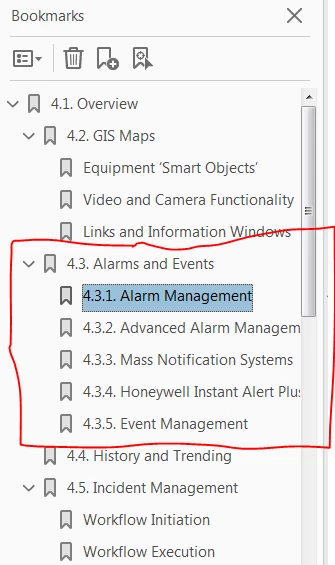
But the challenge I am facing is that I can only see both the Heading 2 style and the Heading 3 style in the bookmarks panel in PDF, when I generate a TOC that contains Heading 2 and Heading 3 style. I believe, unlike MS WORD, in InDesign the bookmarks panel is linked to the TOC (also per the following link: Is there a navigation pane in InDesign )
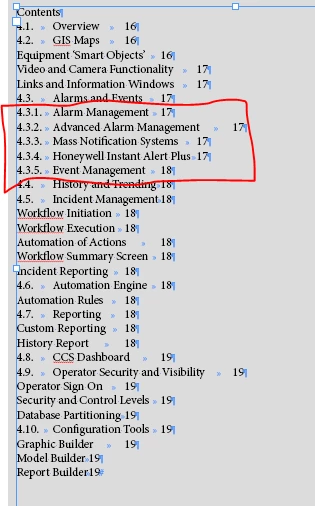
Now, per the cited link, I can remove Heading 3 style from the TOC and add them as bookmarks, but that seems like a long-winded approach to me as I have quite a few Heading 3's in my doc/book.

Is there a way to decouple bookmarks panel with the TOC generation. Any guidance would be appreciated.

Regards

Ashim

    This topic has been closed for replies.
    Correct answer Dave Creamer of IDEAS

    I just did a quick test document.

    For the Default TOC style, I used headings 1-3 and included make PDF Bookmarks.

    I created a new TOC style for onscreen that only including only headings 1 & 2 without PDF bookmarks selected.

    Placed the Default style on the pasteboard (not touching) and placed the onscreen TOC on the page.

    Seemed to do exactly what you want (if I understand it correctly...).

    Below is a screen capture of the PDF (I did not worry about TOC formatting).

    2 replies

    Barb Binder
    Community Expert
    Community Expert
    April 6, 2018

    Hi ashimg23377171:

    You are right—the TOC and PDF bookmarks are tied together, unlike Word. I second Uwe's suggestion.

    ~Barb

    ~Barb at Rocky Mountain Training
    Dave Creamer of IDEAS
    Community Expert
    Dave Creamer of IDEASCommunity ExpertCorrect answer
    Community Expert
    April 6, 2018

    I just did a quick test document.

    For the Default TOC style, I used headings 1-3 and included make PDF Bookmarks.

    I created a new TOC style for onscreen that only including only headings 1 & 2 without PDF bookmarks selected.

    Placed the Default style on the pasteboard (not touching) and placed the onscreen TOC on the page.

    Seemed to do exactly what you want (if I understand it correctly...).

    Below is a screen capture of the PDF (I did not worry about TOC formatting).

    David Creamer: Community Expert (ACI and ACE 1995-2023)
    ashimg23377171
    Inspiring
    April 10, 2018

    hello everyone

    I am having some issues again with the TOC and the bookmarks. As earlier, I would like my TOC in the doc to only show high-level headings (in my case, Heading 1)

    And the bookmark panel in PDF to show all the sub headings within Heading 1.

    This time I have several documents comprising my book. And I have been diff approaches highlighted in the thread.

    In the first case, I have created an exhaustive toc (containing all my styles) and placed it on the pasteboard. I have copied that at onto my main doc and gotten rid of the subheading I do not require. however when I generate a pdf, all I see are heading 1 styles in the bookmark panel.

    As my first approach did not work, I tried to then create a pasteboard toc only of the subheadings (i.e Heading 2 and Heading 3) - as follows:

    I generated the pdf, and I got the subheadings to show in the bookmark panel; however, they showed after all the listing of Heading 1, which is not desirable... I want the subheadings to show at their particular spot within Heading 1.

    Any guidance would be appreciated.

    Regards

    Ashim

    Community Expert
    April 6, 2018

    Hi Ashim,
    I'd rather duplicate the TOC frame. Move the original to the pasteboard so that is still in contact with the page, edit the duplicate and throw away the paragraphs you would not like to see.

    Regards,
    Uwe

    ashimg23377171
    Inspiring
    April 7, 2018

    Thank you so much everyone for weighing in.

    I created two TOCs -- one placed on the pasteboard containing all the styles I would like to see in my bookmark panel.

    And another one placed in the document containing the high-level headings I would like to be previewed in the document.

    Thank you for your time.

    Regards

    Ashim