

muskoka lake
Inspiring
October 18, 2020
Answered

TOC help to change paragraph styles and combine lines
  • October 18, 2020
  • 2 replies
  • 1901 views

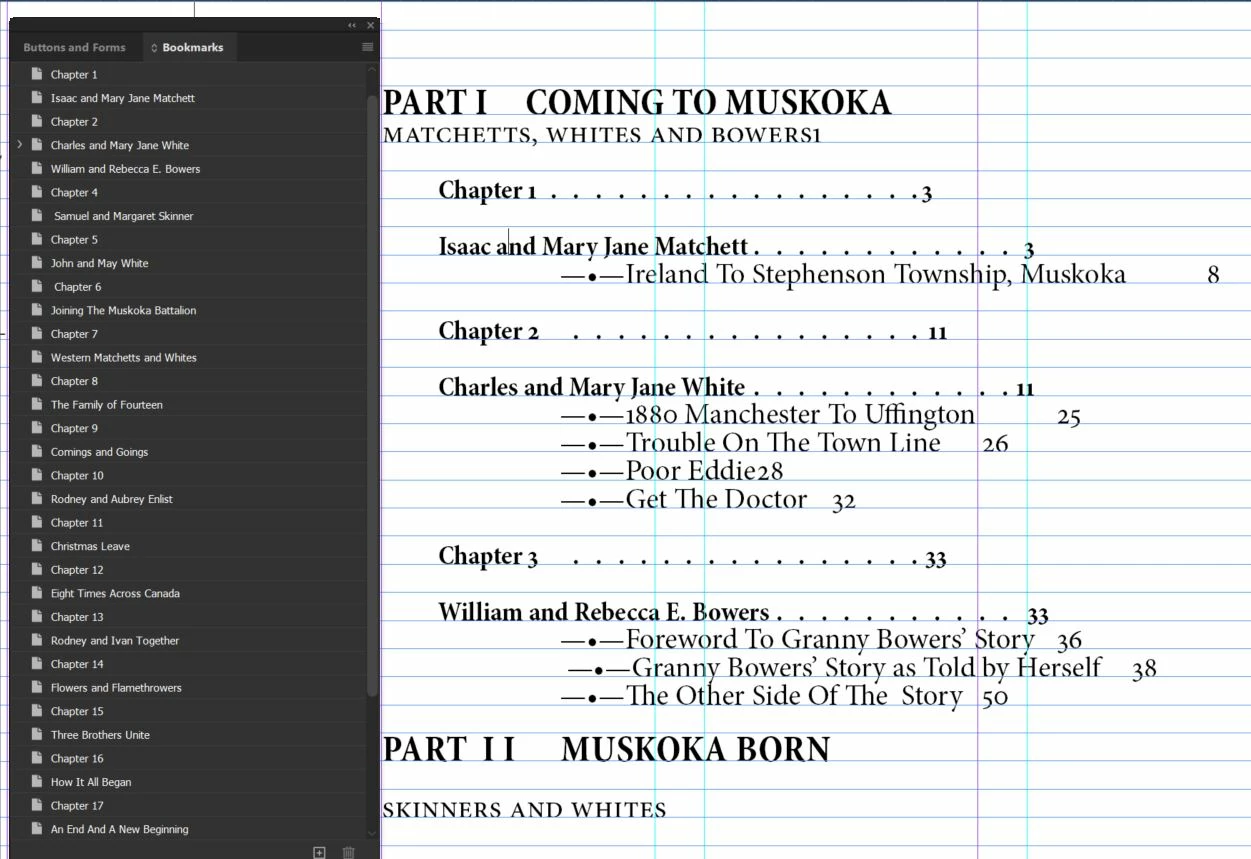
 I have the Chapter page set up with Chapter 1 on a line above the chapter title. I would like to have them all on one line in the Table of Contents.

Can someone help me learn how to create a TOC para style that will end up with both lines combined? I hope I have explained the problem. I know I could manually do it but I'm sure there is some Indesign magic to make it happen on all occurrrences. I made the bookmarks and so I know the chapter number and heading all have the correct para style applied. Now to be able to change it in the TOC is the problem.

This topic has been closed for replies.
Correct answer Barb Binder

Hi Muskoka Lake:


InDesign does not have the option to place two paragraphs on the same line, like FrameMaker does. You will either need to edit the TOC after each update or make the two paragraphs into a single paragraph and separate them with a line break (Ctrl+Enter). When you update the TOC, enable the Remove Forced Line Break checkbox. 


If you choose the latter workflow, be sure there is a trailing space at the end of the chapter number para, so that the space will separate the two in the TOC.


~Barb

2 replies

vladan saveljic
Inspiring
October 18, 2020

If you want to obtain:

Chapter "number" - "Chapter Title"

you can use chapter title in your TOC with numbered list as in my screenshot


muskoka lake
Inspiring
October 19, 2020

That is brilliant. I took the paragraph style off of the word chapter and its number. then I added the numbered list to the style for the chapter title. that is working well.

I do have a problem with the first chapter. It is different from the rest. I cleared all overrides and made sure it has the same para style as the others.


also I am wondering if there is a way to add the Prefix "Chapter" to the numbered list?

My Contents page is getting there but still needs work. thanks for your help to get me this far.

Dave Creamer of IDEAS
Community Expert
Community Expert
October 19, 2020

I did not read more into your question that what you actually asked (can you combine two paragraphs on one line). Luckily, Vladan did.


You can certainly add text in front of your numbering code as shown in Vladan's screen capture. Also, your TOC can include paragraph styles in your book without requiring page numbers to be displayed, but just the text. 


Many times, I need to make 3 or 4 title based-on styles for a book: the main chapter style, the front matter styles (identical to main style without any chapter numbers), and the back matter style (if the appendices are numbered differently). Also, sometimes I make a Chapter_NoContents style for pages that I want to have a title that does not show up in the TOC. 


I also realized you were using bookmarks. Bookmarks are not necessary for this type of list--just good paragraph style usage.

David Creamer: Community Expert (ACI and ACE 1995-2023)
Barb Binder
Community Expert
Barb BinderCommunity ExpertCorrect answer
Community Expert
October 18, 2020

Hi Muskoka Lake:


InDesign does not have the option to place two paragraphs on the same line, like FrameMaker does. You will either need to edit the TOC after each update or make the two paragraphs into a single paragraph and separate them with a line break (Ctrl+Enter). When you update the TOC, enable the Remove Forced Line Break checkbox. 


If you choose the latter workflow, be sure there is a trailing space at the end of the chapter number para, so that the space will separate the two in the TOC.


~Barb

~Barb at Rocky Mountain Training
Dave Creamer of IDEAS
Community Expert
Community Expert
October 18, 2020

To add to Barb's answer, you can put a unique character at the end of the first "line" paragraph style in the actual content and use a character style to make it with a fill of none and 10% width. Create a saved find/change and run it after the update--search for the unique and replace it with a space. A bit of a pain, but not too bad unless you are updating the TOC every 10 minutes.

David Creamer: Community Expert (ACI and ACE 1995-2023)