
Known Participant
December 17, 2021
Answered

TOC is blank

  • December 17, 2021
  • 6 replies
  • 2518 views

CS6.

I've generated hundreds of TOCs and know how to use the function. Suddenly today I can't generate a TOC. I've rebooted, restarted InDesign (any number of times). I've tested generating a TOC in a previous book where it worked fine when that job was live. All I get is the heading word ("Contents") followed by a blank line ending in ¶ and a # on the last line. That's all. I ended up typing the whole TOC manually to get the job out the door, but I'm looking for a solution.
This topic has been closed for replies.
Correct answer Barb Binder

Hi Dick:


My apologies, it was in my spam folder.


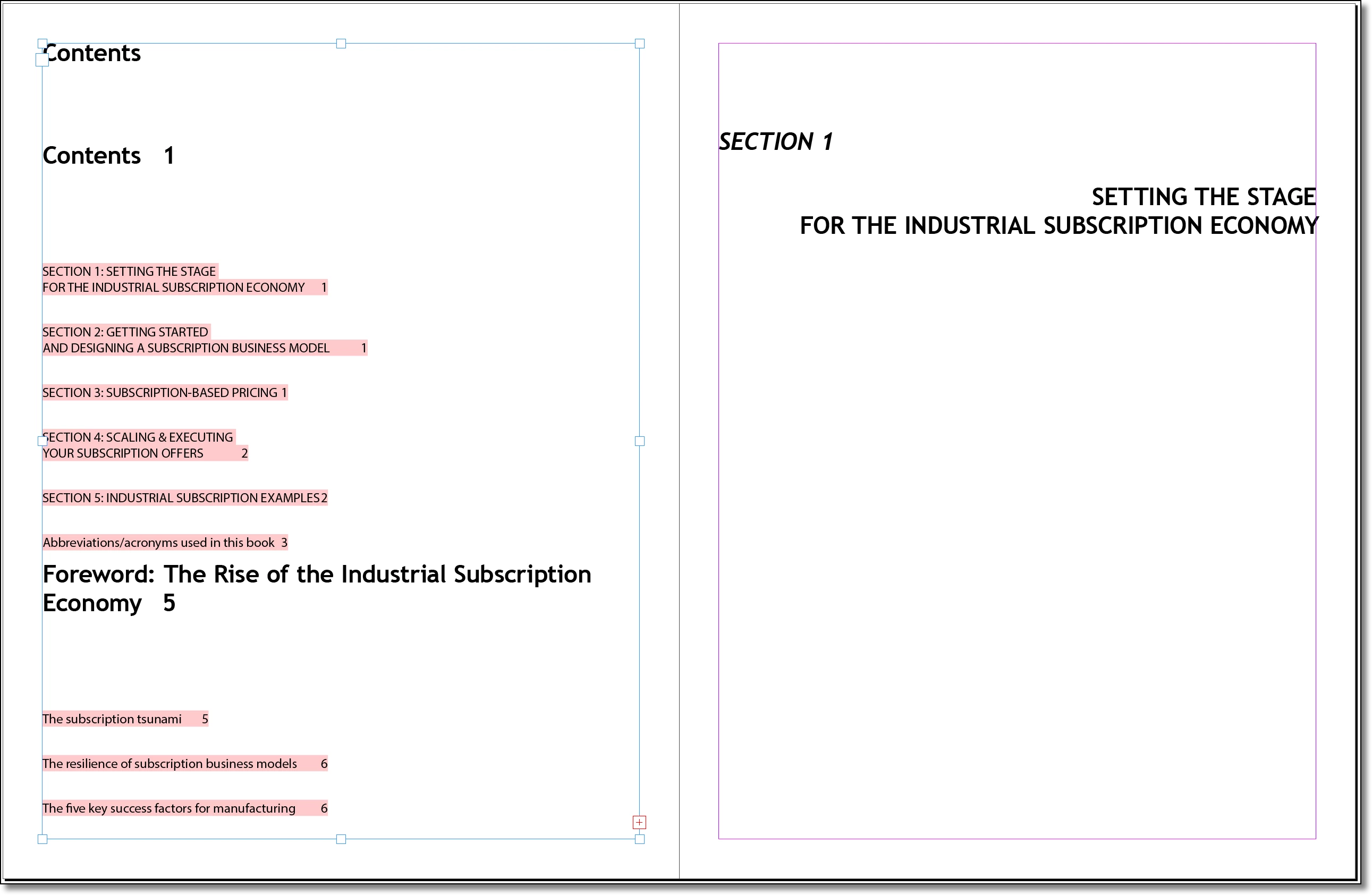
So, like you, I was also unable to generate the TOC for no apparent reason. I then selected the entire threaded story and pasted it into a new file and it worked just fine (see left side of spread, below). This leads me to believe there is some sort of corruption in the file.


Here is a link on how to approach a damaged document: https://helpx.adobe.com/indesign/kb/troubleshoot-file-issues.html.


But worst case is you can fairly quickly rebuild the document using the same cut and paste method I did. If you are going to continue working with the file in the future, it will be worth the effort. If this is the final time it will be printed, you may find it quicker to just type up the TOC manually. 


~Barb


6 replies

Barb Binder
Community Expert
Community Expert
December 18, 2021

Hi Dick:


We are always happy to help. 


~Barb

~Barb at Rocky Mountain Training
Barb Binder
Community Expert
Barb BinderCommunity ExpertCorrect answer
Community Expert
December 18, 2021

Hi Dick:


My apologies, it was in my spam folder.


So, like you, I was also unable to generate the TOC for no apparent reason. I then selected the entire threaded story and pasted it into a new file and it worked just fine (see left side of spread, below). This leads me to believe there is some sort of corruption in the file.


Here is a link on how to approach a damaged document: https://helpx.adobe.com/indesign/kb/troubleshoot-file-issues.html.


But worst case is you can fairly quickly rebuild the document using the same cut and paste method I did. If you are going to continue working with the file in the future, it will be worth the effort. If this is the final time it will be printed, you may find it quicker to just type up the TOC manually. 


~Barb


~Barb at Rocky Mountain Training
Known Participant
December 18, 2021

Thank you, and I'm sorry for the tardy acknowledgment. I have been away from my computer since yesterday afternoon. Thanks for your investigation. Other than whatever correx come back from the proofreader, I'm done with this book, and I already created the TOC manually. But when I start the next book for this client, I'll build it from scratch to avoid importing the corruption from this file. Usually I can work this kind of stuff out on my own. This one had me stumped though. Have a happy holiday season.

Barb Binder
Community Expert
Community Expert
December 17, 2021

Sounds good! If it doesn't, the offer still stands. 


~Barb

~Barb at Rocky Mountain Training
Known Participant
December 17, 2021

Sadly, it didn't. Reinstall was successful. TOC is still hosed. I saved as an INDD. Same deal. But now I'm coming around to your way of thinking that it's the document, because I did find a document where TOC worked properly. So now it's just this one client's documents, which used to work fine. So I'm going to send you the INDD version, naked (not packaged) and let you have at it. I don't see a private message function here. How do I send you the file privately?

Barb Binder
Community Expert
Community Expert
December 17, 2021

You can click my name, above my posts, and use the Message button. Or you can email me offline at barb [at] rockymountaintraining.com. 


~Barb

~Barb at Rocky Mountain Training
Barb Binder
Community Expert
Community Expert
December 17, 2021

Are you willing to share the file @Dick Margulis you used for the screenshots? Corruption is always possible but sometimes it's just something little. If so, you can put a link to it here (public), or message me directly (private). You don't need to include fonts or images.


~Barb

~Barb at Rocky Mountain Training
Known Participant
December 17, 2021

Thanks for the offer. The problem is not with this document; it's with the software. However, I was able to chat with support and get a fresh download, which is in the process of installing now. That should solve the problem.

Peter Spier
Community Expert
Community Expert
December 17, 2021

I sure hope they gave you the last update, 8.1.0.420 or you're going to have a lot of other issues...

Willi Adelberger
Community Expert
Community Expert
December 17, 2021
  1. You should not make the headline style of the toc itself as entry style.
  2. Look, if some glyphs or spaces cause a toc creation. I had this week the issue that a dash in the paragraph style name stopped it. Maybe that another glyph is also stopping it. (This is a bug and I have reported it.)
Joel Cherney
Community Expert
Community Expert
December 17, 2021

Is it just this single document that creates an empty TOC? If so, try exporting that document to IDML and re-opening it, to see if you can clear out whatever corruption is preventing TOC generation.


Or can you not make a TOC in any document? If so, I'd suggest that you try a reset on your InDesign prefs.

Known Participant
December 17, 2021

Thanks for your suggestions, Joel. As I indicated in the query, I had already confirmed that the problem is across all documents. I had forgotten the key sequence for resetting prefs. So I just tried that (thanks for the link) and succeeded in trashing my prefs but did not solve the TOC problem. No change whatsoever. But this gives me an idea. If I knew where that module is buried in the installation hierarchy, I could restore it from backup. So if anyone has an idea about that, let me know.

Randy Hagan
Community Expert
Community Expert
December 17, 2021

If you have a solid system backup that will hopefully get you back to the baseline. Cloned drives with complete system backups are worth their weight in gold in these situations. Just be sure to search your system for data files created since your last backup and save them externally before you go back to your previous baseline. That will keep recovery issues down to the absolute minimum.


If you're "lucky" and that was a random corruption of the program, you will hopefully never see that issue again. You can chalk that up to computer karma. But if you're not quite so lucky, and the backup bears the seed of the eventual corruption that caused you issue, ruder cures may be called for.


The only way I know for "resetting" program modules if resetting preferences doesn't work is to uninstall/reinstall the program. And then, if that doesn't work for the program, to do the CCCleaner/reinstall for the annual version of Creative Cloud that's causing your problem.