


Toolkit Fonts

Copy link to clipboard
Copied
Hi, I started using Adobe fonts from my Toolkit which works fine. However when I open my file each time, it says these fonts cannot be found on my computer and I have to sync each time. How do I get them on to my computer? Also, as this file will eventually be sent to the printer who requires me to send the fonts with the file, how does that work if they stay stuck in the cloud? Many thanks


 23
Replies
23
23
Replies
23




Copy link to clipboard
Copied
In the CC app you can open the Font section and administer the fonts and activate them on your computer.
You cannot send those fonts to the printer, as if he has InDesign in the same version as you have, those fonts can be activated in the very same way as you have described above in your question.
But, you should not send the printer any open INDD file as it can cause damage to your design due to different settings (like user dictionary settings). The printer has to give you all technical information to create a PDF. Send him the PDF according to his requirement, this will include all fonts.
Take care that no font is outlined!
Copy link to clipboard
Copied
The last time I used this printer I sent him the fonts, the ID file and a PDF and the images separately. I have asked them again anyhow. BUT the part i don't understand is how to get the "CC app". Is that an Apple app or what? Did that not install with ID CC? Where do I check or find it? thanks

Copy link to clipboard
Copied
The Creative Cloud desktop app is installed in the Mac menu bar or the Windows task bar when you install the Creative Cloud:
Copy link to clipboard
Copied
OK, so it is what I have already been using then. So how do the fonts get to my computer, I see no option there to do that as suggested. All the fonts are green ticked as "active", but my ID CC file only has the fonts working when I am signed in to the Adobe cloud. So I am back to my original question, how do we get the fonts to our local hard drive so we don't have to work on the ID file in the cloud?

Copy link to clipboard
Copied
So I am back to my original question, how do we get the fonts to our local hard drive so we don't have to work on the ID file in the cloud?
You can’t. The Adobe Fonts are licensed by subscription and you can‘t share them. Your printer would have to have a CC subscription and activate the fonts via their subscription in order to output your file directly from InDesign. If the printer doesn’t have a CC subscription, your only option will be to provide a PDF with the fonts embedded, which the Adobe Font (Typekit) license does allow.
Copy link to clipboard
Copied
so we don't have to work on the ID file in the cloud?
As long as you stay logged into your CC account the fonts should be available from ID until you decide to unsync them. You shouldn’t have to resync every time you open the document from your local drive. Click the blue circle in the upper right corner of the CC app to log in or out.
Depending on your subscription there may be a limit on the number of fonts you can sync.
Copy link to clipboard
Copied
OK thanks, so I can't work on my local applications and correctly use the Adobe fonts, until I am logged in to the cloud. That is all I need to know thanks. Makes it a bit harder to use ID CC as I am not always able to be logged in to use it.
However, I have just done the following:
1. Ensured that I am logged into the the "ID app";
2. Checked that all the fonts are ative and checked green;
3. Opened my ID file, and it still says in a creative cloud dialog box as I open the file:
a: Typekit is On (ticked in green)
b: The document uses fonts that are CURRENTLY UNAVAILABLE ON YOUR COMPUTER!! But you say I can't have them on my computer!
c: And I have to Sync Fonts each time I ope the file, to active them.
So this is still the current issue.
Why?
thanks again
Copy link to clipboard
Copied
OK thanks, so I can't work on my local applications and correctly use the Adobe fonts, until I am logged in to the cloud. That is all I need to know thanks. Makes it a bit harder to use ID CC as I am not always able to be logged in to use it.
You have to be logged into your CC account via the desktop CC app, but you don’t need an internet connection to use the CC applications and fonts—just checked that here to be sure. If you are going to be working without an internet connection, just make sure you don’t log out of your Creative Cloud app before disconnecting.
You only need an internet connection once a month to confirm your subscription.
Copy link to clipboard
Copied
Also, when there’s no internet connection the Finder menu’s CC icon will be grayed out. So here you can see I have disconnected from the internet, but I am running InDesign with the Typekit fonts available. I don‘t have an internet connection, but I’m also not logged out of my Adobe account.

Copy link to clipboard
Copied
Thanks for that, shall try to use with internet like this next time I have to.
However I still have the issue of always having to sync Toolkit fonts each time I open my ID file:
3. Opened my ID file, and it still says in a creative cloud dialog box as I open the file:
a: Typekit is On (ticked in green)
b: The document uses fonts that are CURRENTLY UNAVAILABLE ON YOUR COMPUTER!! But you say I can't have them on my computer!
c: And I have to Sync Fonts each time I open the file, to active them.
Why do I have to do this if my ID App is open and everything is activated?
Copy link to clipboard
Copied
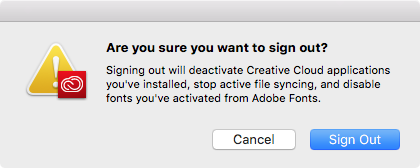
Just to clarify, you are not logging or signing out of your adobe account right? When you do the Adobe fonts get disabled.
Copy link to clipboard
Copied
I am logged in to the Adobe ID App, which shows me as logged in, with Toolkit activated, and all fonts ticked green. Even connected to the internet. But when opening my ID file it always requires me to sync the fonts from the Toolkit to make them active.
Copy link to clipboard
Copied
Is it just one document or does it happen with all docs? You could try trashing your cache and prefs.
Copy link to clipboard
Copied
Below is screen shot

Copy link to clipboard
Copied
When opening the file it changes the fonts to below [in brackets meaning it can't find the font]: BUT does this for all the additional Adobe Toolkit fonts.
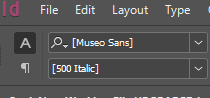
Then after snyc, all that is there to choose after syncing now is 300 and 700 for Museo ROUNDED (previously Mueo Sans not rounded 500 was there to pick and is what I use in my document - but also now vanished):
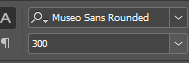
Saved and closed and opened the file again, and they all disappear again requiring yet another (inaccurate) sync, as even the sync is not 100% correct!
Copy link to clipboard
Copied
According to my online account, I have ALL the Museo Sans active, yet in my ID, I see NONE of them even after syncing!

Copy link to clipboard
Copied
Now my Museo Sans seems to have vanished for eternity, and I cannot get it back at all. Tried de-activating and reactivating, makes no difference. The other fonts are working fine.
Copy link to clipboard
Copied
Opened a new file, it also cannot get the Museo Sans fonts despite the fact they are in the Toolkit and logged in.
Copy link to clipboard
Copied
Talk about crazy. I now tried "one by one" to de-activate and reactive the fonts - now it works, I can get my fonts back. But if you do that at the top of the family tree it does NOT work to do that!
Copy link to clipboard
Copied
Cleared the cache, de-activated and reactivated, restarted the computer, and the same problem keeps happening. It is actually worse now, as the Mueso Sans no longer syncs while the other fonts seem to still sync at least. Have lost an important font I was using in the full document.
Copy link to clipboard
Copied
darylGlobal wrote
Cleared the cache, de-activated and reactivated, restarted the computer, and the same problem keeps happening. It is actually worse now, as the Mueso Sans no longer syncs while the other fonts seem to still sync at least. Have lost an important font I was using in the full document.
While you have an internet connection, did you try logging out then logging back in via the CC desktop app (not via the CC web account page)?
Copy link to clipboard
Copied
BUT the part i don't understand is how to get the "CC app". Is that an Apple app or what?
On OSX the CC app should show in your Finder menu bar, it can be used to install and update Adobe Applications and manage Typekit fonts (now called Adobe Fonts). If the CC icon is not showing in your menu bar, look for the Adobe Creative Cloud folder in your Applications folder and launch the CC app.
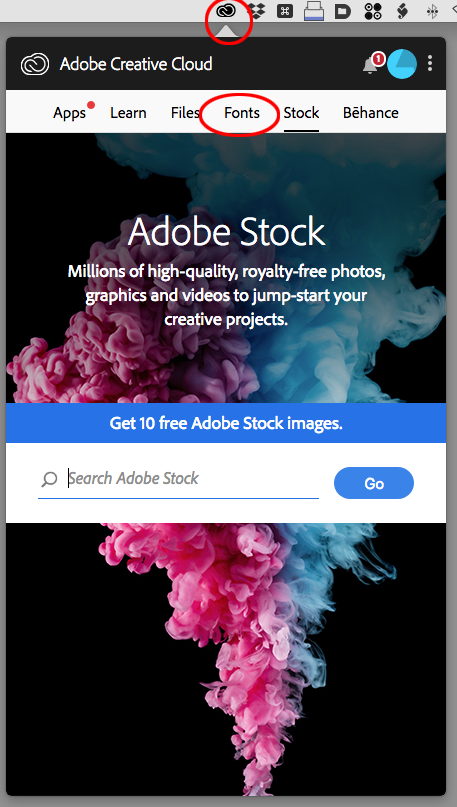
Access the CC Prefs from the ellipses in the upper right corner
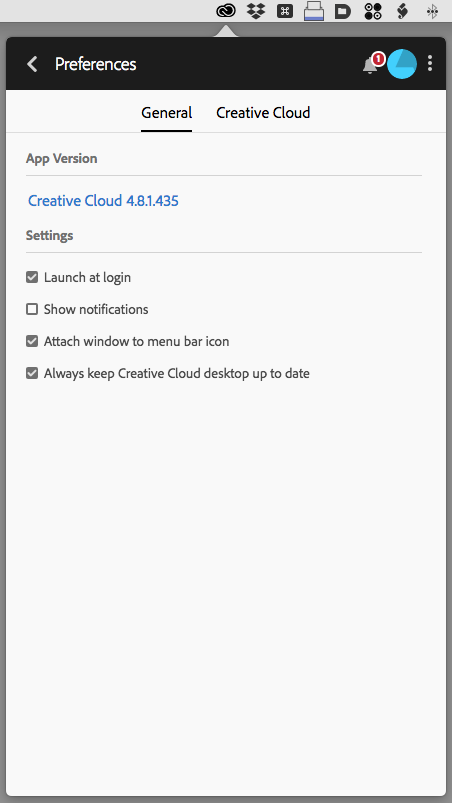
Your printer would need the CC version of InDesign to output directly from InDesign. If you can deliver a PDF for output they won’t need the fonts because they will be embedded in the PDF. Use the PDF/X-4 preset.

Copy link to clipboard
Copied
One more item...
You don't need to use Adobe Fonts in your designs.
You can purchase fonts the traditional way from any vendor and permanently install and use them on your computer, regardless of whether you're connected to the internet or using other non-Adobe software.
There also are open source fonts available, too. (Don't confuse them with OpenType: open source means royalty free and you can embed them into your PDFs for print, PDFs for web, graphics, EPUBs, and other digital media. Some good vendors are:
- https://fonts.google.com/
- https://www.theleagueofmoveabletype.com/
- https://www.fontsquirrel.com/
- https://fontlibrary.org/
Learn more about open source fonts at https://creativepro.com/open-source-fonts/ and How to find and install open source fonts | Opensource.com


Get ready! An upgraded Adobe Community experience is coming in January.
Learn more
 AdChoices