


Copy link to clipboard
Copied
Hello Everyone,
I have a situation where i need to vertically shift all the elements on the page relative to their current location. this would be Up or down based on the current situation. Currently the manual way to complete this part of the task would be to cmd+A > shift+cmd+m > tab > *input the distance manually*. I know scripting should be able to help me out but im not sure where in the indesign scripting i can call the following box, and plug that variable distance in (see screenshot below). I have found a way to acheive the desired result, but its slightly messy and makes for me to "reverse shift" all my graphics back down since they get moved twice by just calling "allPageItems". I was hoping the experts here had some ideas as how to do this without the need for reversing the original shift.
**Quick Edit**
This only has to be done across the current page or spread, i am aware that you cannot select everything in the whole document for manipulation.
***
Here is what i have so far that works, but requires a reverse movement to rest the graphics in their bounding boxes:
var cover = app.activeDocument;
var test = cover.allPageItems;
var myGraphics = cover.allGraphics;
var position = [0, -1.375]; // this is where the Y axis would change with the user input
var reset = [0, 1.375]; //this is the reverse of this number
var trim = cover.documentPreferences.pageHeight;
var units = app.scriptPreferences.measurementUnit = MeasurementUnits.INCHES;
checkHeight(trim);
function globalShift () {
for (i=0; i<test.length; i++)
{
test.move(undefined,position);
}
for (k=0; k<myGraphics.length; k++)
{
myGraphics
}
}
Here is my desired panel to interact with:
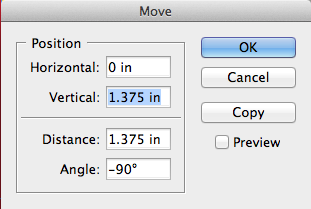
Thank you in advance for all replies!


 1 Correct answer

Just change the cover.allPageItems to cover.pageItems and keep the rest of your code the same.

 7
Replies
7
7
Replies
7


Copy link to clipboard
Copied
have a look at the "AdjustLayout" script that comes by default with indesign (in the scripts pallete, samples, or something like that)
Copy link to clipboard
Copied
could also try just cover.pageItems instead of allPageItems.
Copy link to clipboard
Copied
so something like cover.pageItems.move()?
Copy link to clipboard
Copied
Just change the cover.allPageItems to cover.pageItems and keep the rest of your code the same.
Copy link to clipboard
Copied
excellant, thank you for the help, it does exactly what i wanted without the need for a reverse movement.
Copy link to clipboard
Copied
No problem! Glad it worked for you.

Copy link to clipboard
Copied
I am in a totally similar situation, and finding the correct syntax has been a daunting task.
I have tried testing your code on my end, but I am receiving an error with "checkHeight(trim);".
Is this syntax still relevant 10 years later in InDesign 2023, or have you modified your script in some way over the last 10 years?
Thank you!


Get ready! An upgraded Adobe Community experience is coming in January.
Learn more
 AdChoices