
Participant
March 7, 2022
Answered

Transparent Background text for Youtube watermark

  • March 7, 2022
  • 3 replies
  • 1369 views

Hi - My podcast logo has white lettering with red inner/outer glow (on a black background). It is curved using type on a path.


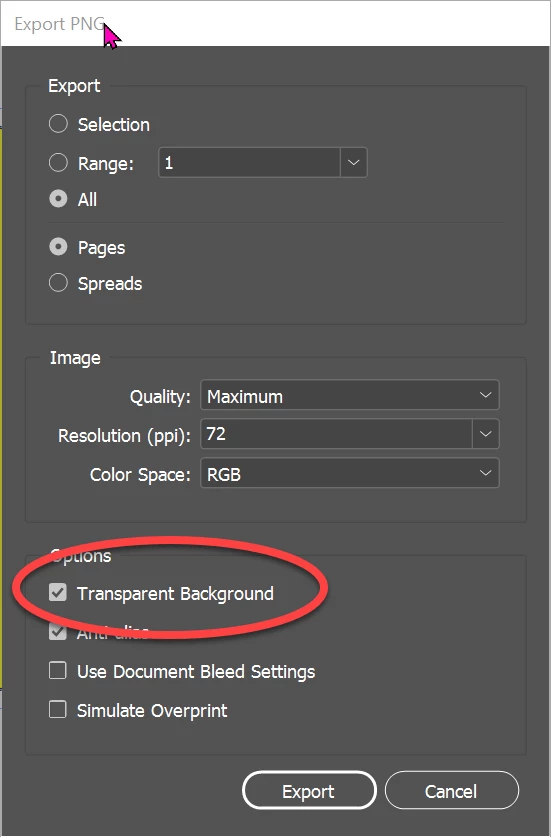
How do I create the logo with just the text on a transparent background? Right now it is showing up as a white background. (I researched in the forums and so made sure to save as a PNG, but that hasn't helped.)


I am a beginner, so please walk me slowly through the steps if you can.


Thank you!!
This topic has been closed for replies.
Correct answer Dave Creamer of IDEAS

Get rid of the background, export as PNG again, and make sure you click Transparent Background.


Then make sure you use Photoshop or Illustrator for video-oriented art in the future.


3 replies

Dave Creamer of IDEAS
Community Expert
Dave Creamer of IDEASCommunity ExpertCorrect answer
Community Expert
March 7, 2022

Get rid of the background, export as PNG again, and make sure you click Transparent Background.


Then make sure you use Photoshop or Illustrator for video-oriented art in the future.


David Creamer: Community Expert (ACI and ACE 1995-2023)
Participant
March 8, 2022

Thank you, David! That did it!


1. How do I resize (in either Photoshop or InDesign) without changing the text? I can't figure out how to crop with a transparent background without resizing the text.

2. Can you help me understand why photoshop/illustrator are better for video? (In this case it's just a fixed logo on a youtube clip that my podcast recording platform inserts automatically.)


Thanks again!

Dave Creamer of IDEAS
Community Expert
Community Expert
March 8, 2022

1. I would need to see the design to understand exactly what you are asking. I'm not sure if you want to resize or crop--those are two different things. Assuming the art is built in separate pieces in InDesign, select everything except the text, group them, and resize holding down Cntl-Shift keys (Cmd-Shift on Mac) while dragging the corner of the bounding box. 

2. Video is pixel based. Both PS and AI have special presets just for video. PS is 99% pixel oriented; AI is 99% a vector program but can output as PNG. AI is better for logo-type art than InDesign. ID would be the last program of the three I would have picked. You might find that AI is closer to ID in it's basic usage. 

David Creamer: Community Expert (ACI and ACE 1995-2023)
Willi Adelberger
Community Expert
Community Expert
March 7, 2022

Save as PDF/X-4. Use that in After Effects or Premiere Pro.

BobLevine
Community Expert
Community Expert
March 7, 2022
What does this have to do with InDesign?
Participant
March 7, 2022

Thanks for your help, Bob. I am creating the logo using InDesign.