
Participating Frequently
May 8, 2018
Answered

Trapping InDesign

  • May 8, 2018
  • 3 replies
  • 2017 views

Hi chaps,

I'm wondering if anyone can help me.

I'm wanting to trap 2 colours to one another, however I can't seem to do it

I've followed this guys instructions 0504 Trapping Color.mov - YouTube  but I can't seem to preview or export and see the trapping.

When ever I export the PDF, no trap is visible,

Can someone help?!

Best,

Dan
This topic has been closed for replies.
Correct answer rob day

If i apply my trapping presets in InDesign, how do i know if I have applied enough trapping, as it doesnt show the trapping in InDesign?

The printer should be setting the trap sizes. It doesn't really matter what your InDesign preset is set to if you are not outputting the press separations. If you send an exported PDF, the trapping will be set by the printer in the separations either via AcrobatPro's built-in trapping or their RIP's trapping software.

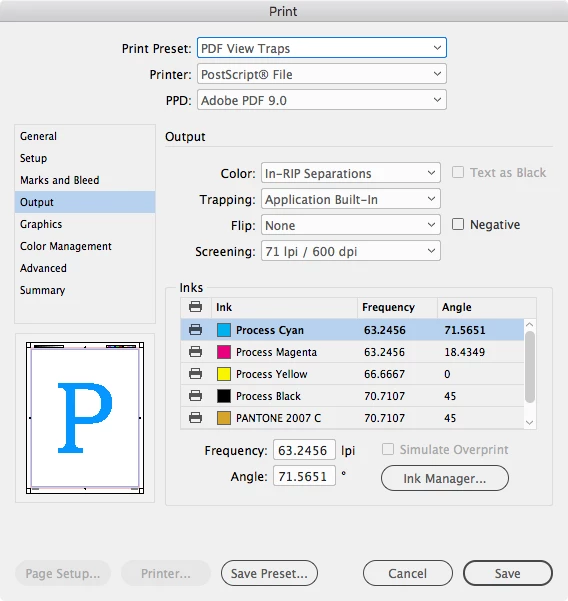
You really don't want to send the printer a printed PDF with traps applied—but to print and distill an In-RIP separation you'll need the Adobe PDF 9.0 PPD installed

3 replies

Community Expert
May 8, 2018

The video addresses how to create a trap preset, and does not show the next part of the process.

- Which is printing postscript (instead of exporting to PDF)

- Selecting the correct print options (Output > Color: In RIP Separations + Trapping: Application Built-In

- and then using Acrobat Distiller to create a composite PDF that has viewable trapping.

madebydanAuthor
Participating Frequently
May 8, 2018

Cheers Jeff. I've tried to do this but my 'Color' Dropdown is greyed out? Any ideas?

Best,

Dan

rob day
Community Expert
Community Expert
May 8, 2018

This is In-Rip Sep output with ID's defaults:

rob day
Community Expert
Community Expert
May 8, 2018

When ever I export the PDF, no trap is visible,

The document's Trapping Preset only has an affect when you Print separations—traps can't be built into the document itself. So an exported PDF has no traps, but can be trapped when printing separations from AcrobatPro—InDesign and Acrobat have the same built-in trapping.

Because trapping is a print function it is possible to Print a PDF with traps via Print>Output>Color>In-Rip Separations, but you really wouldn't want to do that because an exported PDF can be easily trapped at final output.

madebydanAuthor
Participating Frequently
May 8, 2018

Thanks Rob.

If i apply my trapping presets in InDesign, how do i know if I have applied enough trapping, as it doesnt show the trapping in InDesign?

Community Expert
May 8, 2018

.003 inch trap width is Indesign's default and the industry's standard

BobLevine
Community Expert
Community Expert
May 8, 2018

Trapping is the printer’s job. It’s not something you should even be thinking about.

madebydanAuthor
Participating Frequently
May 8, 2018

Thanks Bob.

So when I send my PDF to them they should do all the trapping for me?