WillDog85
Known Participant
July 12, 2022
Answered

Trouble converting in design file to ePub

  • July 12, 2022
  • 2 replies
  • 2869 views

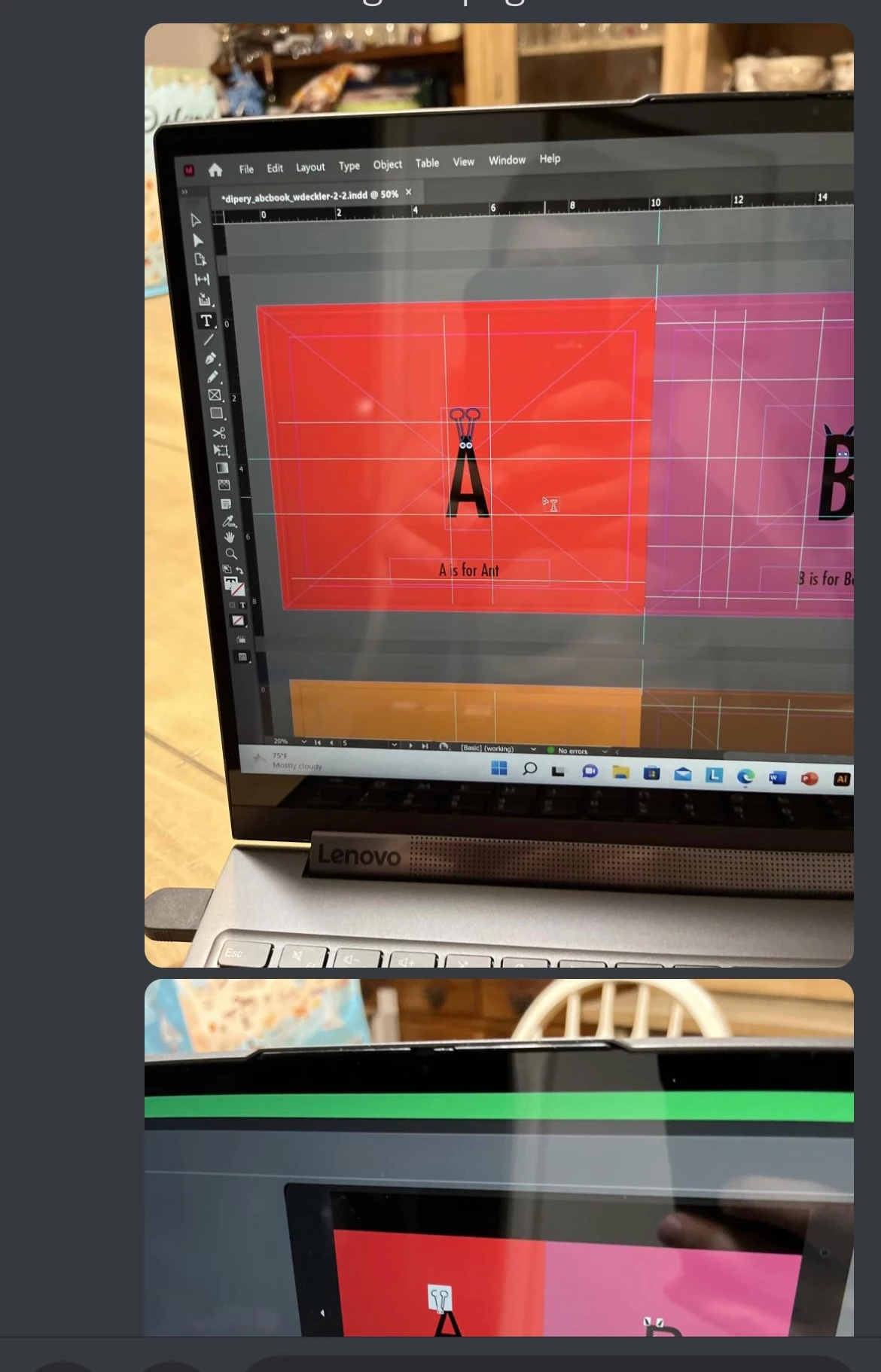
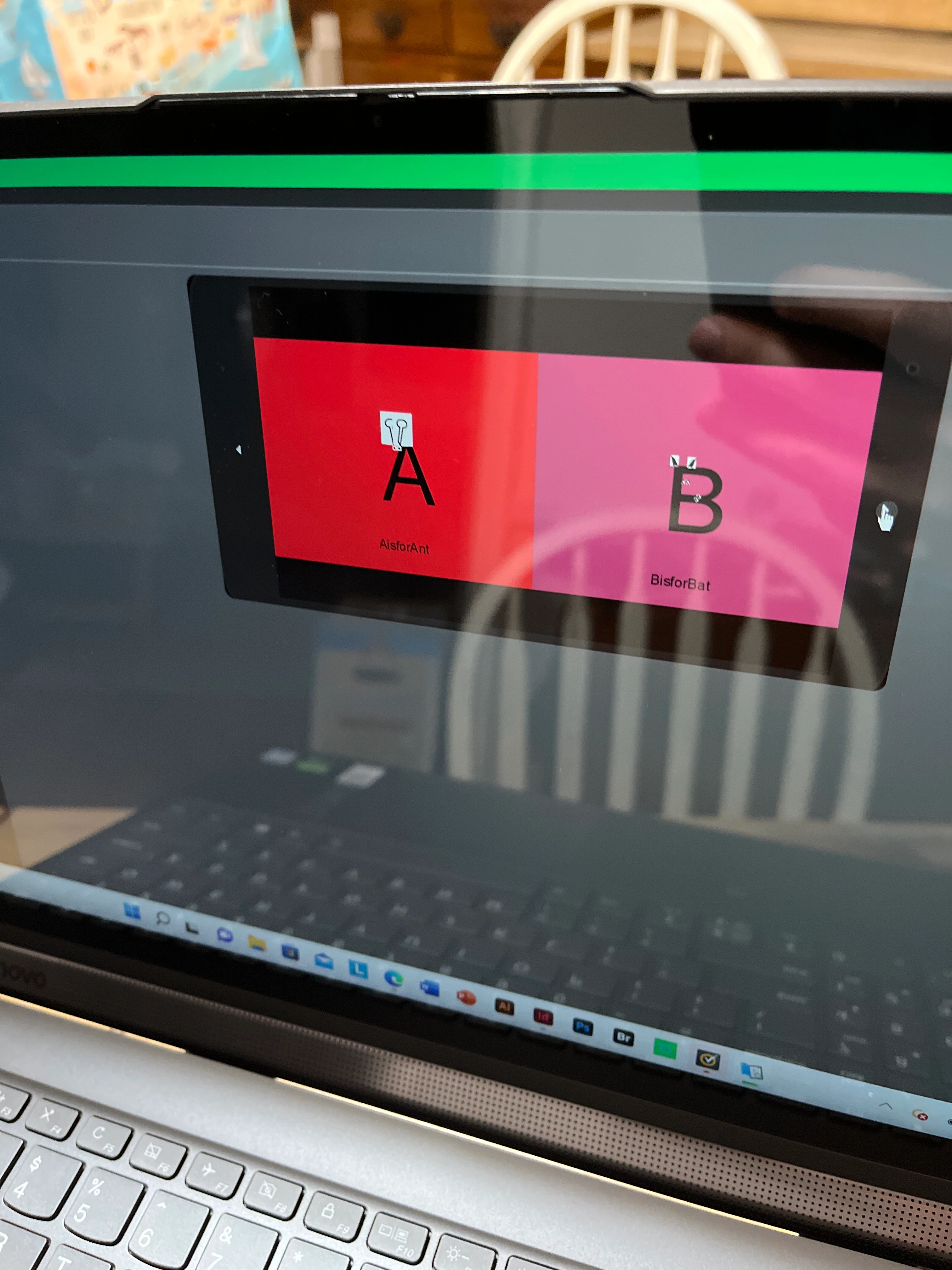
Been trying to convert My indesign file of my children’s book to ePub format but that happens why can any one please help me with this problem
This topic has been closed for replies.
Correct answer James Gifford—NitroPress

See ETA addendum above.


You can't "draw" in ID and have it export successfully to EPUB. Make the illustrations in Illustrator, or create them in a smaller page frame in ID, and export to JPEG. Then place them on ID pages for export.


2 replies

hammer0909
Community Expert
Community Expert
July 13, 2022

Only the fixed-layout EPUB format will maintain position and appearance as it appears in the InDesign document.

James Gifford—NitroPress
Legend
July 13, 2022

He is exporting to fixed-layout. But it won't solve the problems here. To start with, the little illustrations are dependent on a particular font, which is not exporting to the EPUB.


The short answer is that you can't do graphic drawings in ID and expect a reliable export to EPUB, even FXL. And even if enough skill and fussing and post-export work gets an acceptable result, it will change with every EPUB reader and every conversion to another file type, which is endemic in the e-book world.


EPUB is not PDF. Its ability to render "fixed" text pages is adequate, but once you start piling and positioning fonts, graphics and other little bits, it's going to come unraveled. Exactly as it has here.


The correct approach is to make those little illustrations images, by exporting part of the ID pages to JPEG or PNG, then placing those images on ID pages and exporting to EPUB. That will give as "reliable" a result as EPUB can.


WillDog85
WillDog85Author
Known Participant
July 30, 2022

Kindle is uneven about supporting background page color and tends to maintain its viewer margin no matter what you do. I am not sure there is any way to get an "edge to edge" image in Kindle; I know many people who want a full screen photo or other image have tried and failed.


I would make sure the actual page background is a colored rectangle, and not use only the PNG background. The PNG should be only the little illustration on a transparent background, laid in a frame over the full, background color rectangle.


I think that's as close as anything can get to a full color page under Kindle.


Could I just extend the page size and background color to fit the device and should I have a file for both Portrait and landscape

James Gifford—NitroPress
Legend
July 12, 2022

I assume you mean the change of the A and B from narrow block font to the more ordinary sans-serif font?


Fonts in EPUB are a headache and trying to do anything but let readers use their default fonts requires leaping through some hoops. It is difficult to export to fixed-page EPUB (FXL) with embedded/specified fonts.


Are you using defined styles for those letters? Or are they spot-formatted? What font are you using? Is it licensed for export to EPUB?


If you want or need specific letter images for "illustration" purposes, it may be best to convert them to images, either JPEG or AI to outlines to SVG. Make each of the letters part of the illustration, not text.


The more complex method would be to use CSS to control the export more precisely.


ETA: EPUB, even fixed-layout, is not a "print" format. For print or PDF, you can use any method or elements to "draw a page" and have it come out looking exactly like your layout. EPUB is a fluid format and has to be constructed and structured to let readers display the content according to their own rules. I don't think there's any approach of trying to use ID design (combining text, fonts, graphic elements and other artwork) that will let you do these little illustrations. You will have to create the illustrations and then place them in an ID layout.


WillDog85
WillDog85Author
Known Participant
July 12, 2022

No I am trying to not have the images move to random parts of the page

James Gifford—NitroPress
Legend
July 12, 2022

See ETA addendum above.


You can't "draw" in ID and have it export successfully to EPUB. Make the illustrations in Illustrator, or create them in a smaller page frame in ID, and export to JPEG. Then place them on ID pages for export.
