
trying to place Excel spreadsheet as inline graphic
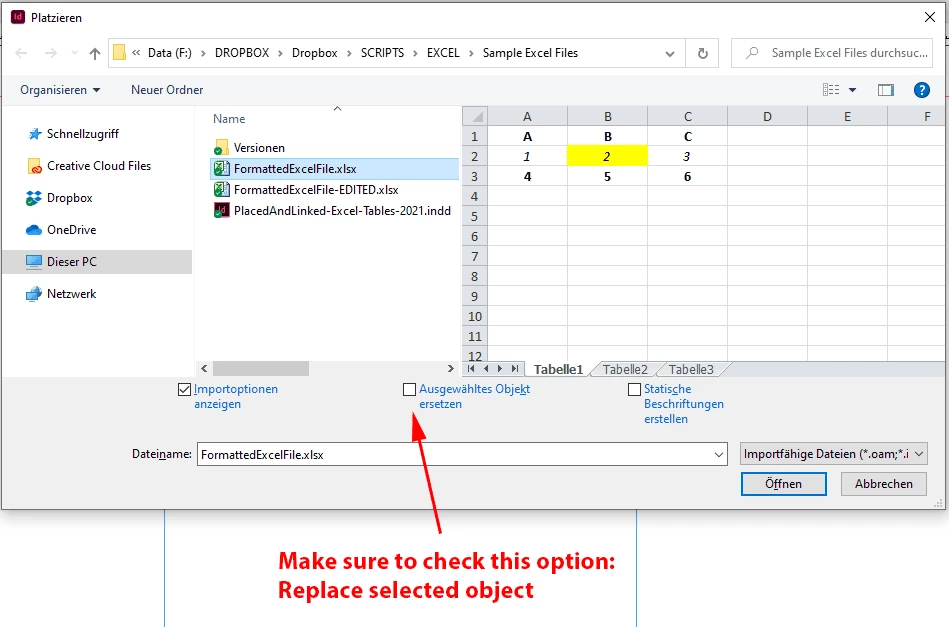
I created a document in Indesign and placed (Ctrl + D) Excel spreadsheets in the text inline. Now I have the document open and am trying to use the same steps I used before to place some more Excel spreadsheets and Indesign is placing them in a separate box and not inline with my text like before. I am following the same steps. Using the Type Tool, I place my cursor where I want the spreadsheet to be. Type Ctrl +D. The Place dialog box opens. I select my file and Show Import Options. The Excel Import Options dialog box opens. I put in my cells and make sure it says Formatted Table then click OK. Instead of the spreadsheet pasting into my text, it is in a separate box from the text. Previously, I got a warning message about it taking longer to import a formatted table but I'm not getting that anymore.
I went back and tried to place some previous spreadsheets and now they don't work either. Did I change a setting accidentally? Help! I need to get these spreadsheets in this document ASAP and I can't figure out why it's not working the way it was!
Thanks!!
 AdChoices