
Participant
November 5, 2018
Answered

Trying to resize cells in a table

  • November 5, 2018
  • 1 reply
  • 1023 views

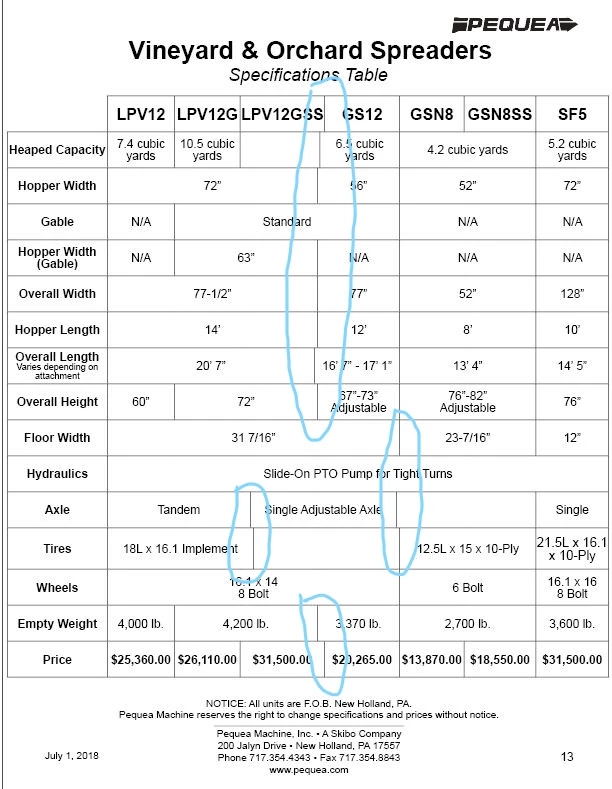
I have a large table with lots of data and I want the cells to be more symmetrical, but as the screenshot shows, a lot of the cells are of by a bit and I can't figure out houw to line them up correctly so it looks like they all line up vertically. Obviously I know how to change the size of the cells, I can go to the table options and change it or use a shift+drag on one of the cell lines so I can make it thinner or wider. I can't find anywhere on how to make it look more organized and I could use the help rather quickly.
This topic has been closed for replies.
Correct answer Laubender

Hi craigw200 ,

start with a new table with 8 columns and 16 rows.

Then duplicate all contents from your old table cell by cell to the new one.

Do not select cells to duplicate the contents, instead select the contents of the cells.

After that decide what cells will be merged in the new table.

Regards,
Uwe

1 reply

LaubenderCommunity ExpertCorrect answer
Community Expert
November 5, 2018

Hi craigw200 ,

start with a new table with 8 columns and 16 rows.

Then duplicate all contents from your old table cell by cell to the new one.

Do not select cells to duplicate the contents, instead select the contents of the cells.

After that decide what cells will be merged in the new table.

Regards,
Uwe

dave c courtemanche
Inspiring
November 6, 2018

Turn your old table into text & tabs for easier replacement in new table (as suggested by Uwe)