
orib7317974
Known Participant
July 20, 2023
Question

Two identical scripts, only one of them giving (weird) error

  • July 20, 2023
  • 2 replies
  • 327 views

I have been experiencing some very weird behavior.


While working on a script, I started experiencing what felt to me like inconsistent results that weren't consistent with the most up-tp-date state of the code. Sometimes something that didn't make sense happened, other times, when running the same script on the same document, the same thing didn't happen.


For example, the script checks for some logical errors in the document. If it finds any, it indicates its position by adding a red rectangle around it and sets some flag to true. Later an alert triggered by that flag is shown to the use. There are only 4 or 5 places in the code where those red rectangles are being added, and each one of them is followed immediately by setting that flag to true. I verified several times I didn't miss any call to the function that adds a red rectangle. Yet, sometimes the script would add red rectangles but not show any alert.


I got the feeling there was some caching mechanizm or something similar, as if it wasn't the most up-to-date, full version of the code that was always running.


So I decided to see what what would happen if I ran the same script under a new name. And then it got really weird:


The second copy, which was identical to the first one (I had just duplicated the file), gave this weird error:
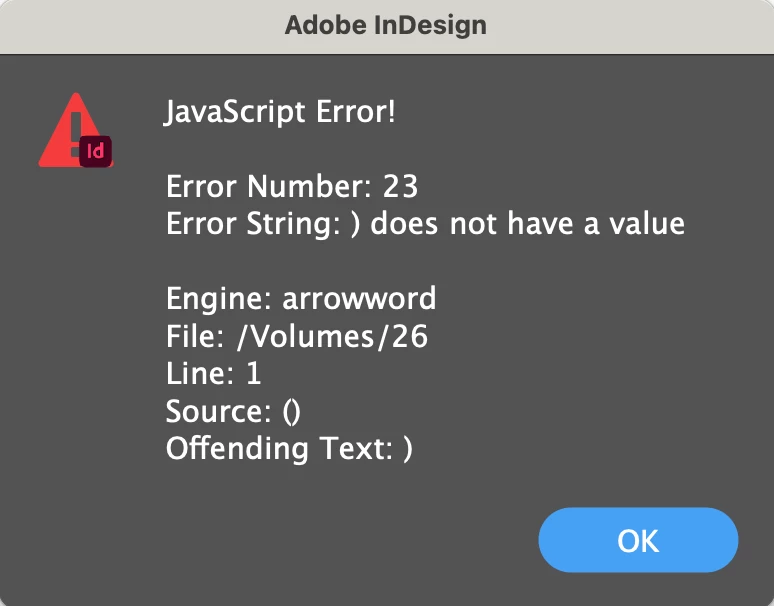


I have no idea what it's talking about.


By now I have tried several different copies of the same script, some of them give this error and some don't.


I use InDesign 2023 on macOS Ventura.


I would appreciate any help, thanks!

This topic has been closed for replies.

2 replies

Community Expert
July 20, 2023

The error message points that the script is being run in a persistent engine. Could that be a problem with some state persisting. Let's start with the question as to why do you need the persistent engine? 

-Manan

-Manan
orib7317974
Known Participant
July 20, 2023

It's true that there had been a #targetengine declaration, but one of the first things I tried was removing it, that didn't help.

m1b
Community Expert
Community Expert
July 20, 2023

Hi @orib7317974, it is definitely possible that outdated versions of functions are being used. This happens when you refactor your code so that a function is moved to a more limited scope, but the old function still resides in the wider scope and is still executed. If you think this may be happening, just quit Indesign and VSCode and start them again.

- Mark

orib7317974
Known Participant
July 20, 2023

Hi @m1b, thank you for this input! Unfortunately, restarting InDesing and VSCode didn't help. I even tried restarting the whole computer, but that too didn't change anything. Any ideas?

m1b
Community Expert
Community Expert
July 20, 2023

Okay, so now are you reliably getting the error message

) does not have a value

?


You're right the message isn't helpful—I mean "/Volumes/26" is a strange path. Anyway it sort of looks more like an error in an included file. Try turning off some includes and see if you can pinpoint the error line. Do you use the ExtendScript Debugger in VSCode? Try putting a debugger; line at the start of your script file and step through until you find the error.

- Mark