
Participant
October 2, 2017
Answered

Two types of footnotes

  • October 2, 2017
  • 2 replies
  • 4584 views

Good Morning.

I need help with footnotes.

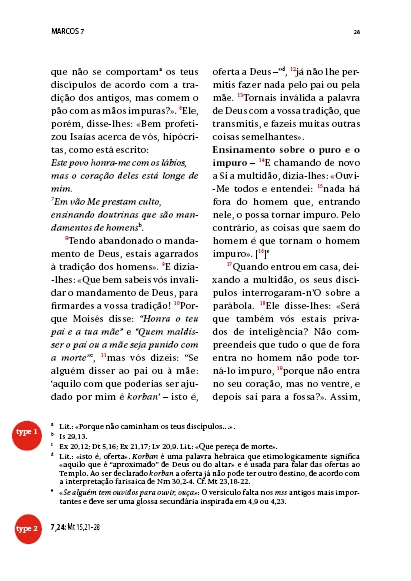
I have a job that requires the use of two types of notes. One type corresponds to traditional footnotes and a second type where other references are placed but independent of the first type.

Is there any way to create a second continuous note system as the first type?

I put a picture to illustrate what I want.

Thank you
This topic has been closed for replies.
Correct answer Barb Binder

The only way I can see to accomplish this is tediously, via cross-references. InDesign currently only supports one type of footnote in document.

2 replies

Obi-wan Kenobi
Legend
October 20, 2017

Hi,

The screenshot is absolutely not clear for me! …

Could you post a best readable one with 2 pages? Thanks!

(^:)

Barb Binder
Community Expert
Barb BinderCommunity ExpertCorrect answer
Community Expert
October 2, 2017

The only way I can see to accomplish this is tediously, via cross-references. InDesign currently only supports one type of footnote in document.

~Barb at Rocky Mountain Training
LiturgiaAuthor
Participant
October 19, 2017

will the new version of InDesign CC 2018 have the tool I'm looking to solve the problem of a second set of notes on the same page?

amaarora
Inspiring
October 20, 2017

Hadn't realised that you can thread an endnote story to a new frame. So you can indeed masquerade endnotes as footnotes by running them as a separate story in frames at the foot of the pages. That's how we did footnotes before InDesign had them, pre-CS. So using endnotes or cross-referenced auto-numbered paragraphs comes down to the same thing.

P.


Exactly!

https://forums.adobe.com/people/Peter+Kahrel  wrote

So using endnotes or cross-referenced auto-numbered paragraphs comes down to the same thing.

P.

Not really. Endnote as a feature overcomes many shortcomings of using cross-references as endnotes: few of them being... maintaining correct chronological order of endnotes, two-way navigation, scope change ability, and functions provided by "Document endnote options"

-Aman