
Participant
October 2, 2017
Answered

Two types of footnotes

  • October 2, 2017
  • 2 replies
  • 4584 views

Good Morning.

I need help with footnotes.

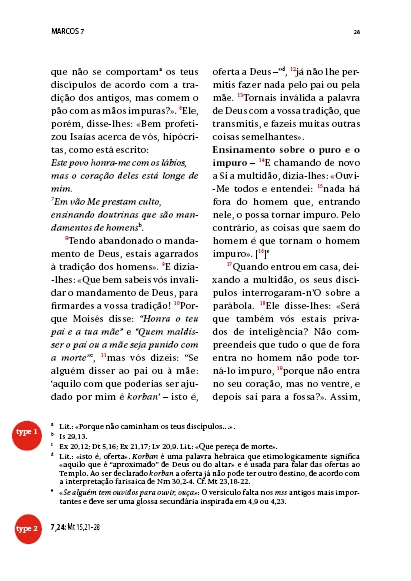
I have a job that requires the use of two types of notes. One type corresponds to traditional footnotes and a second type where other references are placed but independent of the first type.

Is there any way to create a second continuous note system as the first type?

I put a picture to illustrate what I want.

Thank you
This topic has been closed for replies.
Correct answer Barb Binder

The only way I can see to accomplish this is tediously, via cross-references. InDesign currently only supports one type of footnote in document.

2 replies

Obi-wan Kenobi
Legend
October 20, 2017

Hi,

The screenshot is absolutely not clear for me! …

Could you post a best readable one with 2 pages? Thanks!

(^:)

Barb Binder
Community Expert
Barb BinderCommunity ExpertCorrect answer
Community Expert
October 2, 2017

The only way I can see to accomplish this is tediously, via cross-references. InDesign currently only supports one type of footnote in document.

~Barb at Rocky Mountain Training
LiturgiaAuthor
Participant
October 19, 2017

will the new version of InDesign CC 2018 have the tool I'm looking to solve the problem of a second set of notes on the same page?

amaarora
Inspiring
October 21, 2017

> and cases where the reference goes missing

Yes, cross-references can be feeble and fragile.

> With cross references consider cases like: wherein the endnote number "2" comes before "1" in source text.

Not sure how you would accomplish that. I've never seen cross-references behave like that.

> When comparing endnotes vs cross references as endnotes. The ease with which text acting as endnotes can be formatted and ability to easily set prefix/suffixes for endnote markers.

This is ironic. I've put in requests (many moons ago) for the ability to add pre- and suffixes in character styles, exactly as you can in footnote and endnote references and/or numbers, and in text variables. But Adobe never imagined that that might be useful. Good old WordPerfect had that ability, and it was widely used -- understandibly, because it's a very useful feature. Anyway, your comment here shows that it is a useful feature genrally!

Peter


Hi,

Adding a request here Adobe InDesign Feedback  can be helpful

-Aman