
Participating Frequently
April 12, 2024
Answered

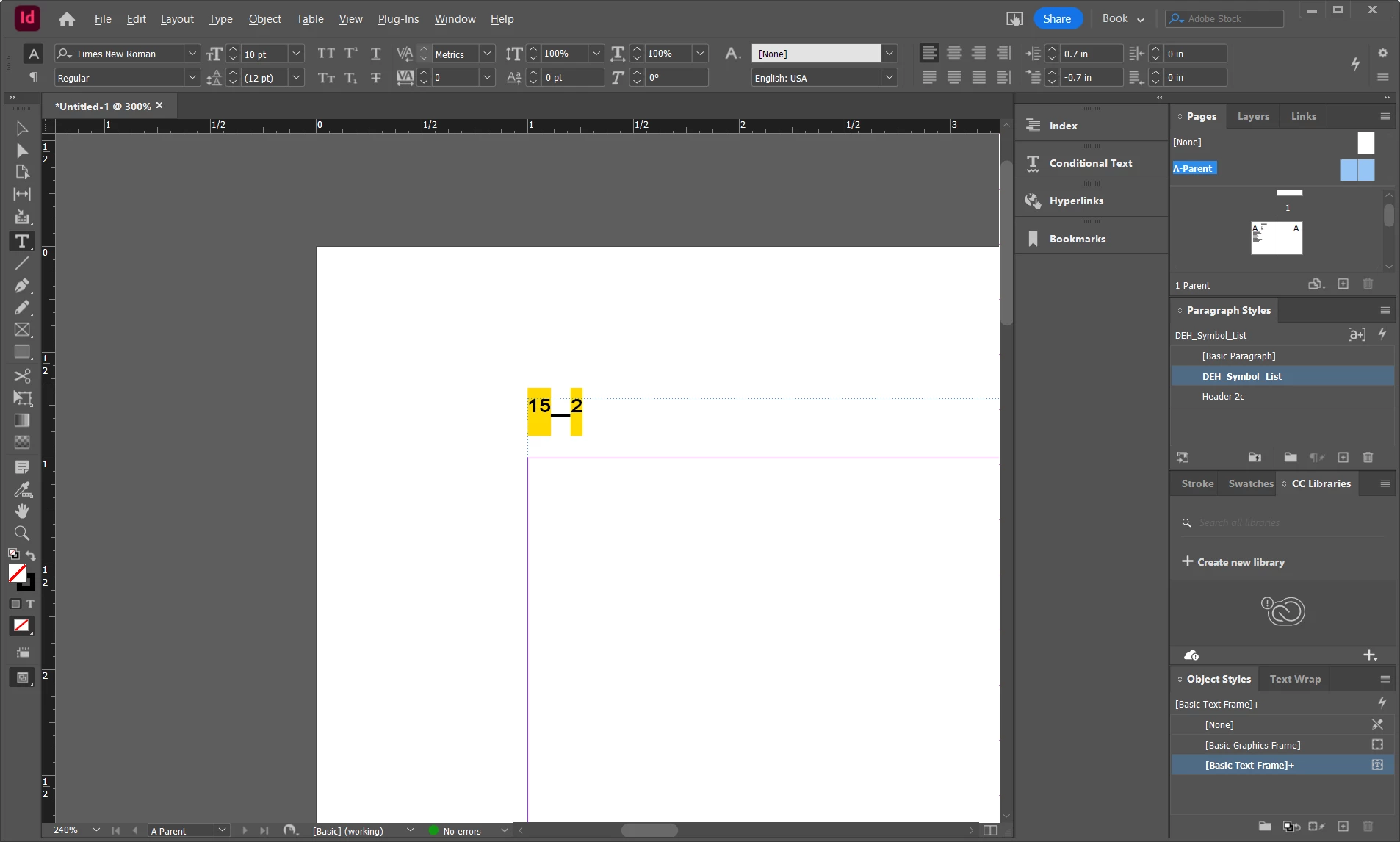
type a hyphen but get an underscore

  • April 12, 2024
  • 1 reply
  • 1248 views

Windows 10.  New InDesign user. Doing something wrong.

I am trying to get "15 - 2". If I use the keyboard key, I get 15_2, regardless whether I hold the shift key or not. If I try inserting em dash or en dash I still get 15_2. Tried in Arial font, Times New Roman and Calibri., all with same problem. 

The 15 and the 2 are hi-lited in yellow. Perhaps a clue. Tried kerning, characters moved, but the yellow hi-lite remained.

First happened when inserting page number. I've deleted the text box and started over just typing 15-2 without having the page number automatically inserted. Also tried em dash and en dash again. No change.


This topic has been closed for replies.
Correct answer Robert at ID-Tasker

Thanks for the help. It is font independent. Through trial and error (and recall) I see I have configured numbers for fractions as a document setting. So if after the 15 I type /32 I get a very nice fraction of 15/32 where the 32 fills in the lower half of the fraction. So the 15 is reduced in size and elevated to make room for the denominator of the fraction. Unexpectedly, this is applied to any number, typed in any frame throughout the document.

Now my problem is finding that setting and unchecking it. I don't see it in document settings. I think it was somewhere that handles glyph replacement.


quote

[...]

Now my problem is finding that setting and unchecking it. I don't see it in document settings. I think it was somewhere that handles glyph replacement.


By @Raymond26965993n8ct


Check GREP styles and Nested Styles in the [Basic Paragraph] style.


It's possible, that you somehow managed to change definition of [No Paragraph Style] - but this one you won't be able to edit from the UI...


1 reply

Participating Frequently
April 12, 2024

More poking around. Turns out the hyphen is not the problem. The problem is the numbers are acting like superscripts or something. Any numbers I type anywhere, in any text frame, with this paragraph style or others, look like they are superscripts. This is clearly self inflicted. Trying to change this with the superscript or subscript options using the tool sabove the ruler has no effect. I've been through the paragraph settings a few times now, can't find anything related to number settings. 

Robert at ID-Tasker
Legend
April 12, 2024

The yellow background is yours?


What CharStyle is applied? What do you have in OpenType Features options in the ParaStyle?

GREP Styles? Drop Caps and NestedStyles?


James Gifford—NitroPress
Legend
April 12, 2024

All this, and I'd wonder about the font you're using. Does this all stop if you switch to a vanilla font like Minion?


Does it happen in all docs, including new ones? Or just this one? If the latter, the doc is probably corrupted.


This wouldn't happen to be a.... template, would it?