
Type>Find Font...
Hello. I've been having a problem with "Find Font" for a few months.
Previously, if there was an errant font that had escaped formatting via Paragraph or Character Styles, I could find it via "Find Font" and in a single click, replace every instance of that font.
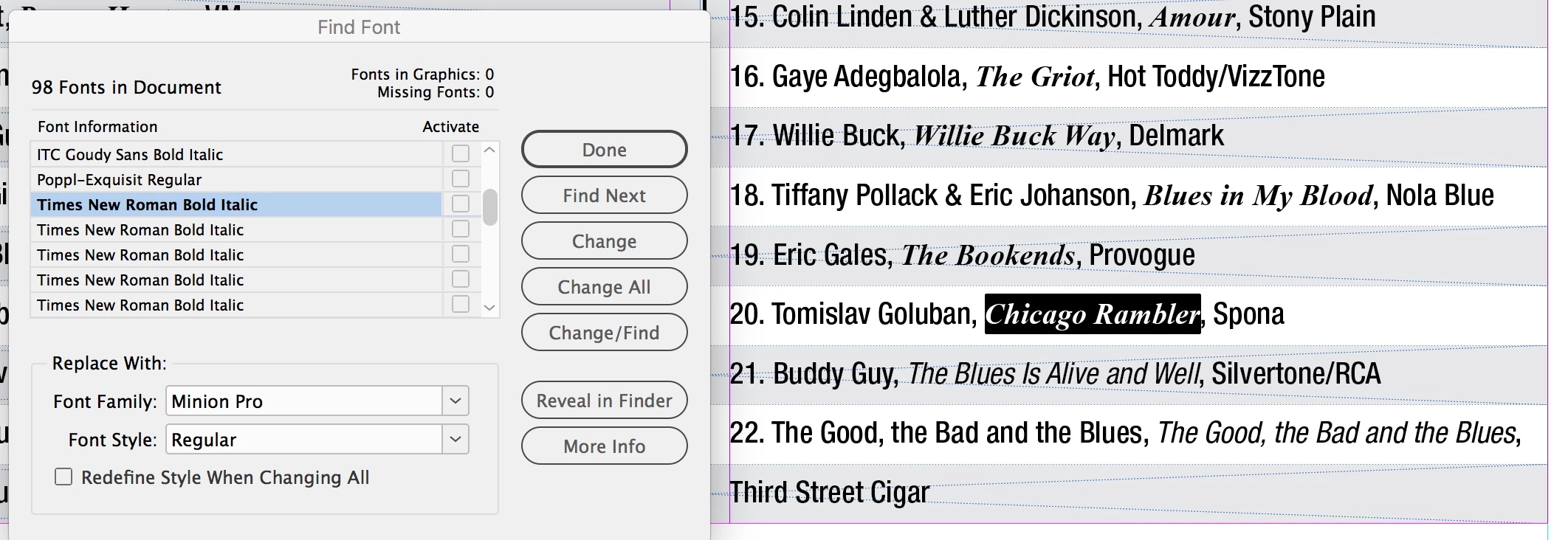
What I've noticed lately, however, is that every instance of that errant font now has an individual entry in the "Find Font" dialog box.
I select one instance in the list, and click to "Find First," and ID goes to that section of text. When I click to "Change/Find" or "Change All," ID will make the requested changed to the currently selected text and then behave as if there are no other instances, even though clearly there are TONS of them.
So, now, for example... if I have a word (or group of words altogether) in Times New Roman Bold Italic and I need it to be Helvetica Medium Condensed Italic, I have to select every entry in the "Find Font" dialog box, click to "find" it, change it, and then go to the next line in the "Find Font" box, again and again... ad nauseam.
I don't know exactly when this happened... the magazine I'm working on is bi-monthly, and I know it was an annoying problem last issue, and maybe the issue before. At the moment, I am about to throw my laptop across the room.
I've included a screen shot of the issue. Thank you in advance for any insight you can give on why this is happening.
Susan
addendum: "Find Font" works as expected when the font is not available in my system. When the font is available, the problem occurs.
arrrgggghhhhh: When I did a Find/Replace for the font that was not available on my system, it did not change the spaces between words, instead changing it to a font that was available to my system, while changing the actual characters to the font I had requested. Never mind... this is an actual problem coming from the person who created the file.
 AdChoices