
Participant
December 30, 2020
Question

Typeface appears uniform in digital but is different weights when printed

  • December 30, 2020
  • 3 replies
  • 1278 views

Relative newbie to InDesign here; thanks for your assistance. I've got a simple InDesign document that I've converted to PDF. When viewed in ID and in the PDF, the typeface looks perfectly uniform throughout. Yet when I print the document, some sections of the text are heavier than other sections:
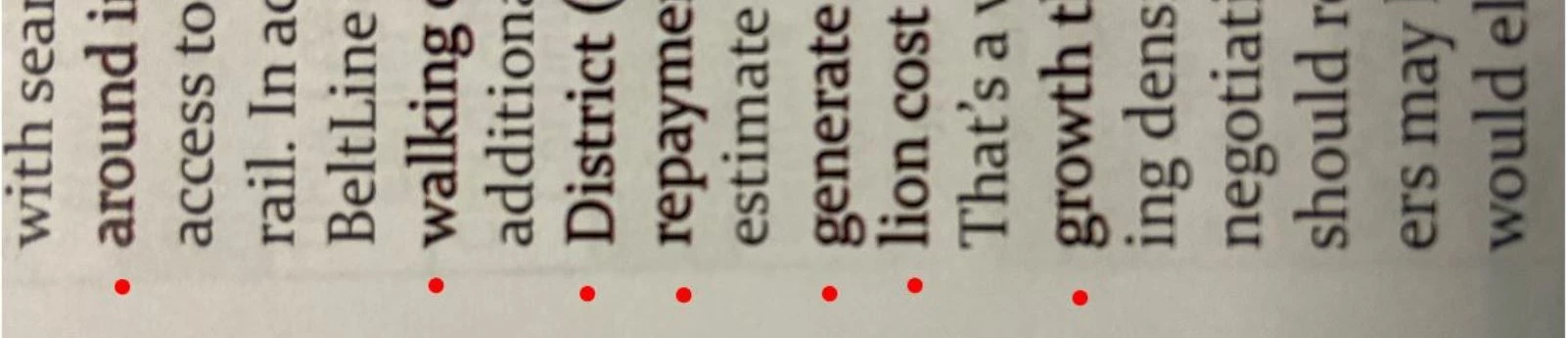
(I turned it sideways to emphasize the weight; red dots indicate lines that are heavier.) I checked every variable I know of but so far the only thing changing from line to line is the kerning - everythng else appears to be exactly the same (color is uniformly black, 13pt font, all Constantina regular).  Any ideas why this might happen? Thank you!  

This topic has been closed for replies.

3 replies

rob day
Community Expert
Community Expert
December 31, 2020

Are you sure the text fill is all the same black—0|0|0|100 CMYK is a different black than 0|0|0 RGB? The heavier weight black looks like it is printing as a 4-colors—there seems to be a magenta fringe on the edges of the text. Is there any transparency on the spread?

LL Tool JAuthor
Participant
January 19, 2021

Hey all - apologes for the delay in replying back info on my own post!  And thanks for the questions. I actually saved it as a High Quality Print format, in Adobe 9.0 version and higher, and the different font weights went away.  No clue what caused it but once I saved it for 9.0 and above, the issue went away. Never look back... 🙂  Thanks again.


LL 

Dave Creamer of IDEAS
Community Expert
Community Expert
December 30, 2020

Check to see if you have any glyph scaling applied:

David Creamer: Community Expert (ACI and ACE 1995-2023)
Typothalamus
Known Participant
March 2, 2022

David, may I ask, what amount of glyph scaling would need to be applied in order to (potentially) run into this issue? My understanding was that a range of 1–2% either way (that's 2–4% total) would be safe for body text. Is that in error, or any caveats? Kind thanks.

rob day
Community Expert
Community Expert
March 2, 2022

Hi @Typothalamus , Glyph Scaling only changes the horizontal scaling of the text and would not affect its weight.


Text that is filled with 0|0|0|100 CMYK black vs. a rich black or an RGB converted black, e.g. 85|75|60|100, would affect the printed weight.

Steve Werner
Community Expert
Community Expert
December 30, 2020

Can you post the PDF file on Creative Cloud or Dropbox or some other service so others can download and test? (You can't upload a PDF file in our forum.)