
Inspiring
July 4, 2025
Answered

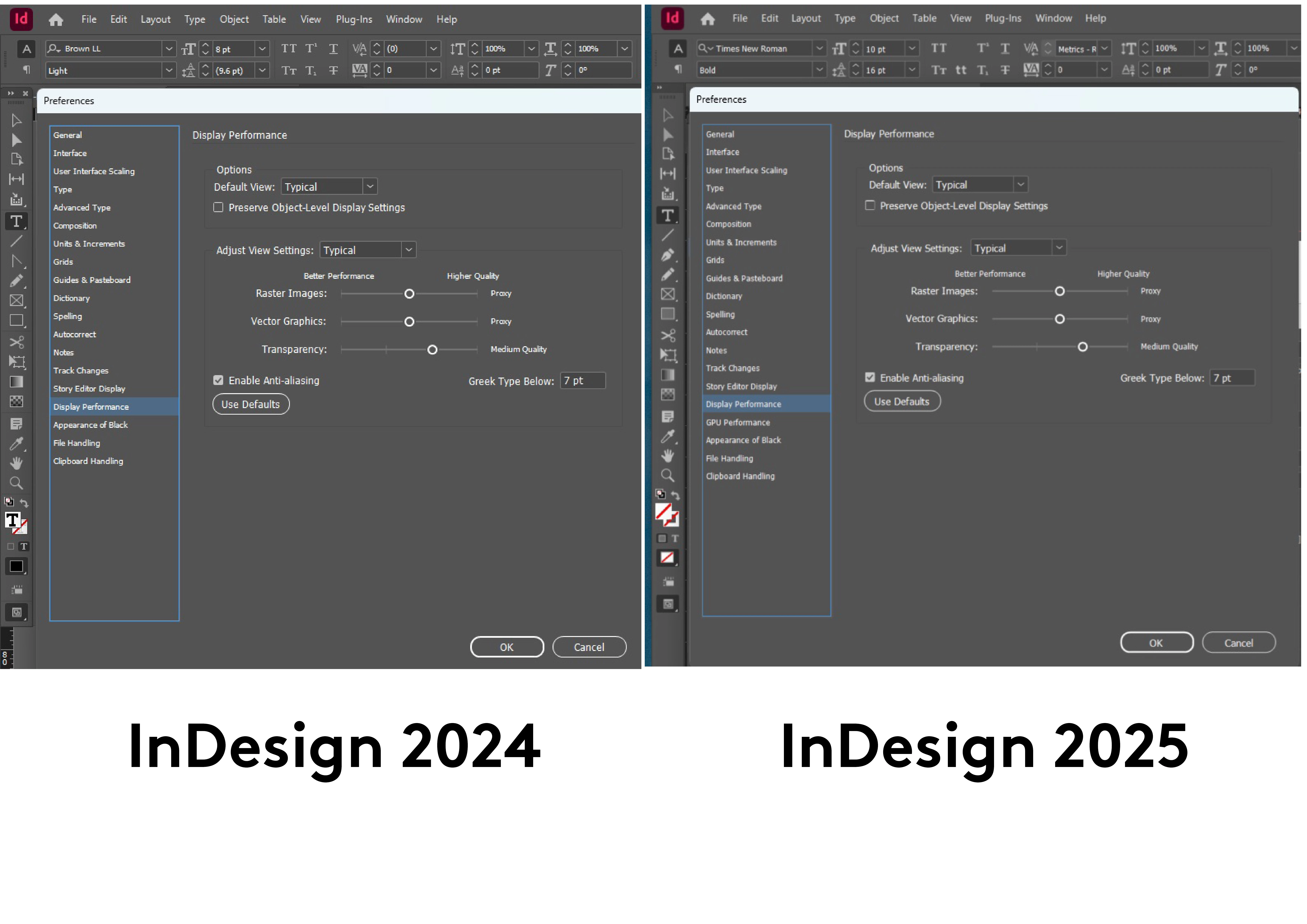
UI in InDesign 2025 Looks Blurry Compared to 2024

  • July 4, 2025
  • 3 replies
  • 1100 views
Hello! I tried the 2025 version earlier in the year but found it unstable at the time and have been stubbornly using 2024 since. I've recently inherited a document from someone externally and since it was created in the new version I figured I'd work on it in that. But I am finding the ENTIRE user interface noticeably fuzzy compared to 2024. I've looked through all the settings and have everything inside the software set up identically (I think.) Comparitive screenshots attached below, same screen, same PC, both running at the same time in similar documents. Could anyone shed any light on this for me, or is 2025 just like this, with this antialiased effect throughout? My eyes are out on stalks. If I can't sharpen it up I'll probably just convert it and continue using 2024. Thanks so much! 


PS I am prepared to take some flak if I've missed something obvious!
 
 
<Title renamed by MOD>
Correct answer FiLiP

Hello and thanks you for the above responses. It was not a Windows setting, and as mentioned in my original post the UI settings within both versions of InDesign were identical. I uninstalled 2024, and 2025's interface subsequently sharpened up by itself so I have not had to try any of Abhishek's suggestions. I'm sorry if this is a somewhat unsatisfactory resolution, because we are no closer to discovering the cause, nevertheless the problem is resolved and I thank those of you that took the time to show an interest! Best wishes, FiL

3 replies

Abhishek Rao
Community Manager
Community Manager
July 4, 2025

Hi @FiLiP,


Thanks for sharing all these details. Please try the suggestions from the experts first to check your Windows display scaling and UI scaling inside InDesign. In addition to that, you can also try renaming the CEP and UXP folders to see if that helps fix the fuzzy interface issue.

To do this, rename the CEP folder to CEP.old from this location:
On Windows: C:\Program Files (x86)\Common Files\Adobe

If that does not help, also rename the UXP folder to UXP.old from these locations:
On Windows: C:\Program Files\Common Files\Adobe and C:\Program Files (x86)\Common Files\Adobe

After doing this, restart InDesign and check if the UI looks sharp again.

Please let me know how it goes.


Looking forward to your update!

Abhishek

FiLiPAuthorCorrect answer
Inspiring
August 20, 2025

Hello and thanks you for the above responses. It was not a Windows setting, and as mentioned in my original post the UI settings within both versions of InDesign were identical. I uninstalled 2024, and 2025's interface subsequently sharpened up by itself so I have not had to try any of Abhishek's suggestions. I'm sorry if this is a somewhat unsatisfactory resolution, because we are no closer to discovering the cause, nevertheless the problem is resolved and I thank those of you that took the time to show an interest! Best wishes, FiL

Community Expert
July 4, 2025

Any windows scaling applied?


Legend
July 4, 2025

Are you sure this is an ID thing? I have a normal Windows workstation with Intel graphics chips running on Full HD and never had such a problem in any past version of ID.

Sure, it could be related to UI scaling, but do you use UI scaling?