
ashimg23377171
Inspiring
July 19, 2019
Answered

unable to find and replace dollar sign indesign

  • July 19, 2019
  • 2 replies
  • 1697 views

Hi

I am working on a table where i wish to remove all the dollar signs.

I am doing the find and replace option, but it does not work.

what could i be missing here.

Screenprint below:
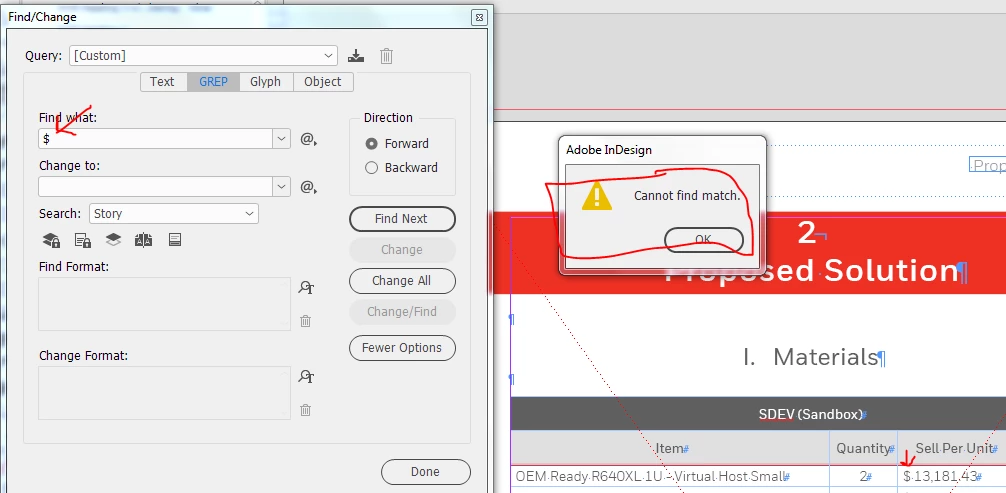
Any guidance would be appreciated.

    This topic has been closed for replies.
    Correct answer vladan saveljic

    I see grep search in your screenshot.

    The dollar sign in grep search means "End of Paragraph [location]".

    Use text search instead

    2 replies

    vladan saveljic
    vladan saveljicCorrect answer
    Inspiring
    July 19, 2019

    I see grep search in your screenshot.

    The dollar sign in grep search means "End of Paragraph [location]".

    Use text search instead

    ashimg23377171
    Inspiring
    July 19, 2019

    Yes, thanks so much. i guess i was a bit hasty.

    Thank you all

    Community Expert
    July 22, 2019

    Hi ashimg23377171 ,

    if you like to find a $ in the text with GREP just use the following pattern:

    \$

    You are "escaping" the Dollar sign with a back slash, so GREP is searching for a $ in the text.

    Alternatively you could also search for the unicode value of the $ that is 0024 with this pattern:

    \x{0024}

    Regards,
    Uwe

    Legend
    July 19, 2019

    $ means something special in GREP, but why not sure why you are using grep at all? Just an ordinary replace (TEXT) should do it.