
Participating Frequently
December 5, 2018
Answered

Unchecking Hyphenation still causes all subsequent text to be lost

  • December 5, 2018
  • 4 replies
  • 3122 views

I see this has NOT been resolved since 2014:

I lose words when i uncheck hyphenate

I want to have 2 paragraphs of text that simulates ancient Greek manuscripts.  NO hyphens and NO breaking at a syllable.  When they ran out of space in the papyrus roll they just continued the word, wherever the break was, on the next line.

I tried to turn off hyphenation for the one paragraph.  All text gone for the rest of the doc.  I tried setting up a new style with no hyphenation.  All text gone...

4 years, and InDesign has not fixed this problem.

I pay for a subscription and can't get support for a bug?  This is bs.

I will now start looking at Lulu and other vendors who don't require you to work with a POS program once I finish this book.

Short of typing each line individually, counting letters, and then hitting return (with single space) so I get the look I want, I see no other  solution.  Does any InDesign employee want to try to keep me in the camp?  And keep me from putting out to all academics I know NOT to self-publish with ad-Oh-be.
    Correct answer Laubender

    Hi gregorys84937500 ,

    try what samar1234 is suggesting.

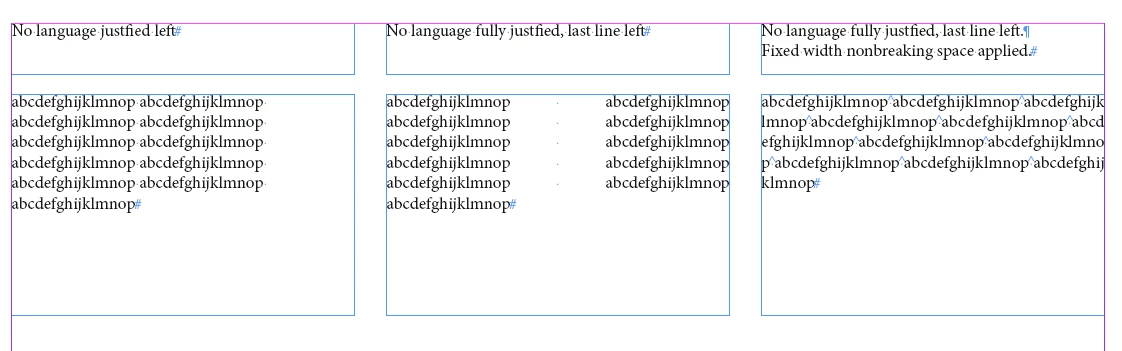
    You may substitute every blank with a FIXED_WIDTH_NONBREAKING_SPACE character to make it work:

    Regards,
    Uwe

    4 replies

    LaubenderCommunity ExpertCorrect answer
    Community Expert
    December 5, 2018

    Hi gregorys84937500 ,

    try what samar1234 is suggesting.

    You may substitute every blank with a FIXED_WIDTH_NONBREAKING_SPACE character to make it work:

    Regards,
    Uwe

    Andreas Jansson
    Inspiring
    December 5, 2018

    Acutally trying the answer from samar1234 and following your excellent screensshots Uwe... make me realize I'd like to erase my previous answer!

    : )

    Seems to work fine!

    Andreas Jansson
    Inspiring
    December 5, 2018

    > All text gone for the rest of the doc.  I tried setting up a new style with no hyphenation.  All text gone...

    I guess it's not gone, it's just overflowing, right?

    That paragraph, perhaps it contains words that doesn't fit on one line? Or does it use non-breaking spaces instead of normal spaces? Either way, the text needs more space when hyphenation is not allowed, and overflowing is the way that InDesign (and I believe all other DTP software) handles this situation. Words can not be broken up unless hyphenation is on.

    If I had this (very uncommon) problem, and I need to do it many times, or on a large mass of text, I'd write a script that puts line breaks at the right places.

    Sam A.
    Inspiring
    December 5, 2018

    Try this under Paragraph Style Options:

    – Basic Character Formats: make sure No Break is NOT selected

    – Advanced Character Formats -> Language: [No Language]

    Participant
    October 13, 2020

    Thanks, this solved my issue!

    Participating Frequently
    December 5, 2018

    Can you modify the font to turn the hyphen into a space?