Participating Frequently
September 17, 2024
Answered

Understanding InDesign's First Baseline Offset: Is Ascent Actually Aligned to the Em Square?

  • September 17, 2024
  • 5 replies
  • 3587 views

In Text Frame Options, Baseline Options there's an option to align the First Baseline Offset to a selection of Ascent, Cap Height, x-height, etc.


Left at the default (Ascent), swapping through typefaces it's clear the offset doesn't align to the ascent. As I understand it, it's meant to be the lowercase 'd'. Though I haven't seen an explanation as to why it doesn't align.


It makes me wonder if it instead is aligned to the top of the Em square defined in the design of the typeface. Would anyone have any confirmation or evidence of this?


<Title renamed by MOD>

Correct answer Peter Kahrel

" it's meant to be the lowercase 'd'. "

No. Ascent is the designed distance from the baseline to the top of any potential glyphs (accents, etc). Yes, in the old days, ascents were based on the tallest ascender (and any accented glyphs were placed above this line). Nowadays, the ascent is much larger to enclose these glyphs, and have become even bigger as fonts are getting more glyph support; they increase the ascent to accomoodate the new glyphs above the ascenders. Open source fonts are especially bad at this as they keep "tinkering" with the offsets, so the, say, Open Sans you used 2 years ago can be quite different than the one you can download today. This is troublesome for InDesign documents composed based on Ascent if they are opened by somoen using differently designed fonts.

Baselines are also all over the map due to the design of the font, so yes, in the traditional EM square sense, a font with larger descenders will have a higher baseline relative to a font with shorter descenders.


Nowadays, the ascent is much larger to enclose these glyphs, and have become even bigger as fonts are getting more glyph support; they increase the ascent to accomoodate the new glyphs above the ascenders.


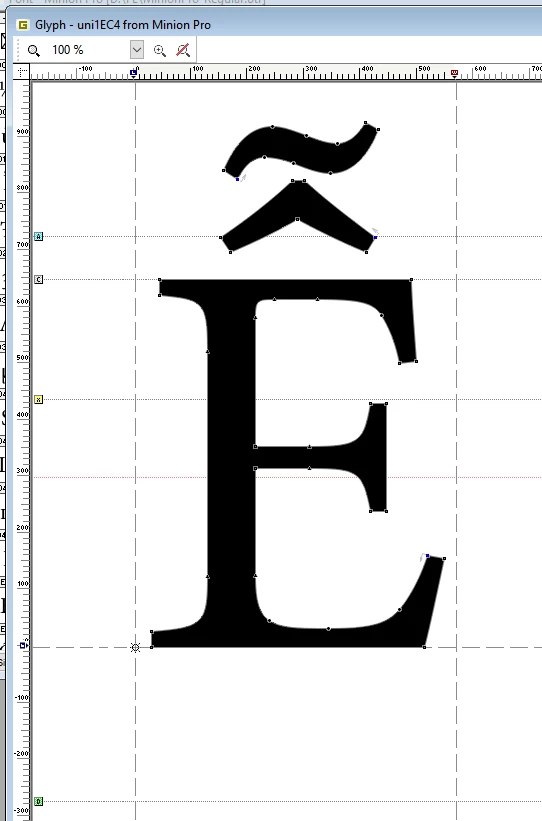
Not exactly. In most fonts (that I have seen) some diacritics, especially complex ones, are above the font's ascender value:
 

5 replies

rob day
Community Expert
Community Expert
September 18, 2024

Hi @Ciaran25473599uu11 , Also, you can see that the ascender line is determined by the font’s designer (not InDesign), by comparing different versions of the same named font.


Here is the cloud activated Adobe Type version of Roboto compared to the Google freeware version, which I have installed in my user Fonts folder. The AdobeType version sets the Ascender line above the diacritic marks plus some padding, while the Google version sets it on the lowercase ascender:


Participating Frequently
September 18, 2024

Thank you Rob, another good point in the discussion around this subject.


Seems the answer is another maddening quirk between the design of a typeface (occasionally arbitary position of the ascent) and the function of the program like InDesign.


Perhaps I should put in a feature request for programs like InDesign, Illustrator etc to allow the program to visualise the various constructions line: Baseline, x-height, cap height, ascent and descent. As well as their overhangs and overshoots.

rob day
Community Expert
Community Expert
September 18, 2024

If you are looking for more consistency use Cap or x-height—those lines are less ambiguous.

Peter Kahrel
Community Expert
Community Expert
September 18, 2024

Just in case you want to align the first line's ascent with the top of the text frame, first get the real ascent's value. You can use the following script. Select an ascender letter and run the script. Note the value.


Then set the text frame's first baseline offset to Fixed and the Min: value to the value you recorded.


if (app.selection.length === 0 
			|| !(app.selection[0] instanceof Character)) {
	alert ('Please select a single character', '', true);
	exit();
}

ch = app.selection[0]
bline = ch.baseline;
x = ch.createOutlines()[0];
realAscent = bline - x.geometricBounds[0];
app.activeDocument.undo();
alert (realAscent.toPrecision(4), 'Real ascent');


Community Expert
September 18, 2024

@Ciaran25473599uu11 asked: "… Is Ascent Actually Aligned to the Em Square?"


Well, the only thing I have to add is that there is also an option to the First Baseline Offset that is not available through the user interface; it can be assigned by scripting with e.g. ExtendScript (JavaScript). Here all the possible options for scripting:

https://www.indesignjs.de/extendscriptAPI/indesign-latest/#FirstBaseline.html#d1e76521


The one that is missing in the user interface is: FirstBaseline.EMBOX_HEIGHT


If one selects a text frame (not the text, the frame itself) one could apply the value with the following script code:

app.selection[0].textFramePreferences.firstBaselineOffset = FirstBaseline.EMBOX_HEIGHT;


From my German InDesign 2024 where the selected text frame is showing first baseline set to EMBOX height. No idea why this option is not available in the user interface, when applied you see an empty field for "Offset" ("Versatz" in German):


Regards,
Uwe Laubender
( Adobe Community Expert )

Peter Kahrel
Community Expert
Community Expert
September 18, 2024

O, yes, that one. I've never found any use for it. It's available also for anchored frames (to position them vertically relative to the anchor point). InDesign's em corresponds to the point size, so in 10-points text the em is 10 points.

Peter Kahrel
Community Expert
Community Expert
September 17, 2024

It's built into the font. Some fonts set the ascent to the highest ascent, others leave some space. This screenshot is from the Minion Pro in a font editor, which shows that its top is a bit below the ascent value set for the font. The ascent is the top horizontal rule labelled A in the light-blue box on the left.


Participating Frequently
September 17, 2024

Interesting! Peter, thank you.


If I understand that correctly, an ascent value (line A) is listed as part of the fonts' features, which InDesign can read. But it doesn't necessarily refer to the ascenders in the font, nor does it mean the ascenders align to this value.


Is this just one of those odd quirks in font design? 

Peter Kahrel
Community Expert
Community Expert
September 17, 2024

Correct, it is one of those.

Willi Adelberger
Community Expert
Community Expert
September 17, 2024

Ascent uses the highest letter. It is different in different fonts. More reliable results you will get with cap height (= H-height). 

Scott Falkner
Community Expert
Community Expert
April 30, 2025

Agreed. I use Cap Height so often I made it the default. To do that cahnge the first baseline offfset while no document is open. This will become the default nor all new documents you create on that device. It will not affect documents you ahve already made.

mattk79
Participating Frequently
April 30, 2025
Scott,

Thanks for this. I was wondering how to make it default as it’s not in Preferences. But if it doesn’t affect old docs, if I open an old one and want to make changes and it was set to Ascent as default will it then be reapplied as CapX or just stay the same?

I’ve made some painful alignment changes already, but I have tables and every cell is now affected by this. I’m using Sans Source Pro which is ironic because nothing been updated with this font. This is an ID thing trying to simulate font adjustments as it didn’t happen with all my fonts in the document. But now you can’t get a true text center alignment with Ascent. They always mess up what has worked for decades. That’s why I hate updating anything.

Matt Kornegay