Copy link to clipboard
Copied
Hello Dano,
If you have data in your master.xls that you can also have as part of your merge process see the steps below....
1. Start off by creating a Paragraph style named "PDF_name"
2. Create a text box in the slug area with a portion of the box within the page bounds and assign the Paragraph style "PDF_name"
3. Assign the field from the data source for the pdf naming
4. Create and save the Merged document, run the script to export the pdfs
The below script will export pdfs named by the contents
Fixing the typo does not solve the issue though...
I would greatly appreciate you help.
By @gijsd18053393
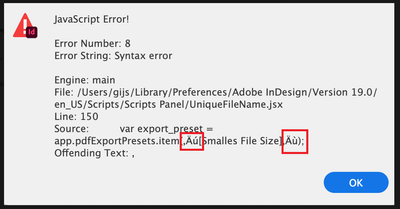
As per the screenshot - you have wrong quotes:
copy the one from the rectangle instead of the around [...]:
Copy link to clipboard
Copied
My solution, but not free. There is a 30-day trial.
https://www.marspremedia.com/software/indesign/export-named-pages
Copy link to clipboard
Copied
I use Zevrix's Output Factory to do this type of naming and exporting.
https://zevrix.com/OutputFactory/
Its not free but well worth the money given all is fuctionallity.
Get ready! An upgraded Adobe Community experience is coming in January.
Learn more