

Answered
Unnecessary Overset Text
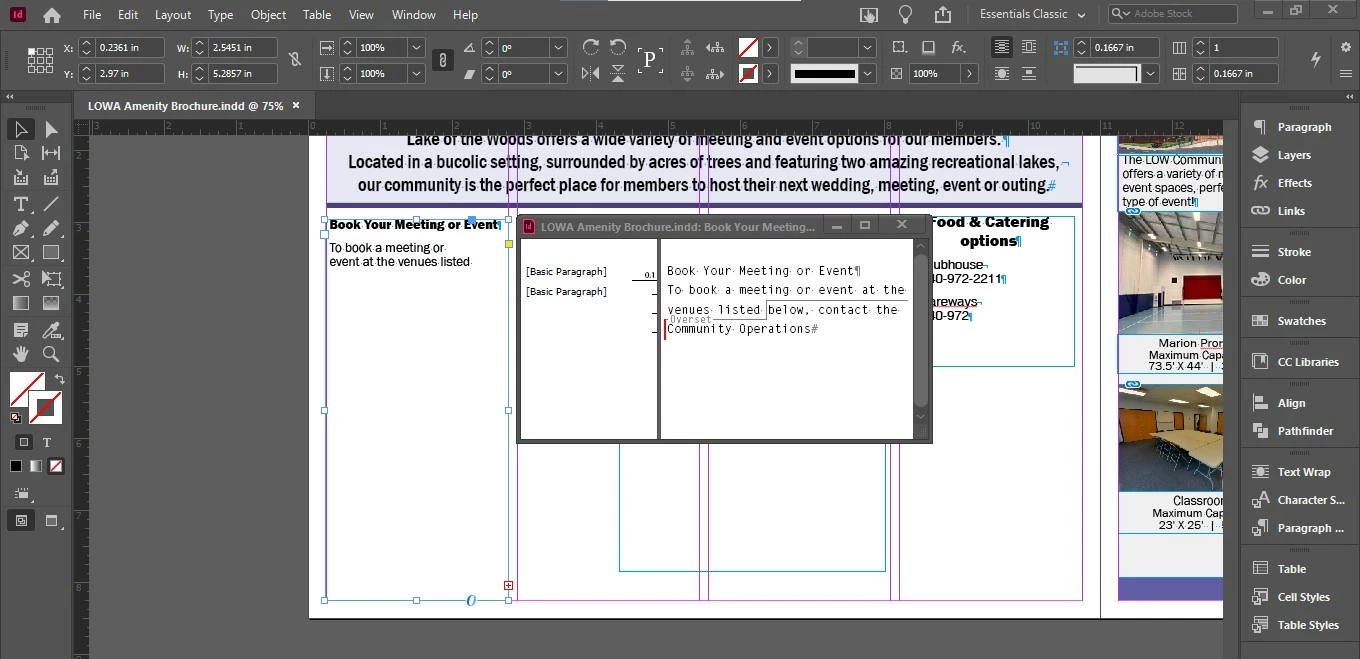
I am working with InDesign and since the latest update to version 16.1 I have had all of my text boxes, in every file behave strangely. When I type in new text, it automatically jumps out of the box and becomes overset. In some cases I can change this in Story Editor, or by copying and pasting the hidden character for a return, but not in all cases.
As you can see from the screenshot, the text frame has ample room, and yet there is still overset text.
- Adobe Indesign Creative Cloud version 16.1 (I've tried rolling back the update, it didn't help)
- Windows 10 PC, Version 10.0.19041
- Basic Paragraph style
- Text frame set to "Ignore Text Wrap"
 AdChoices