Inspiring
Dec 11, 2020 9:39 AM UTC
Answered

Unwanted alternate layouts

Hi All,

hope you're having a good day.

I have created a problem that I simply can't seem to resolve. The more I look at it, the less chance I seem to have of fixing it.

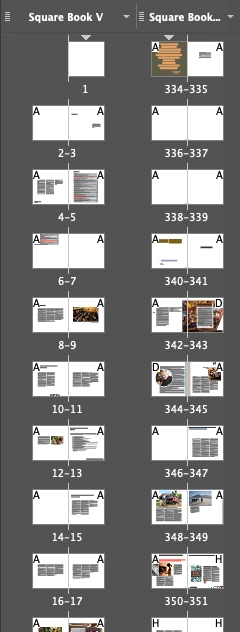
In brief, I am moving pages from two separate files into a new file. When I do so, the pages from one file are listed under a different layout to the pages from the other file. I don't want this. I'd like them just to be one continuous layout.

I can't see how to stop this happening nor can I see a way of combining them once they are in the new document. Can someone please put me out of misery?

Now, the cause might well be that I am an idiot, but I'm hoping there is a way around this. Making myself smarter doesn't seem to be an option!😉

Any help would be greatly appreciated.

Many thanks....Chloe


LaubenderCorrect answer
Community Expert
Dec 15, 2020 11:36 AM UTC

You said: "…nor can I see a way of combining them once they are in the new document".


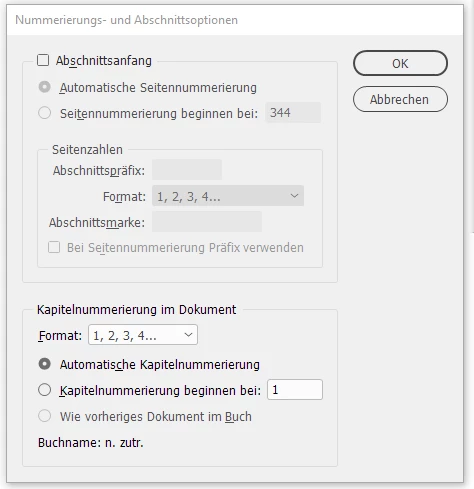
At least that should be possible. You simply have to remove the section entry( not the alternate layout! ) on page 344 that I can see in your screenshot. To do that select page 344 and invoke Numbering & Section Options.


Uncheck checkbox

[ ] Start Section


From my German InDesign 2021:

Changed controls:


Note: If you try to remove the alternate layout all the pages of that alternate layout would be removed.

Not so if you remove the section entry.


Regards,
Uwe Laubender

( ACP )


12 replies

Participant
Jan 29, 2026 2:15 PM UTC

this is EXACTLY what I needed - thank you!

Translate
Participant
Oct 25, 2023 10:56 AM UTC

Try going to Window > Workspace > Essentials (in Windows) . Seems to have done the trick for me to remove the extra views.

Translate
Participant
Feb 27, 2023 4:01 PM UTC

Hello! I found your submission because I, too, was having the same issue. I just happenstance found a solution for anyone with the same issue. If you highlight your pages on the alternate layout view, right click, scroll down to "view pages", you should find the alternate layout removed when selecting "vertical" or "horizontal". 

Translate
Community Expert
Feb 28, 2023 6:48 AM UTC

Hi @minoo-liz ,

changing the view will not remove the alternate layout.

You still have some section starts like your screenshot is showing with page 12, 14, 16, 18 and 20.


Regards,
Uwe Laubender
( Adobe Community Expert )

Translate
Participant
Mar 31, 2023 4:48 PM UTC

Thanks!

Translate
LaubenderCommunity ExpertCorrect answer
Community Expert
Dec 15, 2020 11:36 AM UTC

You said: "…nor can I see a way of combining them once they are in the new document".


At least that should be possible. You simply have to remove the section entry( not the alternate layout! ) on page 344 that I can see in your screenshot. To do that select page 344 and invoke Numbering & Section Options.


Uncheck checkbox

[ ] Start Section


From my German InDesign 2021:

Changed controls:


Note: If you try to remove the alternate layout all the pages of that alternate layout would be removed.

Not so if you remove the section entry.


Regards,
Uwe Laubender

( ACP )


Translate
Participant
Dec 16, 2020 12:38 AM UTC

Uwe,

thanks so much. You are a genius!!! I hadn't even thought there might be a section insert there. I have made the change you suggested and it worked perfectly!

You are a gentleman. It's only thanks to experts like you who give up their time in these forums that people can get fixes to our problems and learn more and more tricks. We are so lucky to have you!

Kind regards...Chloe 

Translate
Community Expert
Dec 14, 2020 8:02 PM UTC

Hi Cloe,

one remark and two questions.

[1] You are not alone. That's nothing unusual. It happend to me as well.

[2] Are the page sizes different? The ones you already have in the target document vs the ones you are moving?

[3] Are you adding pages to the end of the document?


What you can try:

If the answer to [3] is a "yes", move the pages before the last spread of your target document.

Then move the moved spread to the end using a selection of pages in the Pages panel.


Not adding pages to the end ( or perhaps to the beginning ) of a document should prevent the creation of a new alternate layout.


Regards,
Uwe Laubender

( ACP )

Translate
Participant
Dec 15, 2020 11:03 AM UTC

Hi Uwe,

thanks so much for helping out.

The page sizes are all the same.

I was trying to add pages to the end of the 'receiving' document. I have, subsequently, tried to add the pages earlier in the document but that has made no difference. They still go into an alternative layout. I'm afraid. There doesn't seem to be any way to move pages from one layout to the other within the same document.

Your suggestions made perfect sense but, in this case, they don't seem to be working for some reason. 

I think I might be stuck with what I have.

Kind regards....Chloe


Translate