
Robin_NK
Participant
November 10, 2017
Answered

Unwanted space added before last line in paragraph

  • November 10, 2017
  • 3 replies
  • 3792 views

Hello everyone, first time poster so thanks for taking the time to look at my (undoubtedly stupid) question. I searched the forum but couldn't find the right answer so far.

I have a textbox with justified text in it, text aligned to the bottom of a text box. The 'space after' is set as 0mm, but still unwanted space is added before the last line of the paragraph (see screenshot with paragraph settings + text). This happens regardless of whether I set the vertical alignment to top, middle or bottom of the text box.
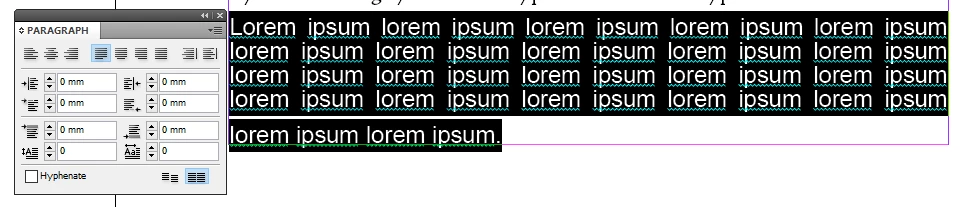
This is probably a weird setting that I can't find, but it's had me stumped for 2 hours now! Any tips or insights? My workaround is making the last line a new paragraph and manually adjusting the spacing but surely that can't the the way to handle this...

PS - This is InDesign CS5.5
This topic has been closed for replies.
Correct answer vladan saveljic

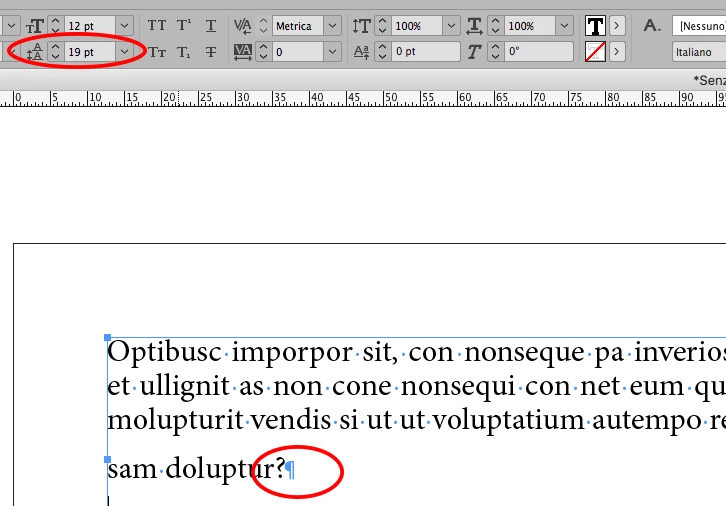
select all, non printing mark too, and apply the leading

(probably the paragraph end has a greater leading than the rest of the paragraph)

3 replies

Robin_NK
Robin_NKAuthor
Participant
November 13, 2017

I can confirm it works! Thanks for the tip. I had no idea that nonprinting characters could (invisibly) change leading. Thanks everyone!

Steve Werner
Community Expert
Community Expert
November 10, 2017

I think Vladan's answer is correct.

You can prevent this in the future if you set the InDesign Type preference circled below:

vinny38
Legend
November 10, 2017

Steve,

Even though I think "Apply Leading to Entire Paragraphs" is definitively useful and should be set by default, I don't think it would prevent such behavior...

Steve Werner
Community Expert
Community Expert
November 10, 2017

Vinny,

I wouldn't have thought of that combination of events. Would you agree that the preference would make multiple leading values less likely?

vladan saveljic
vladan saveljicCorrect answer
Inspiring
November 10, 2017

select all, non printing mark too, and apply the leading

(probably the paragraph end has a greater leading than the rest of the paragraph)

Robin_NK
Robin_NKAuthor
Participant
November 10, 2017

Thanks for this suggestion! Out of the office now but will try it as soon as I have access to ID again. Seems like odd behaviour on ID's part but I'm sure there's a good reason for it to do so.