
Participant
November 20, 2018
Answered

Update Library Item Missing

  • November 20, 2018
  • 5 replies
  • 3369 views

I am trying to update a library item. It's a previously created library item that I've made changes to. There used to be a contextual menu item called "Update Library Item" but it's gone. How can I get it back?
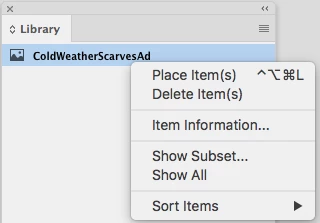
I searched through previous forms and found two solutions that are no longer available in the current version of InDesign: (1) There is no Indesign>Configure Plug-Ins... And (2) I have no idea what this is: 1. Swatch Library Panel - OFF. What does "Swatch Library Panel" mean?

This topic has been closed for replies.
Correct answer caras35150961

I found the fix for this:

  • (Windows) Start InDesign, and then press Shift+Ctrl+Alt. Click Yes when asked if you want to delete preference files.
  • (Mac OS) While pressing Shift+Option+Command+Control, start InDesign. Click Yes when asked if you want to delete preference files.

5 replies

Participant
May 3, 2023

In CC2023, just double click the asset in the library. In my case, I hade an asset created in Illustrator and double clicking it in the library (from InDesign) took me to illustrator where I made changes and then the library asset was updated.

Participating Frequently
July 14, 2020

This Bug still persists and to me personally is not something the user should fix by resetting his preferences.

The menu item shouldn't even disappear in the first place.

So i opened up a Ticket on InDesign Uservoice:

https://indesign.uservoice.com/forums/601180-adobe-indesign-bugs/suggestions/40902982--update-library-item-option-missing-in-context-me

caras35150961AuthorCorrect answer
Participant
May 30, 2019

I found the fix for this:

  • (Windows) Start InDesign, and then press Shift+Ctrl+Alt. Click Yes when asked if you want to delete preference files.
  • (Mac OS) While pressing Shift+Option+Command+Control, start InDesign. Click Yes when asked if you want to delete preference files.
RalfH73
Participating Frequently
November 26, 2018

Same issue here.
Suddenly the 2 items disappeared. (update and Migrate)

- It's not the permissions on the filesystem
- indesign preferences were reset : no success
- toggled the visibility in  edit - menus (both were ON) : no success

(mac os10.12.6, ID 2015.4)

Community Expert
November 26, 2018

Hi Ralf,

what is the version of InDesign that created your library file?

What's the exact version you opened the library file with?

Are both InDesign CC 2015.4?

Regards,
Uwe

RalfH73
Participating Frequently
November 26, 2018

Hi Ralf,

so the issue is specific to your workflow, machine settings, network settings etc.pp.

Hard to tell what's going on…

Regards,
Uwe


Thank you for "thinking with me"

Community Expert
November 20, 2018

Hi caras35150961 ,

what's your version of InDesign on what operating system version?

I still can see this option with my German InDesign CC 2019 14.0.1.209 on Windows 10:

How many assets are in the library?

Hm. Perhaps the library is read-only in your file system?

No. Even then the menu item should be there. Grayed-out of course:

Regards,
Uwe

Participant
November 20, 2018

I am on a Mac running High Sierra (v10.13.6), English, InDesign CC 2018 (version 13.1).

I checked the Library file in the Finder and it is unlocked. I have 69 assets in my Library. I am able to add and delete assets just not update the assets. So that makes me think my Library is unlocked.

Steve Werner
Community Expert
Community Expert
November 20, 2018

I have no problem seeing it in InDesign CC 2019.

Try restoring your InDesign preferences:

Set preferences in Adobe InDesign