
Known Participant
February 24, 2017
Answered

Urdu Nastaleeq Font

  • February 24, 2017
  • 5 replies
  • 46624 views

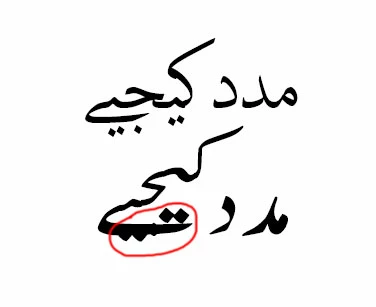
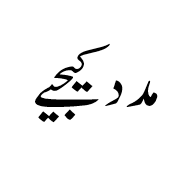
I tried lots of available nastaleeq fonts for Urdu in Adobe InDesign, some works well but distort some words, while same font in other apps like Microsoft Word doesn't have such problem, can anyone please help with this.

In Adobe InDesign:
In Microsoft Word:
Correct answer shibli313

Thank you very much Shibli please also share paragraph, character or language settings if you're using anything​ specific for Urdu.


You're welcome

Please check your email. I've already sent you ID file with paragraph style "General 1"

5 replies

Known Participant
December 14, 2017

Please read it carefully. There's nothing in the Paragraph Style and you don't need one, only thing you need is latest Jameel Noori Nastaleeq (v3) font, don't ask for download link but Google it. Thanks

anisycom
Participant
November 30, 2017

can you send me the Paragraph Style?

thanks

Zaid Al Hilali
Community Expert
Community Expert
February 24, 2017

I'm on Mac, just downloaded Nafees Nastaleeq font from this research centre in Lahore after reading their license agreement.

I got a better result than yours above but I had a bit of overlapping as you can see. Perhaps you need to give a try.

Known Participant
February 26, 2017

Thanks Zaid, I tried all available nastaleeq fonts including this one, but its not serving the purpose.

Zaid Al Hilali
Community Expert
Community Expert
February 26, 2017

The best Nastaleeq font on InDesign I've ever found was developed by Decotype and had to work through a special InDesign plug-in called Tasmeem. The control was phenomenon but you must invest

Above are samples from Tasmeem catalogue which used to work on my older InDesign CS5

Community Expert
February 24, 2017

Hi,

is that really the same font as used with MS Word?
The rendering of at least one glyph looks a bit different…

Regards,
Uwe

Known Participant
February 26, 2017

Same (jameel noori nastaleeq) font, seems like Word handle it well while ID need more sophisticated font or maybe I'm missing something.

Joel Cherney
Community Expert
Community Expert
February 24, 2017

There are quite a few possibilities here. What version of ID are you using? Can you share the file, or tell us the name of the font? I don't handle lots of Urdu, but I know that there are lots of nastaliq fonts that require particular installation methods or tricks in typesetting - or plugins, or whole other applications. Speaking of which: I assume you are aware of InPage, right?

It looks like you probably have the World-Ready Composer turned on (do you?), but what language do you have your text marked as in the Character panel? I know that Urdu is not in the dropdown, so you might need to add it yourself - here are instructions from Adobe (assuming you are using InDesign CS6 or CC).

Lastly, I had never read about it until you asked your question, but Mubeen looks awfully promising.

Known Participant
February 26, 2017

I tired it on Adobe InDesign CC 2015 and 2017 on Windows 10 and MacOS Seirra with same result. Yeah I use InPage but it has very limited set of tools and options.

Mubeen is not that good in real use, even in their sample PDF there are lots of kerning tracking issues. For now I'm using GREP + Character Style to control kerning and it work well. There are only few problematic words, found a workaround (InPage to Illustratorfor to InDesign and snippet for repeated words), but it take little bit extra time as compare to simple text base workflow.

Participant
April 4, 2017

@Prince Oceans, I am new to InDesign and I don't want to work with In page for obvious reasons, I also thought about trying mubeen but GREP+CharacterStyle seems to be better option but its complicated. Can you share/recommend your character styles etc.

Thanks