mydear1
Participating Frequently
November 29, 2023
Answered

Urgent Help Needed! Cambria Font Woes in InDesign

  • November 29, 2023
  • 3 replies
  • 4116 views

Hello,

I find myself in a font frenzy with Cambria in Adobe InDesign! 🆘 Despite my best efforts, it's not playing nice. Any wizards out there who can sprinkle some magic advice on fixing this? 🧙‍♂ Your wisdom is much needed!

Thanks a ton,

This topic has been closed for replies.
Correct answer Joel Cherney

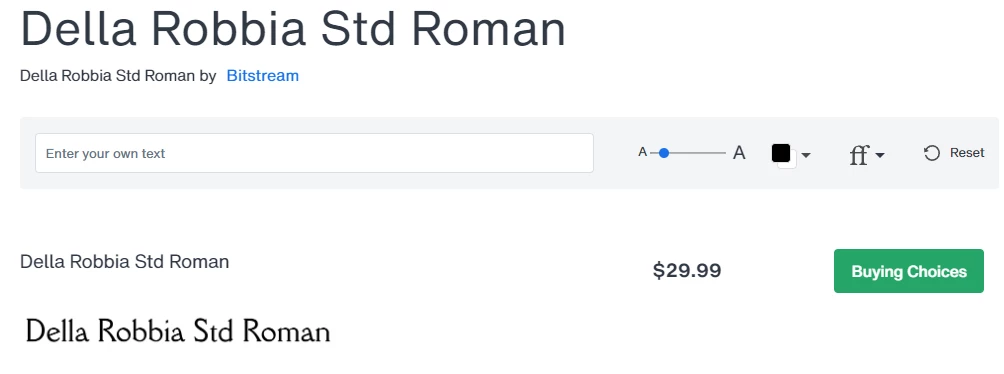
Well, like Steve, I've never heard of typeset.io. Browsing it briefly, I can't imagine how you're getting from what looks like an automated PDF scraper to a font question. But: I can tell you that the glyph shapes of Cambria in your InDesign sample match what Cambria looks like on my machine, which is exactly what it's looked like since Microsoft introduced ClearType a million years ago. And when I chop out your example of what you want that font to look like and throw it into WhatTheFont, a font matching service at myfonts.com, what I get back is "Della Robia Std" from Bistream


3 replies

Joel Cherney
Community Expert
Joel CherneyCommunity ExpertCorrect answer
Community Expert
November 29, 2023

Well, like Steve, I've never heard of typeset.io. Browsing it briefly, I can't imagine how you're getting from what looks like an automated PDF scraper to a font question. But: I can tell you that the glyph shapes of Cambria in your InDesign sample match what Cambria looks like on my machine, which is exactly what it's looked like since Microsoft introduced ClearType a million years ago. And when I chop out your example of what you want that font to look like and throw it into WhatTheFont, a font matching service at myfonts.com, what I get back is "Della Robia Std" from Bistream


mydear1
mydear1Author
Participating Frequently
November 29, 2023

I extend my sincere gratitude for your invaluable assistance. In my quest for a solution, I found myself meandering without a clear understanding of the root cause.

It has come to my attention that "Della Robbia" was not installed on my system. Consequently, when I converted a PDF featuring "Della Robbia" into MS Word, the font seamlessly transitioned to "Cambria," elucidating the entire narrative.

Your attention to this matter is truly appreciated, and I am genuinely thankful for your kind assistance.

Best Regards,

Bevi Chagnon - PubCom.com
Legend
November 29, 2023

In your screen capture, the top sample IS Cambria.

The bottom sample is Della Robia.

Use What The Font to verify this. https://www.myfonts.com/pages/whatthefont


|    Bevi Chagnon   |  Designer, Trainer, & Technologist for Accessible Documents ||    PubCom |    Classes & Books for Accessible InDesign, PDFs & MS Office |
Steve Werner
Community Expert
Community Expert
November 29, 2023

Go to Type > Find/Replace Font. Select Cambria font from the list. Click the More Info button. Make a screen capture of what you see and post it.

mydear1
mydear1Author
Participating Frequently
November 29, 2023

Please look at the required captured screen.
Thanks


Steve Werner
Community Expert
Community Expert
November 29, 2023

What I meant was: In the list of fonts at the upper left, I see Cambria Regular and Cambria Bold. Click to select the font which is displaying incorrectly. Then click More Info to display information about that font. Make a screen capture of the resulting screen which show information about the version you are using.