

mickyhulse
Known Participant
August 10, 2018
Answered

URLs in small column make text disappear: How to force break only URLs (no hyphenation)?

  • August 10, 2018
  • 2 replies
  • 2300 views

Hello,

As a contrived example, I have this url:

https://www.google.com/search?ei=5VFtW-jWN8fC0PEP9LGp4AM&q=Adobe+Indesign&oq=Adobe+Indesign&gs_l=psy-ab.3..0i131i20i263k1j0j0i20i263k1j0i131k1j0l6.2226.4190.0.4408.14.14.0.0.0.0.116.1037.12j2.14.0..2..0...1.1.64.psy-ab..0.14.1025...35i39k1j0i228k1j0i67k1j0i131i67k1j0i20i264k1j0i131i20i264k1.0.mytk429kye4

I am trying to put it in a 3-column master text frame.

Unfortunately, it only shows a small portion:
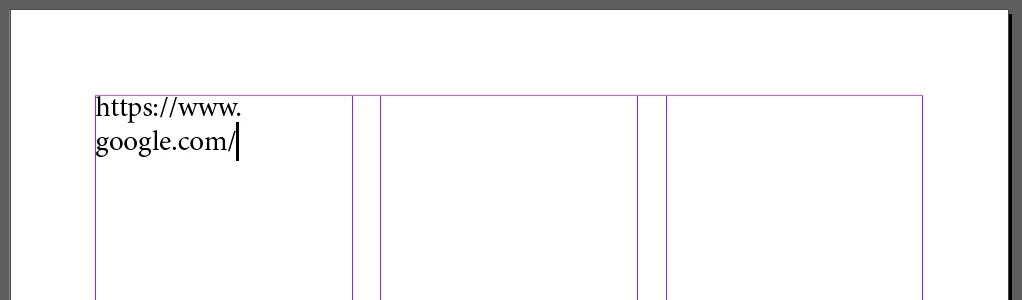
How can I force just the URL to break no matter the character?

I am aware of discretionary line breaks; I would prefer to not manually insert these as this is for an appendix with many URLs (and other text).

I'm running Indesign CC 13.1. Oddly, I don't remember having this issue in previous versions of Indesign.

Thanks for your help!

This topic has been closed for replies.
Correct answer Marie_D

Hi Micky

I think you should be able to perform the GREP search and replace as explained in the article, but just remember to include the character style sheet you have created for underlining hyperlinks in the 'Find' field.

2 replies

Participating Frequently
August 10, 2018
mickyhulse
Known Participant
August 10, 2018

Marie_D  wrote

This tip might also help:

https://indesignsecrets.com/breakinglines.php

Thanks Marie! That totally helped!!!

Unfortunately, I need to only apply the discretionary line breaks to URLs.

Can I do this with a character style? I already have a character style that underlines hyperlinks .... Perhaps it could also apply a discretionary line break to each character in the matched character style?

I'm almost thinking Hyperlink Pro plugin might do trick. On the other hand, I just need a simple script that will insert discretionary line breaks for URLs only ... I'm decent at scripting, so it seems like a simple jsx script would do the trick.

Again though, not to sound like a broken record, but I don't remember having this issue in previous versions of Indesign. Hahah.

Thanks for your help Marie, I greatly appreciate it!

Marie_DCorrect answer
Participating Frequently
August 10, 2018

Hi Micky

I think you should be able to perform the GREP search and replace as explained in the article, but just remember to include the character style sheet you have created for underlining hyperlinks in the 'Find' field.

TᴀW
Legend
August 10, 2018

My https://www.id-extras.com/products/hyperlinkpro  (not free) will insert the discretionary line breaks for you, and in the optimal place from a spacing point of view, plus it respects the Chicago Manual's rules about where URLs are allowed to be broken.

May be worth checking out.

Ariel

mickyhulse
Known Participant
August 10, 2018

TᴀW  wrote

My https://www.id-extras.com/products/hyperlinkpro  (not free) will insert the discretionary line breaks for you, and in the optimal place from a spacing point of view, plus it respects the Chicago Manual's rules about where URLs are allowed to be broken.

May be worth checking out.

Thanks Ariel! I will check it out!

In this case, I just need the url to break irrespective of any conventions... basically, I don't want my text to disappear and am not worried about rules per se. Don't get me wrong, I used to work at a newspaper so I am all for rules, but in this case, I just want only the URLs to force wrap ... They should always start on a newline, so the part of the URL that is problematic is the bits after the TLD/.com.

Oddly enough, I swear that I never noticed this problem with Indesign in recent previous versions. Strange.

Thanks for your help!!!