
Known Participant
July 10, 2021
Question

Using a template to make a resume, text isn't appearing as the templates does.

  • July 10, 2021
  • 3 replies
  • 780 views

Hi, I'm a big time newbie to InDesign so forgive me. I've done some searching online but I couldn't figure out how to do exactly what I'm trying to.
I downloaded a resume template from Adobe Stock and I'm replacing the text with my own but there seems to be a change in the padding of the text boxes whenever I try to insert my own text. Here's a before and after:
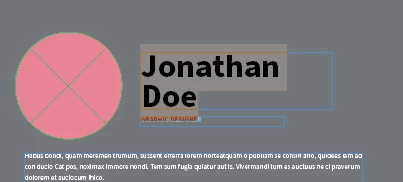
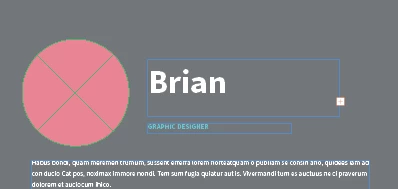
 

You can see there's a substantial addition of space when you compare my "B" to his "J".  

I'm not deleting the old text, just typing over it, so I wouldn't think formatting would be changed. Because of this, my name on the headline doesn't show my last name unless I make the text box larger which messes up the clean look of the document. I've looked in text box properties and the margins and padding are at 0 with no way to make it negative (which makes sense) so I don't know where this extra space is coming from.

Any help is greatly appreciated! I'm trying to get my first IT job soon and want to have more than a LinkedIn printout. 🙂

This topic has been closed for replies.

3 replies

Community Expert
July 12, 2021

Hi ceponatia,

hm, without a chance to look into the original InDesign document, I think we see an issue with the applied font.

A mismatch between the used font from the template and the one you applied. This mismatch is not visible immediately after you opened the not edited template, but hits you in the moment you are editing the text.


Could you make the InDesign document available for testing?

Just put it on Dropbox or a similar service and share the download link.


Thanks,
Uwe Laubender

( ACP )

ceponatiaAuthor
Known Participant
July 12, 2021
I was starting to think that last night as well because it turns out EVERY
text box does this, not just the name. I will share the document once I'm
home from work, thank you
Peter Spier
Community Expert
Community Expert
July 10, 2021

I suspect the vertical justification on that text frame is set to centered. If you want it to be top aligned open the text frame options and change it.

ceponatiaAuthor
Known Participant
July 10, 2021

It's Top aligned by default. This is the unedited text options of a brand new instance of the file. When I change the text, nothing changes as far as I can see...


Bill Silbert
Community Expert
Community Expert
July 10, 2021

You didn't say how long your last name is. If it is a name that is too long to be contained in the text frame then what is happening is normal behavior. The difference in the width of the J and B does not seem to me to be a possible factor in this case. A B will always be wider than a J—that's just the way that the letters are. Also being worried about the size of the text frame should not be a consideration. For a printed piece or an exported pdf the size of text frames cannot be seen. A text frame needs to be as large as necessary to contain the needed type.

ceponatiaAuthor
Known Participant
July 10, 2021

First off thanks for your reply, I appreciate your time.
"If it is a name that is too long to be contained in the text frame then what is happening is normal behavior."
As soon as I type the "G" of my last name, it vanishes. Since "Brian" is shorter than "Jonathan", I don't think that's the issue.

"The difference in the width of the J and B does not seem to me to be a possible factor in this case. A B will always be wider than a J—that's just the way that the letters are."

I was talking about the distance between the top of the B and the top of the J and the text box border being noticably different, not the width.

I'm not worried about the text frame itself being seen, as I'm aware it won't print or show up on an exported document, but I didn't want to have to mess with the skeleton of the page and the few times I tried didn't look very nice. If this is the only solution, I'll do what I can. Thanks again!

ceponatiaAuthor
Known Participant
July 10, 2021

Hmm, can't figure out how to edit my last post. I should clarify that there's a line break at the end of Jonathan and Doe is on a separate line. I'm attempting to do that with my last name as well to preserve formatting but this causes the second line of text to not show up inside the text box.