Participant
June 15, 2022
Answered

Vector indesign

  • June 15, 2022
  • 3 replies
  • 510 views

Hi everyone,


I try to vector all the text on different pages. Is there a way to do it or do I pages by pages ?


Thanks all


Pierre

This topic has been closed for replies.
Correct answer Laubender

Hi Pierre,

if you want the vector outlines of the texts in an exported PDF, do the conversion in Acrobat Pro.

Switch to the Print Production workspace and open Acrobat's Preflight panel. Go to Acrobat Pro DC 2015 Profiles, select Single Fix-ups, see into Document, there is the command "Convert fonts to outlines".
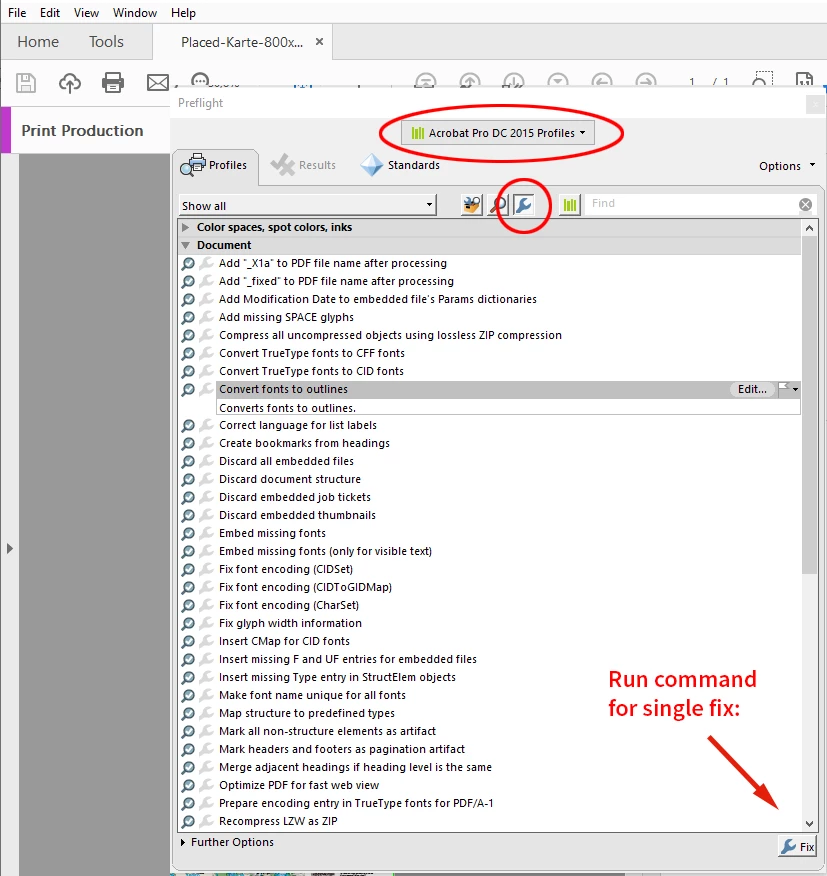
 

Run the command with the Fix button.

Under "Further Options" you could tell Acrobat to do this on all pages of the PDF or only on certain pages.


Regards,
Uwe Laubender
( Adobe Community Professional )

3 replies

Community Expert
June 15, 2022

To answer your original question:

"or do I pages by pages"


If you have to do the conversion in InDesign you have to to do it spread by spread if you select all text frames on a spread.

If the text is running through several text frames from page to page you could select all text in the threaded story and then apply the command.


Warning:
Be aware, that not all of the text is converted right. Auto numbers and auto bullets are missing. Underline is missing and if you do a conversion of all text in a frame the frame vanishes as well so properties like a color fill on a text frame will also vanish. (Plus a hundred of other things that could go wrong…)


Better do it in an exported PDF when in Acrobat Pro as I have shown this in my post above.


Regards,
Uwe Laubender
( Adobe Community Professional )

Peter Spier
Community Expert
Community Expert
June 15, 2022

One other problem with outlined text is it loses the "hinting" built inot most fonts wihich makes them easier to read and results in the text appearing bolder.

LaubenderCommunity ExpertCorrect answer
Community Expert
June 15, 2022

Hi Pierre,

if you want the vector outlines of the texts in an exported PDF, do the conversion in Acrobat Pro.

Switch to the Print Production workspace and open Acrobat's Preflight panel. Go to Acrobat Pro DC 2015 Profiles, select Single Fix-ups, see into Document, there is the command "Convert fonts to outlines".


Run the command with the Fix button.

Under "Further Options" you could tell Acrobat to do this on all pages of the PDF or only on certain pages.


Regards,
Uwe Laubender
( Adobe Community Professional )

Participant
June 15, 2022

Uwe ! you are my hero ! thanks a lot 

You make me win so much time 

Pierre

jmlevy
Community Expert
Community Expert
June 15, 2022

yes ! it's the printer who wants that...


Ouch! That's a very bad sign… Is it an online printer? 

Peter Spier
Community Expert
Community Expert
June 15, 2022

Do you mean convert text to outlines? If so, why do you want to do that?

Best practice is to leave text live, but if you absolutely must convert to outlines it should be done as part of export to PDF.

InDesignSecrets » Blog Archive » Converting Text to Outlines The Right Way