
muskoka lake
Inspiring
October 26, 2020
Answered

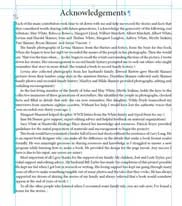
vertical blue line for overrides?
  • October 26, 2020
  • 2 replies
  • 650 views

 I think this blue line shows there is an over ride on a paragraph style. When I clear over rides it goes away. I have no idea why they occur but think it might have to do with a different child master that I applied with a different text box size.

When I send the document to the printer will the over ride come back?

This topic has been closed for replies.
Correct answer Jeff Witchel, ACI

Yes, it's a paragraph level override.

And no, I don't think it would make any difference to a printer if there are Style overrides, in that it has nothing to do with the printing of the layout. It's really a design-consistency issue. 

2 replies

Jeff Witchel, ACI
Community Expert
Jeff Witchel, ACICommunity ExpertCorrect answer
Community Expert
October 26, 2020

Yes, it's a paragraph level override.

And no, I don't think it would make any difference to a printer if there are Style overrides, in that it has nothing to do with the printing of the layout. It's really a design-consistency issue. 

muskoka lake
Inspiring
October 26, 2020

Thanks Jeff! The article you referenced really helped me understand what was happening. It does seem to be a useful feature, I've located some errant text boxes and some caption boxes that were missing their object style with it already.


Jens Trost
Inspiring
October 26, 2020

You can disable the Style Override Highlighter in the Paragraphs Styles panel, and no – it won't print.


See also
https://www.creativepro.com/why-is-my-indesign-text-highlighted-in-blue/