
Participant
September 15, 2025
Answered

Vertical text not spacing evenly

  • September 15, 2025
  • 3 replies
  • 261 views

I've enabled the Japanese version so I could type vertically and the page numbers get unevenly spaced between certain numbers .
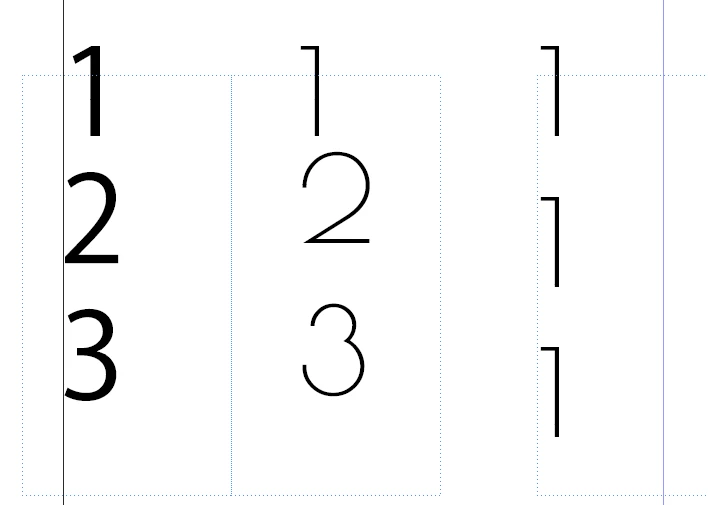


All three boxes have the same formatting, except the first is a Japanese font. The issue seems to be that the "1" in my font of choice (second two boxes) is spaced differently than other numbers. Is there a way to get all of these to space evenly automatically? None of the tracking, kerning, leading, line height etc. options seem to remedy this. 

Correct answer -_._5342

This issue is that the paragraph was set to Adobe Paragraph Composer and not Adobe Japanese Paragraph Composer.

3 replies

Joel Cherney
Community Expert
Community Expert
September 15, 2025

I actually can't reproduce that at all, oddly enough. Are you using tatechuyoko? I'm guessing not - as it doesn't matter what font I pick or what numeral style I use, my 1s line up correctly:


Ehh, on second thought, perhaps the Arial Narrow and Proxima Nova examples are pushed a little bit to far to the right, I think. But if you've turned tatechuyoko on, it'll basically behave as if it is centered, which seems to be closer to what you'd want. Additionally, your preferred font seems to have a very short serif/ear/what would you call that stroke, anyways? so I imagine it'd render closer to the centerline than any of the examples I picked out. 

-_._5342AuthorCorrect answer
Participant
September 16, 2025

This issue is that the paragraph was set to Adobe Paragraph Composer and not Adobe Japanese Paragraph Composer.

Barb Binder
Community Expert
Community Expert
September 15, 2025

I've enabled the Japanese version so I could type vertically

Are you working in a Japanese-language document, or do you just need some vertical text?


~Barb

~Barb at Rocky Mountain Training
-_._5342Author
Participant
September 16, 2025

Just needed the vertical text. Wasn't getting the results I wanted from the English version's Text to Path Tool, and was hoping switching versions would fix that. Did not...

-_._5342Author
Participant
September 15, 2025

I believe the issue is that this font does not have the correct vertical kerning (if any) and would need to be edited in third-party software.